MPI- Message Passing Interface
Part 3
MPI- Message Passing Interface
Part 3
The Message Passing Interface (MPI) is the industry-standard API used to write parallel programs that run across multiple machines or multiple CPU cores. It defines a set of library routines that let processes exchange messages explicitly, making it the foundation of programming on HPC clusters, supercomputers, and distributed memory systems.
Although the MPI standard defines official bindings only for C, C++, and Fortran, Python programs can also use MPI via the widely adopted
mpi4pypackage. This allows Python applications to run on any MPI-enabled HPC platform.
A Brief History of MPI
Before MPI existed, parallel programming was chaotic:
- Every supercomputer vendor used their own message-passing library.
- Code written for one architecture would often break on another.
- Researchers had to rewrite applications whenever they moved to a new machine.
To solve this, in the early 1990s a small group of computer scientists met in Austria to discuss a unified message-passing standard. This led to:
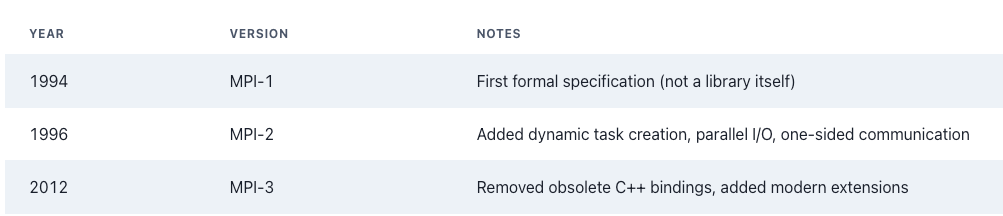
Today, MPI is the de-facto standard for distributed memory parallelism.
Programming Model
MPI follows a distributed programming model, but can also support data-parallel patterns.
Key characteristics of MPI programming:
🔹 Explicit Parallelism
You, the programmer, explicitly define:
- How many processes will run
- What work each process performs
- What messages get sent/received
- How processes synchronize
Nothing is automatic and this gives you full control and very high performance.
🔹 Static Number of Tasks
Traditionally, MPI jobs launch with a fixed number of processes. These are called ranks. MPI-1 did not allow creating new processes during runtime. MPI-2 introduced dynamic process management, but most HPC applications still use fixed ranks.
🔹 Works on All Hardware Platforms
MPI programs run on:
- Distributed memory systems (multi-node HPC clusters)
- Shared memory systems (multicore servers)
- Hybrid systems (nodes with many cores + accelerators like GPUs)
MPI doesn’t care about hardware layout and it gives you a portable abstraction.
MPI Program Structure
MPI (Message Passing Interface) is the standard for writing programs that run across multiple processes, often across multiple nodes in an HPC cluster.
To communicate correctly, MPI programs follow a fixed structure where every MPI program in the world starts, runs, and ends using these same core functions. Python can run MPI programs using the library mpi4py. The structure is almost identical to C, but the syntax is much simpler.
In mpi4py, the MPI program structure is:
- Import MPI: This loads the MPI module. In Python, MPI is initialized automatically when you import it.
So you do not call
MPI_Init()manually.
from mpi4py import MPI
2. Get communicator: The communicator tells MPI which processes are allowed to talk to each other.
comm = MPI.COMM_WORLD
3. Get total number of processes: Used to find out how many total processes are running in the MPI job.
size = comm.Get_size()
4. Get your rank: Each MPI process gets a unique rank (ID number) from 0 to size−1. Rank is used to control “who does what” in MPI programs.
rank = comm.Get_rank()
5. Parallel logic (MPI send/recv, broadcasts, compute, etc.)
6. Finalize (optional)
MPI.Finalize()
MPI automatically initializes and finalizes when running Python programs.
Example MPI Hello World (mpi_hello_world.py)
from mpi4py import MPI

# Initialize MPI communicator
comm = MPI.COMM_WORLD

# Total number of processes
world_size = comm.Get_size()

# Rank of this process
world_rank = comm.Get_rank()

# Get processor (node) name
processor_name = MPI.Get_processor_name()

# Print the Hello World message
print(f"Hello world from processor {processor_name}, "
      f"rank {world_rank} out of {world_size} processes")
Running the Python MPI Program
Unlike C, no Makefile is required.
Simply run:
mpirun -np 4 python mpi_hello_world.pyor
mpiexec -n 4 python mpi_hello_world.pyWhat Happens?
-np 4→ launches 4 processes- Each process runs the same script
- Each gets a different rank
Example output:
Hello world from processor node1, rank 0 out of 4 processes
Hello world from processor node2, rank 1 out of 4 processes
Hello world from processor node3, rank 2 out of 4 processes
Hello world from processor node4, rank 3 out of 4 processes
Order may vary — MPI does not guarantee output ordering.
Running on Multiple Nodes (Cluster)
If running on an HPC cluster:
Create a host file:
node1
node3
node6
node10
Run:
mpirun -np 4 -hostfile machine.file python mpi_hello_world.pyRunning with Slurm (Very Important for HPC)
If using Slurm, you do NOT manually use machine files.
Instead:
Example Slurm script (job.slurm)
#!/bin/bash
#SBATCH --nodes=2
#SBATCH --ntasks=4
#SBATCH --time=00:05:00
module load mpi
srun python mpi_hello_world.pySubmit with:
sbatch job.slurmSo now we have a Hello World program. It proves that multiple processes are running, each process has a unique rank, and the MPI environment is working correctly.
The real power of MPI lies in process communication, the ability for distributed processes to exchange data explicitly.
Step 1: Rank-Based Behavior
Before communication, we teach processes to behave differently.
from mpi4py import MPI
comm = MPI.COMM_WORLD
rank = comm.Get_rank()
size = comm.Get_size()
if rank == 0:
    print("I am the master process")
else:
    print(f"I am worker process {rank}")
Explanation
- Rank 0 is often treated as the master
- Other ranks are workers
- This is the basic master–worker model
Now that processes can identify themselves, let’s allow them to exchange data.
Step 2: First Communication (Send / Receive)
In this step, we introduce basic point-to-point communication. The master process (rank 0) sends a message to a worker process, which receives it. This demonstrates how MPI processes can exchange data and work together, rather than running independently
from mpi4py import MPI
comm = MPI.COMM_WORLD
rank = comm.Get_rank()
if rank == 0:
    message = "Hello from Master"
    comm.send(message, dest=1)
elif rank == 1:
    received = comm.recv(source=0)
    print("Worker received:", received)
Important MPI Rule
- Every
send()must have a matchingrecv(). - Source, destination, and tag must match.
- Otherwise, the program may hang (deadlock).
Run with:
mpirun -np 2 python script.pyWhat This Demonstrates
- Rank 0 sends a message
- Rank 1 receives the message
- Processes are no longer independent
MPI communication always requires a matching send and receive.
Watch for Deadlock
If both processes wait to receive first, the program will hang. This is called a deadlock. To avoid deadlocks, ensure that the order of send and receive operations is consistent across processes, or use non-blocking communication routines.
# Wrong ordering example (may cause deadlock)
if rank == 0:
    comm.recv(source=1)
    comm.send("Hi", dest=1)
Step 3: Master Sending to All Workers
Now let us scale slightly:
from mpi4py import MPI
comm = MPI.COMM_WORLD
rank = comm.Get_rank()
size = comm.Get_size()
if rank == 0:
    for i in range(1, size):
        comm.send(f"Hello Worker {i}", dest=i)
else:
    msg = comm.recv(source=0)
    print(f"Rank {rank} received:", msg)
What This Demonstrates
- Master distributing work
- Workers receiving instructions
- Basic task distribution pattern
This pattern is the beginning of distributed computing.
Step 4: Move to Collective Communication
After send/recv, introduce broadcast:
Broadcast is a collective operation, meaning all processes in the communicator must call it. Collective calls act as synchronization points in MPI programs.
if rank == 0:
    data = 100
else:
    data = None
data = comm.bcast(data, root=0)
print(f"Rank {rank} received broadcast value {data}")root=0means rank 0 is the source of the broadcast.- All processes must call
bcast(), even if they are not the root.
“Instead of sending messages one by one, MPI provides optimized collective operations.”
Step 5: Advanced Collective Communication
After mastering send/receive and broadcast, MPI provides several collective operations to simplify communication patterns among multiple processes.
Scatter: Distributing Data from Master to Workers
import numpy as np
from mpi4py import MPI
comm = MPI.COMM_WORLD
rank = comm.Get_rank()
size = comm.Get_size()
if rank == 0:
    data = np.arange(size * 2)
    print("Master scattering:", data)
else:
    data = None
recvbuf = np.zeros(2, dtype=int)
comm.Scatter(data, recvbuf, root=0)
print(f"Rank {rank} received:", recvbuf)- Master splits data into chunks and sends each chunk to a different worker.
- Workers receive only their portion of the data.
Gather: Collecting Data from Workers to Master
sendbuf = recvbuf
gathered = None
if rank == 0:
    gathered = np.empty(size * 2, dtype=int)
comm.Gather(sendbuf, gathered, root=0)

if rank == 0:
print("Master gathered:", gathered)- Reverse of scatter: each worker sends its results back to the master.
- Useful for collecting results after parallel computation.
Reduce / Allreduce: Combining Results
value = rank + 1
total = comm.reduce(value, op=MPI.SUM, root=0)
if rank == 0:
print("Sum of ranks:", total)reduce()performs a computation (sum, max, min) across all processes.allreduce()returns the result to all processes, not just the root.
Step 6: Non-Blocking Communication
Non-blocking sends and receives allow processes to overlap computation and communication, reducing idle time.
from mpi4py import MPI

comm = MPI.COMM_WORLD
rank = comm.Get_rank()
if rank == 0:
    req = comm.Isend([42, MPI.INT], dest=1)
    print("Master sent message without waiting")
    req.Wait()  # Ensure completion
elif rank == 1:
    buf = 0
    req = comm.Irecv([buf, MPI.INT], source=0)
    req.Wait()
print("Worker received:", buf)Isend/Irecvinitiate communication and immediately return.Wait()ensures completion before using the data.- Helps prevent deadlocks and improves performance.
Step 7: Synchronization with Barrier
Sometimes you need all processes to reach the same point before continuing:
comm.Barrier()
print(f"Rank {rank} reached the barrier")Barrier()is a collective synchronization point.- Useful for timing, debugging, or coordinating computation steps.
Best Practices for MPI Programs
- Always match
send()withrecv(). - Prefer collective operations (
bcast,scatter,gather,reduce) over many point-to-point messages. - Avoid deadlocks by consistent ordering or using non-blocking communication.
- Use synchronization (
Barrier) carefully to coordinate processes. - Scale programs gradually: start with a few processes, then increase.
Conclusion
In this post, we explored the fundamentals of MPI programming using Python and mpi4py.
- We started with Hello World to verify multiple processes and unique ranks.
- We introduced rank-based logic and the master–worker model.
- Then we moved to point-to-point communication with
send()andrecv(). - Finally, we scaled up to collective operations like
broadcast,scatter,gather, andreduce, and introduced non-blocking communication and barriers.
Understanding these concepts is critical for building scalable parallel applications on HPC clusters and supercomputers.
메타데이터
- post_id
- 5805511ec72e
- slug
- mpi-message-passing-interface-5805511ec72e
- url
- https://medium.com/@voohithabojja/mpi-message-passing-interface-5805511ec72e
- canonical_url
- https://medium.com/@voohithabojja/mpi-message-passing-interface-5805511ec72e
- author_url
- https://medium.com/@voohithabojja
- status
- ok
- fetched_at
- 2026-06-12 07:40:50




