Building an AI Agent from Scratch: The Full Story Behind PulseBot
https://github.com/timeplus-io/PulseBot
Building an AI Agent from Scratch: The Full Story Behind PulseBot
https://github.com/timeplus-io/PulseBot
The AI Agent Explosion
In early 2025, Andrej Karpathy coined the term “vibe coding” in a casual tweet. The idea was simple: describe what you want in plain language, and the AI writes the code. Within a year, over 90% of developers in the US had adopted this approach. Claude Code launched in February 2025. Eight months later, it surpassed both GitHub Copilot and Cursor as the most-used AI coding tool. OpenClaw — the open-source personal agent framework acquired by OpenAI — grew even faster. It hit 247,000 GitHub stars in just 60 days, making it the fastest-growing open-source project in GitHub history. Gartner projects that by the end of 2026, 60% of all new code will be AI-generated.
These numbers tell a clear story. AI has moved beyond an assistant role. It is becoming the primary author of code. And the most exciting part of this shift is the rise of Agents — programs that can make decisions on their own, call tools, and keep working without constant human input.
My reason for building PulseBot, though, was not about chasing trends.
I’ve spent years at Timeplus building Proton, a streaming SQL engine. One question kept coming up: after an Agent finishes running, where do all those interaction logs, tool calls, and cost records go? Most of the time, they simply vanish. The majority of Agent frameworks store messages in memory. When the process stops, everything disappears. That’s fine for a toy project. It’s a serious problem if you want Agents in production.
PulseBot started from a straightforward observation. A stream processing engine is naturally good at persisting data, querying it in real time, and reacting to events. Why not use it as the foundation for an Agent system?
What Actually Makes Up an Agent?
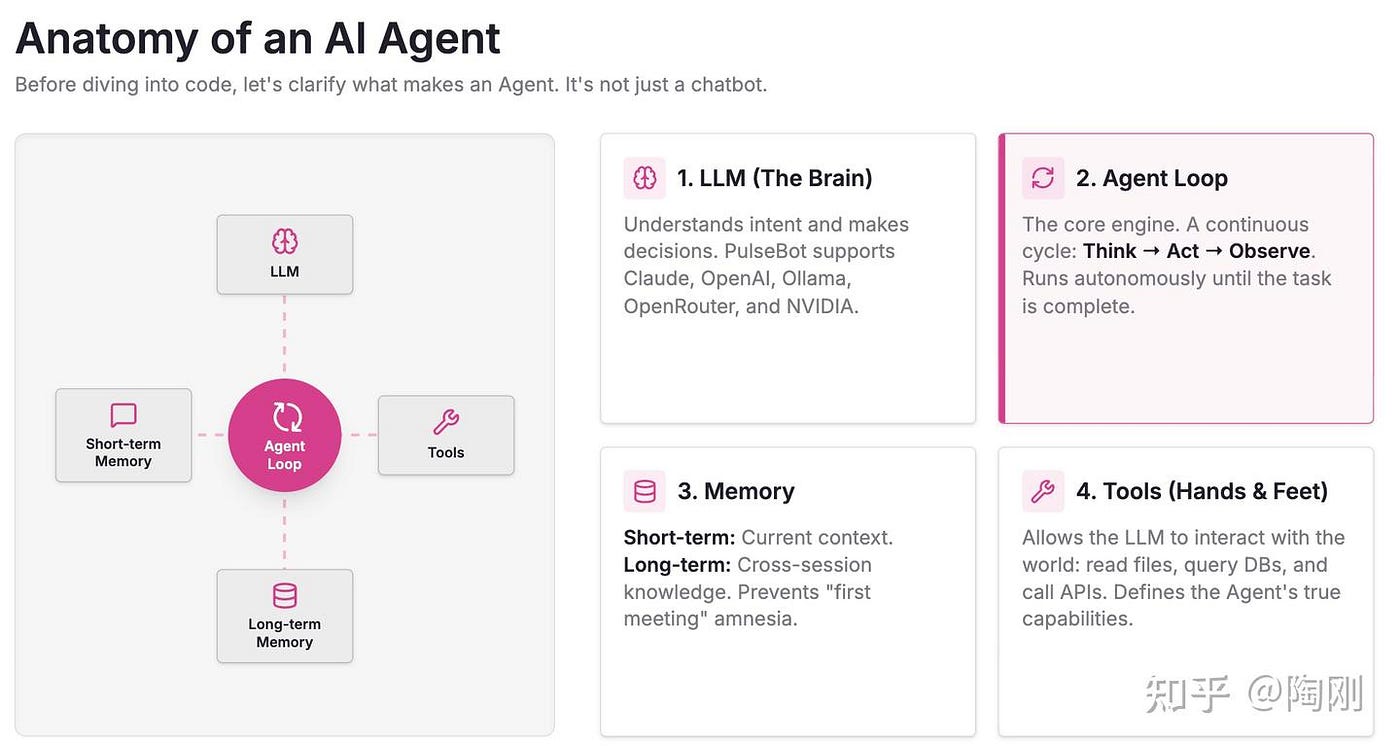
Many people confuse Agents with chatbots. They’re not the same thing. A chatbot gives you one answer and stops. An Agent keeps going. Regardless of which framework wraps it, every Agent boils down to four pieces.
The LLM acts as the brain. It understands what the user wants, decides what to do, and generates responses. PulseBot supports Anthropic Claude, OpenAI, Ollama, OpenRouter, and NVIDIA models. Which one you pick depends on your use case and budget.
The Agent Loop is what separates an Agent from a simple Q&A bot. It runs a continuous cycle: receive input, think, call a tool, observe the result, think again, and respond. This loop can run for multiple rounds. The Agent might invoke several tools before it decides the task is done.
Memory comes in two layers. Short-term memory is the current conversation — what the user said, what the Agent replied. Long-term memory stretches across sessions. If you told the Agent last week that you use PostgreSQL, it should remember that the next time databases come up. Without long-term memory, every conversation feels like a first meeting.
Tools give the Agent hands and feet. An LLM on its own can only generate text. Through tool calling, it can read and write files, run shell commands, query databases, send messages, and call APIs. The range of available tools directly determines how much an Agent can actually accomplish.
PulseBot’s Architecture: Streams as the Foundation
The core idea behind PulseBot’s design can be stated in one sentence: the communication layer, the observability layer, and the persistence layer are all the same thing.
Traditional Agent frameworks tend to piece together separate systems. A message queue handles communication. A database stores state. A monitoring tool records logs. A scheduler runs periodic tasks. That means maintaining four independent pieces of infrastructure. The data between them stays siloed.
PulseBot takes a different path. Every piece of data flows through Timeplus streams. A user’s message is an event. The Agent’s reply is an event. A tool call is an event. LLM spending is an event. A scheduled task trigger is an event. All of these get written into Timeplus streams, persisted to storage, and made queryable through standard SQL.
It helps to understand what a Timeplus “stream” actually is, because it differs from a traditional database table in a fundamental way. A table is static. Data goes in and sits there. You run a SELECT, get your results, and the query ends. A Timeplus stream is a continuously growing, unbounded sequence of events. When you run a SELECT on a stream, the query doesn’t end. It keeps running. Each time a new event arrives, the query immediately produces a new result. Timeplus calls this a “streaming query.” It answers the question “what is happening right now?” rather than “what happened in the past?”
If you do need historical data, Timeplus supports that too. Wrapping a stream name in the table() function — like SELECT * FROM table(messages) — turns the query into a bounded, traditional one. It scans all existing data in the stream and returns results.
So a Timeplus stream plays a dual role. It acts as a real-time message channel (new events are immediately queryable) and as persistent storage (past events can be retrieved at any time). This is why PulseBot can use streams to solve messaging, state storage, and real-time monitoring simultaneously. In the Timeplus model, these are not separate problems.

The framework maintains nine streams, each with a specific job:
- messages — the central hub for all conversations. User inputs, Agent replies, and tool results all land here.
- llm_logs — records every LLM call: which model was used, how many tokens it consumed, latency, time to first token, and whether the call succeeded.
- tool_logs — captures the parameters, duration, and outcome of each tool execution.
- memory — holds vectorized long-term memories with importance scores.
- events — the system’s nervous system. Heartbeats, channel connections, skill loads, alerts, and task notifications flow through here.
- task_triggers — an audit log for scheduled tasks.
- Three kanban-related streams (kanban, kanban_projects, kanban_agents) — used for multi-Agent coordination.
Deployment is straightforward. A Docker Compose file starts three services: Timeplus (the streaming database, on ports 8123/3218/8463), the PulseBot Agent (the message processing loop), and the PulseBot API (a FastAPI server providing REST and WebSocket endpoints on port 8000). All streams get created automatically on first startup. No manual table setup is needed.
Why build on Proton, the open-source streaming engine behind Timeplus? Proton is a single C++ binary, under 500MB in size. It can process 90 million events per second with end-to-end latency of 4 milliseconds. For an Agent workload — which typically has low message volume but high sensitivity to latency — that’s more than enough. And it removes the need to deploy Kafka or Redis separately.
The Agent Loop: A Six-Step Cycle
PulseBot’s Agent Loop breaks into six steps. Each one connects deeply with Timeplus streams.
Listening. The Agent watches the messages stream for user_input events. This is not polling. It is stream-driven. Processing only triggers when a new message arrives. When nothing is happening, the Agent consumes zero compute.
Building context. The Agent pulls recent conversation history from the messages stream (short-term memory). It also runs a vector search against the memory stream to find the most relevant long-term memories. These two sources combine to form the context for the upcoming LLM call.
Calling the LLM. The assembled context, along with all available tool definitions, gets sent to the model for reasoning.
Executing tools. If the LLM’s response includes a tool call request, the Agent runs the corresponding tool. Every execution — its parameters, duration, and result — gets written to the tool_logs stream. After a tool finishes, the result goes back to the LLM. The model then decides whether it needs to call another tool or generate a final reply.
Writing results. The Agent’s response goes into the messages stream. At the same time, a complete record of the LLM call — model name, provider, input and output token counts, estimated cost, latency, time to first token, the list of tools invoked, and success or failure status — gets written to llm_logs.
Extracting memories. During the response process, the LLM automatically identifies information worth remembering from the conversation. This could be the user’s technology preferences, project background, or decisions they’ve made. Each extracted memory receives an importance score and gets written to the memory stream.

This entire cycle runs asynchronously using Python’s async/await. Every part of it is observable through SQL. Want to know how much the Agent spent in the last hour? Query llm_logs. Need to find the slowest tool call? Sort tool_logs by duration. No Prometheus or Grafana setup is required. The streaming database itself serves as the monitoring system.
The system prompt follows a deliberate structure. It starts with the Agent’s identity and behavior guidelines. It lists all discovered skills — just their names and short descriptions, which typically amounts to only a few hundred tokens. It provides available tool definitions in JSON Schema format. It injects relevant long-term memories retrieved through semantic search. These four components combine into a dynamically generated prompt for each conversation turn.
A key design choice: the system prompt only includes skill names and brief descriptions, not full instructions. Each skill takes up roughly 24 tokens in the prompt. When a user’s question matches a particular skill, the Agent dynamically loads that skill’s complete instructions at that point. This lazy-loading approach keeps the base context small without sacrificing depth.
The Skill System and Tool Calling
PulseBot’s skill system follows the agentskills.io standard and is compatible with the OpenClaw/ClawHub skill format. A skill has a simple structure — it’s just a folder containing a SKILL.md file. The file's header uses YAML frontmatter to define the name, description, version, and dependencies. The body contains Markdown instructions for the Agent.
Writing a skill feels like writing a document. There’s no new DSL to learn. There’s no API endpoint to register. Drop a Markdown file into the designated directory, and PulseBot discovers it automatically. No restart is needed — skills are hot-loaded.
PulseBot ships with five built-in skills:
- file_ops provides file operations —
read_file,write_file,list_directory— within restricted directory boundaries. - shell gives command-line execution capability with safety guards that reject dangerous operations like
rm -rf /. - workspace handles creating and publishing interactive web applications.
- scheduler manages timed and periodic tasks.
- project_manager coordinates multi-Agent projects.
Each skill can declare the tools it provides. These tools get exposed to the LLM through standard function calling. When the LLM decides to invoke a tool, the Agent framework handles parameter validation, execution, logging, and result delivery.
Beyond local skills, PulseBot integrates with the ClawHub registry. You can search and install community-published skills through the CLI:
pulsebot skill install timeplus-sql-guideThe timeplus-sql-guide skill, for example, contains a complete reference for Proton's streaming SQL. It covers tumble(), hop(), and session() window functions, external stream creation syntax for Kafka, Redpanda, and Pulsar, Python and JavaScript UDF writing patterns, RANDOM STREAM test data generation, and CREATE TASK scheduling syntax. All of this might add up to thousands of tokens. But when the user isn't asking about streaming SQL, none of it occupies context space. The skill's full instructions only load when the user says something like "help me write a streaming aggregation query."
Memory Management: Streams for Short-Term, Vectors for Long-Term
Memory is what makes an Agent genuinely useful. An Agent that forgets everything forces the user to re-explain their setup every single time. The experience is painful.
PulseBot splits memory into two layers.
Short-term memory is straightforward. It’s the current conversation history stored in the messages stream. Because all messages are persisted in Timeplus, the conversation context survives Agent process restarts. This contrasts sharply with OpenClaw, which stores messages in memory. When the process stops, chat history is gone.
Long-term memory involves more nuance. In the sixth step of the Agent Loop, the LLM automatically extracts noteworthy information from conversations. Maybe the user mentioned they prefer VS Code. Maybe they’re building a real-time risk control system on Kafka. Each extracted piece of memory gets vectorized through an embedding model and written to the memory stream along with an importance score.
When a new conversation starts, the Agent takes the current question, runs a semantic search (based on vector similarity) against the memory stream, and retrieves the most relevant memories. These get injected into the system prompt. The Agent effectively "remembers" key information from previous conversations and can reference it naturally in the new context.
PulseBot uses hybrid scoring for memory retrieval — cosine similarity multiplied by importance weight. The core SQL lives in pulsebot/timeplus/memory.py:
SELECT id, content, memory_type, category, importance,
       source_session_id, timestamp,
       cosine_distance(embedding, [0.012, -0.034, ...]) as distance,
       (1 - cosine_distance(embedding, [0.012, -0.034, ...])) * importance as score
FROM table(pulsebot.memory)
WHERE importance >= 0.0 AND is_deleted = false AND length(embedding) > 0
ORDER BY score DESC
LIMIT 5
cosine_distance is a built-in Proton function that computes vector distance directly at the SQL layer. Subtracting it from 1 gives cosine similarity. The hybrid formula multiplies semantic similarity by importance. A memory with importance 0.9 and similarity 0.7 can outscore one with importance 0.3 and similarity 0.85. This design prioritizes "important and relevant" memories when context space is limited, rather than just "most similar."
The table() wrapper makes this a bounded query that scans all historical data in the memory stream. Without it, the query becomes a streaming one — only returning memories written after the query starts. That would miss the point entirely.
Deduplication uses the same SQL pattern, with an additional raw similarity column. Before storing a new memory, the system queries for similar existing ones. If the highest similarity exceeds a threshold (0.95 by default), the new memory is skipped. This prevents the same fact from being stored dozens of times.
For vectorization, PulseBot offers two options: local embeddings and OpenAI cloud embeddings. Local embeddings need no external API key. Combined with Ollama as the LLM, you can run PulseBot completely offline with no external dependencies. If you want higher retrieval quality, you can switch to OpenAI’s embedding models.
On the storage side, memories use append-only writes with soft deletion. Why not direct updates? Proton is a stream processing engine. It’s append-only by nature — events arrive and cannot be modified. This aligns perfectly with event sourcing principles. To “update” a memory, the system inserts a new one and marks the old one as deleted.
Because all memories live in Timeplus streams, you can query them with SQL at any time. Want to know what the Agent remembers about a specific user? A single SELECT handles it. Need to clean up stale memories? A logical DELETE does the job.
Workspace: Delivering More Than Text
Most Agents only produce text. But often, users want something they can actually run — a dashboard, a data visualization page, an interactive widget.
PulseBot’s Workspace system was built for this. When a user says “build me a real-time monitoring dashboard,” the Agent doesn’t just generate HTML code and paste it into the chat. It uses the workspace_create_app tool to create a standalone web application directory. It writes HTML, JavaScript, and CSS files into that directory with workspace_write_file. It then publishes the application on a dedicated port.
The Workspace is hosted by the PulseBot Agent itself and exposed through a proxy via the API server. Configuration looks like this:
workspace:
  base_dir: "./workspaces"
  port: 8001
  api_key: "your-internal-key"
This design elevates PulseBot’s output from text to runnable applications. Combined with the Timeplus SQL skill, the Agent can create dashboards that query streaming data in real time, build monitoring interfaces, or generate data analysis apps — all without the user writing a single line of code.
Scheduled Tasks: SQL Instead of Cron
Scheduled tasks are essential in many Agent scenarios. Summarize yesterday’s GitHub activity every morning at 9 AM. Check server status every hour. Generate a weekly data report.
Most Agent frameworks handle scheduling through system cron or an in-process timer. Both have obvious drawbacks. System cron is disconnected from the Agent framework — managing and monitoring those tasks at the framework level is difficult. In-process timers vanish when the Agent restarts.
PulseBot uses Timeplus’s native TASK objects for scheduling.
The mechanism works like this. The scheduler skill creates a TASK object in Timeplus using a CREATE TASK SQL statement. This TASK runs at a specified interval or cron expression. Each execution calls a Python UDF (user-defined function) that sends an HTTP POST request to the PulseBot API's /api/v1/task-trigger endpoint. The API server receives the request, the Agent processes the associated prompt, generates results, and broadcasts them through the events stream as a task_notification event to all connected channels (Telegram, web chat, etc.). Each invocation also gets recorded in the task_triggers stream for auditing.

The advantages are clear. Tasks live in the database engine, not in Agent memory. Agent restarts don’t affect task execution. Task state and history are queryable through SQL. Management happens through the CLI, consistent with the rest of the framework.
Multi-Agent Collaboration: Kanban-Based Project Management
When a task grows too complex for a single Agent, multiple Agents need to work together.
PulseBot organizes multi-Agent collaboration around a familiar concept — the Kanban board. A main Agent (usually playing the role of project manager) creates a “project,” breaks the task into subtasks, assigns them to different Agents, and tracks overall progress.

This mechanism relies on three dedicated Timeplus streams.
The kanban stream acts as a message queue between Agents. Agents publish task items, status updates, and work results here. Each message is a “card” that can move between different states.
The kanban_projects stream records a project’s lifecycle — when it was created, its current status, which Agents are involved, and the overall goal.
The kanban_agents stream maintains each Agent’s state and checkpoints. If an Agent gets interrupted mid-task (say, by a process restart), it can resume from the latest checkpoint instead of starting over.
The project manager skill provides four tools: create_project (create a new project and assign tasks), list_projects (view all active projects), get_project_status (check a specific project's progress), and cancel_project (cancel a project).
Why Kanban instead of other coordination models? Kanban is inherently event-driven. Every state transition produces an event. This fits perfectly with PulseBot’s stream-based architecture. Every Agent action is recorded as an event in a stream. The entire collaboration process is observable, queryable, and replayable.
Compared to memory-based multi-Agent frameworks, this design offers a practical benefit: Agent teams can be distributed across machines. The main Agent and its worker Agents don’t need to run on the same server. They communicate through Timeplus streams. As long as they can connect to the same Timeplus instance, they can collaborate.
Here’s an example of a multi-Agent project created through a natural language prompt:
“Please create a project, prepare an investment memo for this startup, timeplus.com. In parallel: research the market opportunity and analyze the founding team’s background. Once both are done, a senior analyst should synthesize them into the core investment thesis. Then an editor polishes the final memo.”

Unlike frameworks like n8n or Dify, which require users to manually construct task graphs, PulseBot lets you define Agent team dependencies through natural language. That’s a meaningful convenience.
Event-Driven Agent Tasks: Triggering Workflows with Streaming SQL
The multi-Agent system already supports two execution modes — one-shot and scheduled. But real production environments have many needs that neither mode covers. When the events stream receives an error with severity = 'error', a group of Agents should automatically investigate. When a sensor reading crosses a threshold, an analysis pipeline should start immediately.
The underlying pattern is this: the trigger for an Agent workflow is not a person or a clock. It’s a specific pattern in a real-time data stream.
To address this, PulseBot implements a third execution mode — event-driven. The trigger source is a user-defined Proton streaming SQL query. Each time the query produces a new row, a multi-Agent workflow fires.
EventWatcher: The Streaming Query Sentinel
The core component is called EventWatcher (in pulsebot/agents/event_watcher.py). Its job is clear: subscribe to a user-specified streaming SQL query, extract context fields from each result row, check whether the project is idle, and trigger a workflow run if it is.
The flow works as follows. A Proton streaming SQL query runs continuously, waiting for new events. When a new row arrives, EventWatcher extracts the specified context_field value. It checks whether the project is currently busy. If busy, it skips the row, advances the checkpoint, and waits for the next event. If idle, it marks the project as busy, writes a trigger message to the kanban stream (with the message type, target ID, and assembled prompt), and advances the checkpoint. The Manager Agent picks up the trigger from the kanban stream and distributes tasks to Worker Agents. Workers run their LLM calls and tool executions, returning results through the kanban stream. The Manager Agent aggregates all results, broadcasts a task_notification through the events stream, and calls the on_run_complete callback. Finally, ProjectManager.mark_project_idle() releases the busy flag so EventWatcher can handle the next event.

A critical design decision here is drop-on-busy. If the Agent team is processing a previous workflow, new arriving events get skipped rather than queued. Why? In real-time scenarios, accumulating unprocessed events is often more dangerous than dropping them. Imagine an error alert firing 50 times in 10 seconds. You don’t want the Agent team processing all 50 sequentially. Dropping duplicates and handling only the latest one is usually the right behavior.
Defining Triggers with SQL
Creating an event-driven project requires three key parameters. event_query is a standard Proton streaming SQL query that defines what event should trigger the workflow. context_field specifies which column in the query result provides context information. trigger_prompt is a prompt template that gets concatenated with the extracted context and sent to the Worker Agents.
For example, to automatically trigger investigation when system errors occur:
event_query: "SELECT payload FROM pulsebot.events WHERE severity = 'error'"
context_field: "payload"
trigger_prompt: "System error detected. Please investigate and summarize:"
When a severity = 'error' event appears in the events stream, EventWatcher extracts the payload field and appends it to the trigger prompt, forming a complete instruction for the Agent team.
One constraint: the query must directly target a Proton stream or view. Nested subqueries are not allowed. Proton’s _tp_sn (sequence number) is a system column on the physical stream. Its visibility across subquery boundaries can't be guaranteed. PulseBot validates this at project creation time and rejects queries containing nested FROM ( patterns.
Checkpoint Mechanism: No Lost Events After Restarts
After processing (or skipping) each row, EventWatcher persists the current Proton sequence number _tp_sn as a checkpoint in the kanban_agents stream.
What happens on restart? The ProjectManager’s recovery logic checks each active project’s schedule_type. For interval or cron types, it follows the standard Timeplus Task recovery path. For event types, it reads EventWatcher's last checkpoint from kanban_agents and rebuilds the streaming query with a _tp_sn > {checkpoint_sn} filter and SETTINGS seek_to='earliest'. Consumption resumes exactly where it left off.
If no checkpoint exists (fresh start), the query uses SETTINGS seek_to='{start_time}' to consume events from the project's creation time. If a checkpoint exists (recovery), the original query gets appended with AND _tp_sn > {checkpoint_sn} SETTINGS seek_to='earliest'.
This mechanism provides exactly-once semantics at the workflow trigger level. No events are missed. No events are triggered twice.
Reconnection and Error Handling
EventWatcher’s main loop is a while _running outer loop wrapping an async for iteration over the streaming query. If the Proton connection drops unexpectedly (network issues, Proton restart), the outer loop restarts the query from the last checkpoint. Reconnection uses increasing delays — 3 seconds, 10 seconds, capped at 30 seconds.

If three consecutive query starts (_MAX_CONSECUTIVE_FAILURES = 3) disconnect without returning any rows, EventWatcher concludes that the query itself is broken (bad SQL, nonexistent stream, etc.). It logs the error and stops rather than retrying forever. This prevents a broken query from consuming resources indefinitely.
One implementation detail worth noting: EventWatcher uses two separate Timeplus client connections. One handles streaming reads (execute_iter blocks the connection). The other handles checkpoint writes. Running streaming reads and writes on the same connection would cause mutual blocking.
How Event-Driven Differs from Scheduled Execution
At the Manager Agent layer, event-driven and scheduled projects share the same code. The Manager Agent processes trigger messages identically regardless of whether they come from EventWatcher or from a Timeplus Task callback. The difference lies only in the trigger source.
But there is one important distinction. Event-driven projects don’t create Timeplus Tasks. Scheduled projects rely on CREATE TASK SQL to register periodic execution at the database engine level. Event-driven projects rely on EventWatcher's streaming query subscription. Cleanup follows the same split — scheduled projects need DROP TASK, while event-driven projects need to cancel the EventWatcher's asyncio task.
In the data model, the kanban_projects stream's schedule_type column has four valid values: empty string (one-shot), interval (fixed interval), cron (cron expression), and event (event-driven). Event-driven projects additionally use event_query and context_field columns.
Event-driven mode extends PulseBot’s multi-Agent system from “passive response” and “scheduled checks” into real-time reaction. Combined with Proton’s streaming SQL, trigger conditions can be highly flexible. They can be simple field filters (WHERE severity = 'error'), window aggregations (error rate exceeding 5% over the past 5 minutes), or even cross-stream JOINs (trigger when a user ID from the order stream also appears in the risk list stream).
This effectively implements Complex Event Processing-driven Agent orchestration. Traditional CEP systems detect patterns and trigger alerts or execute predefined rules. PulseBot’s EventWatcher connects CEP output directly to LLM-powered Agent teams. The system can detect anomalies, analyze them, investigate root causes, and potentially fix issues — all autonomously.
Streaming Observability: SQL Is Your Monitoring System
PulseBot exposes a streaming SQL proxy endpoint (POST /query) that accepts raw SQL queries and returns results in NDJSON (newline-delimited JSON) format. Any external application — web frontend, mobile app — can run streaming queries against any of PulseBot's streams and receive Agent behavior data in real time.
Want to build an Agent cost monitoring dashboard? Run this query:
SELECT model, sum(input_tokens) as total_input,
       sum(output_tokens) as total_output,
       sum(estimated_cost) as total_cost
FROM table(llm_logs)
GROUP BY model
No Prometheus needed. No Grafana setup. No additional data pipelines. The streaming database itself is the observability platform.

Because all events are persisted, you can replay an Agent’s complete behavior trace after the fact. What messages did it receive? What reasoning did it do? What tools did it call? How much did it cost? What was its final reply? For debugging Agent behavior or conducting post-mortem analysis, this capability is extremely valuable.
Closing Thoughts
PulseBot’s entire backend is roughly 15,000 lines of Python. It’s not large — especially compared to OpenClaw’s 400,000+ lines. The goal was never to build an all-encompassing framework. It was to validate an architectural idea: the persistence, observability, memory, scheduling, and multi-Agent coordination challenges that AI Agents face are fundamentally data management problems. A streaming processing system like timeplus proton is the best tool for solving them.

Routing all Agent activity through nine Timeplus streams means the Agent Loop, memory system, skill execution, task scheduling, and multi-Agent collaboration can all be observed and queried through a single SQL interface. Kanban-based multi-Agent collaboration demonstrates how streaming event logs naturally support distributed Agent teams. SQL-native TASK scheduling eliminates dependencies on external cron. Event-driven project execution through streaming SQL queries brings real-time pattern-triggered Agent workflows into reach.
PulseBot is still young and actively evolving. Multi-Agent collaboration efficiency and intelligence have significant room for improvement. The Agent’s autonomous capabilities still lag behind mainstream tools like Claude Code and OpenClaw.
If you’re interested in Agent development — whether to understand the internals or to use it directly — the code is on GitHub at github.com/timeplus-io/pulsebot. Issues and PRs are welcome.
메타데이터
- post_id
- 168eec1747a2
- slug
- building-an-ai-agent-from-scratch-the-full-story-behind-pulsebot-168eec1747a2
- url
- https://medium.com/@taogang/building-an-ai-agent-from-scratch-the-full-story-behind-pulsebot-168eec1747a2
- canonical_url
- https://medium.com/@taogang/building-an-ai-agent-from-scratch-the-full-story-behind-pulsebot-168eec1747a2
- author_url
- https://medium.com/@taogang
- status
- ok
- fetched_at
- 2026-06-26 21:52:29