Avoiding deadlocks with JDBC
Successfully mixing Kotlin, Coroutines, jOOQ and JDBC
Avoiding deadlocks with JDBC
Successfully mixing Kotlin, Coroutines, jOOQ and JDBC
Introduction
When using Coroutines with jOOQ and JDBC, developers often experience their systems locking up and failing to serve requests of their users.
Like many others, we thought using asynchronous APIs such as fetchAsync, Publisher<T> and others which can be found in jOOQ, would be effortless to use in our suspend functions in order to achieve a higher degree of concurrency, since surely calling a suspend function such as await() on a CompletionStage<T> or awaitFirst() on a Publisher<T> results in a non-blocking operation continuing the calling suspend function once a result is ready, right?
Wrong… While a suspend function definitely should suspend execution whenever it is waiting for an external resource such as a database query to return, it is not guaranteed, and the implementor can implement any type of blocking operation in a suspend function, which leads to the calling Thread being blocked for the duration of the function invocation.
Non-blocking jOOQ
jOOQ does not implement any type of database operations by itself. The actual database operations are performed by either a JDBC implementation, or an R2DBC implementation, depending on the DataSource used to create the jOOQ Configuration.
Even though jOOQ doesn’t execute the SQL statements itself, it does implement both blocking (like the fetch() function) and non-blocking (like the Publisher<T> interface) APIs. However... jOOQ also supports implements the non-blocking API while using a JDBC DataSource... At least it does on the surface. In reality, the non-blocking API is actually implemented through a blocking implementation when using JDBC. This blocking non-blocking implementation is the source of many developers' confusion, since it would seem reasonable to expect that a non-blocking API can be safely consumed using another non-blocking technology like Kotlin Coroutines through a suspend function, but doing so may soon lead to your application timing out when attempting to acquire a connection to the database.
jOOQ with JDBC only implements blocking operations, regardless of what the function signature says.
Now the simple answer to how to safely mix Kotlin, Coroutines and jOOQ is to switch from the blocking JDBC implementation to the non-blocking R2DBC implementation. However, there may be reasons why such a change is not easy to implement in your application just yet.
Another simple answer to the problem is to stop using coroutines and start using Virtual Threads introduced in JDK 21, which aim to solve much of the same problem Coroutines solve in Kotlin, but does so on the JVM level rather than the source code compilation level.
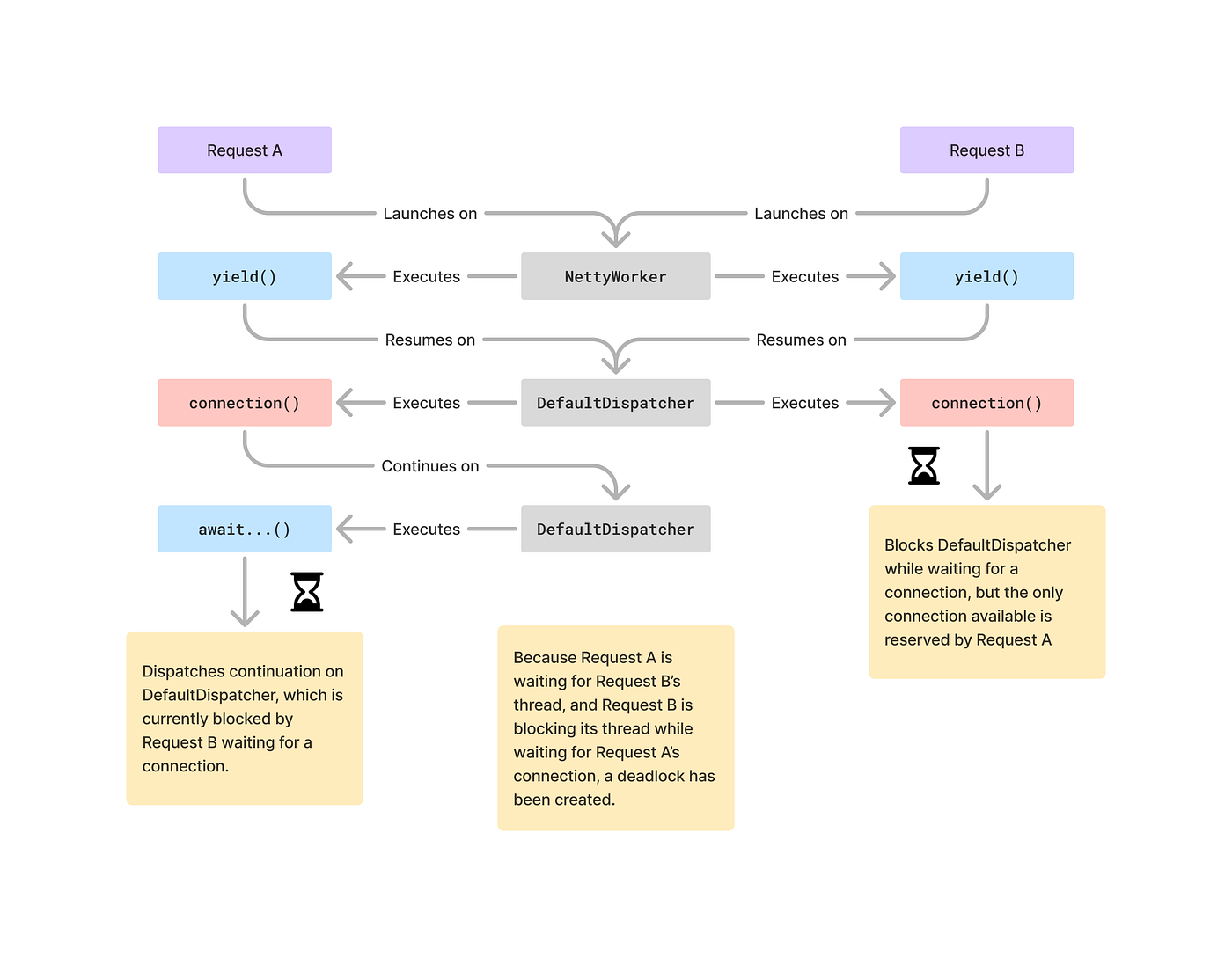
Cause of the deadlock
The following illustration shows how the dreaded deadlock occurs in a Micronaut application, but the issue is not inherently related to Micronaut, and as such the same principles applies to other frameworks like Spring, Quarkus or Ktor.
The blue boxes are non-blocking suspend functions, the red boxes and functions that will block a thread while waiting for a resource, and the gray boxes in the center are threads.
- Request A starts processing on the
NettyWorkerthread - Request A’s processing hits a suspension point, represented by
yield()(but it could also be an external HTTP request), suspending the remaining work, freeing up theNettyWorkerthread. - Request B starts processing on the
NettyWorkerthread - Request A resumes on a
DefaultDispatcherthread, because Micronaut launchessuspendfunctions withDispatchers.Defaultin itsCoroutineContext(see ContinuationArgumentBinder.kt) - Request A acquires a connection from the connection pool using
connection(), blocking theDefaultDispatcherthread until a connection is acquired - Request B’s processing hits a suspension point, represent by
yield(), suspending the remaining work, freeing up theNettyWorkerthread - Request A hits a suspension point when it calls an
awaitfunction likeawaitFirst(), freeing up theDefaultDispatcherthread - Request B resumes on the
DefaultDispatcherthread - Request B blocks the
DefaultDispatcherthread until it acquires a connection from the connection pool - Request A dispatches a resumption of the remaining work on the
DefaultDispatcherthread
And this is where our deadlock occurs: Request B is blocking the DefaultDispatcher thread while waiting for a connection, which prevents Request A from resuming its execution that would result in eventually releasing the connection it is holding for its transaction.
Now you might be thinking: What if we add more threads in the dispatcher, surely that would solve the problem, right? Regardless of how many threads you add to the dispatcher used to execute our code, we’re only postponing the problem. No matter how many threads we add to the dispatcher, a deadlock will eventually reveal itself given enough concurrent users.
Channeling Coroutines
Since blocking connection acquisition stands out as the source of our deadlock, we need a way to make it non-blocking (for the calling thread). The KotlinX Coroutines library includes the Channel<T> type, which can function much like an efficient, non-blocking, suspending queue of objects, and while we could introduce something like a SuspendingDataSource interface, it could be cumbersome to work into an existing application and ecosystem. Instead, we will approach the problem with the intention of extending the existing jOOQ API through extension functions.
Since we cannot change the connection acquisition itself, as this is part of JDBC, we can use a Channel<T> with the size of our connection pool to delay the blocking connection acquisition until a point where we know that there's a connection available in the connection pool, e.g. using something like:
@Singleton
class ServiceContext(private val configuration: Configuration) {
    // We're just storing the permission to obtain a connection, hence Unit
    private val connections: Channel<Unit>

    init {
        val connectionPool = configuration.dataSource() as HikariDataSource
        val maximumPoolSize = connectionPool.maximumPoolSize
        connections = Channel<Unit>(maximumPoolSize)

        repeat(maximumPoolSize) {
            connections.trySendBlocking(Unit)
        }
    }

    suspend fun <R> transaction(block: (Configuration) -> R): R {
        connections.receive()
        try {
            return configuration.transactionResult { trx ->
                block(trx)
            }
        } finally {
            connections.send(Unit)
        }
    }
}
However, doing this will only work as long as the maximumPoolSize is smaller than the number of threads in the CoroutineDispatcher used to execute our new transaction function, which is something that is unlikely to be the case since it would lead to poor resource utilization and concurrency.
Building upon this, we can add a thread pool to dispatch every transaction (and thus connection acquisition) onto a thread pool the size of the connection pool, meaning there will always be at least one thread available.
@Singleton
class ServiceContext(private val configuration: Configuration) {
    // We're just storing the permission to obtain a connection, hence Unit
    private val connections: Channel<Unit>
    private val dispatcher: CoroutineDispatcher

    init {
        val connectionPool = configuration.dataSource() as HikariDataSource
        val maximumPoolSize = connectionPool.maximumPoolSize
        connections = Channel<Unit>(maximumPoolSize)

        repeat(maximumPoolSize) {
            connections.trySendBlocking(Unit)
        }

        val executor = Executors.newFixedThreadPool(maximumPoolSize)
        dispatcher = executor.asCoroutineDispatcher()
    }

    suspend fun <R> transaction(block: (Configuration) -> R): R {
        connections.receive()
        try {
            return withContext(dispatcher) {
                configuration.transactionResult { trx ->
                    block(trx)
                }
            }
        } finally {
            connections.send(Unit)
        }
    }
}
Now this will work for any configuration of maximumPoolSize as long as there are platform threads available, and your execution graph will now look similar to the one illustrated below.

One notable difference between the graph and the implementation we built in this article, is that the graph shows an implementation that constrains the execution of a transaction to a single thread during the lifetime of the transaction, which the implementation we have built together here does not, as it can resume on any available thread in the thread pool. Not isolating a transaction to a single thread creates an illusion of concurrency, since queries sent using a JDBC connection instance are evaluated serially on the database side anyways. You can check out my project Nillerr/jooq-kotlin for an implementation that ensures thread isolation of queries during the lifetime of a transaction.
Virtual Threads
If you want to use Virtual Threads instead of platform threads, simply use a virtual thread dispatcher like so:
val executor = Executors.newVirtualThreadPerTaskExecutor()While using Virtual Threads seems like a simple option to reduce the need for platform threads, it does come at a cost. I observed a 12% concurrency decrease (requests per second) when using virtual threads over platform threads for database operations.
Conclusion
In this article, we explored the challenges of avoiding deadlocks when using Kotlin Coroutines with jOOQ and JDBC. We discussed how blocking operations can lead to deadlocks and how to mitigate this issue by using a Channel and a thread pool to manage connection acquisition.
For a complete solution that works with any jOOQ and JDBC configuration, you can check out my project on GitHub: Nillerr/jooq-kotlin. This project is also available on Maven Central, making it easy to integrate into your existing applications.
By leveraging the techniques and tools discussed, you can ensure that your applications remain responsive and free from deadlocks, even under high concurrency, although to achieve the full power of coroutines you should be using non-blocking implementations like R2DBC.
메타데이터
- post_id
- 1fee13eafbda
- slug
- avoiding-deadlocks-with-jdbc-1fee13eafbda
- url
- https://medium.com/@nillerr/avoiding-deadlocks-with-jdbc-1fee13eafbda
- canonical_url
- https://medium.com/@nillerr/avoiding-deadlocks-with-jdbc-1fee13eafbda
- author_url
- https://medium.com/@nillerr
- status
- ok
- fetched_at
- 2026-07-20 17:28:32




