Understanding Sets in Python: Removing Duplicates and Optimizing Performance
When working with data in Python, one common problem is handling duplicates and performing fast lookups. This is where sets become…
Understanding Sets in Python: Removing Duplicates and Optimizing Performance
When working with data in Python, one common problem is handling duplicates and performing fast lookups. This is where sets become extremely useful.
Unlike lists, sets are designed for uniqueness and speed. In this article, we’ll explore how sets work, why they are efficient, and where they are used in real-world scenarios.
What Exactly Is a Set?
A set in Python is a collection of unique elements stored in an unordered manner.
That means:
· Duplicate values are automatically removed
· The order of elements is not guaranteed
· You cannot access elements using indexing
Creating a set:
numbers={1,2,3,4}
Or using the built-in constructor:
numbers=set([1,2,3,4])
1. Removing Duplicates Efficiently
One of the simplest and most common uses of sets is duplicate removal.
Suppose you have user IDs collected from a website:
user_ids=[101,102,103,101,104,102]
unique=set(user_ids)
print(unique)
Output:
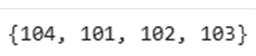
Instead of writing loops or conditions, the set automatically ensures uniqueness.
This is especially useful in:
· Cleaning messy datasets
· Removing repeated entries
· Preparing data before analysis
2. Sets in Data Validation
Imagine you’re validating coupon codes in an online store.
valid={“save10”,”welcome20”,”festive50”}
Print(“save10” in valid)
OUTPUT:

Membership checking in sets is extremely fast.
Why?
Sets are implemented using hashing, which allows average-case constant time lookup.
This makes them ideal for:
· Authentication systems
· Access control
· Fast validation checks
3. Comparing Two Datasets
Sets are powerful when comparing groups of data.
Let’s say you have users from two different campaigns:
A={“usha”,”nandu”,”sravani”}
B={“shiva”,”usha”,”srinandana”}
Common Users
For sets, the & operator means:
Intersection (common elements in both sets)
print(A&B)
OUTPUT:

All Users Combined
Union It gives all elements from both sets (no duplicates).
print(A|B)
OUTPUT:

Difference — elements present in A but not in B
Users Only in A
Difference — elements present in A but not in B
print(A-B)
OUTPUT:

These operations are extremely useful in:
· Marketing analytics
· User segmentation
· Audience comparison
4. Performance Advantage Over Lists
Let’s compare searching in a list vs a set.
L1=[10,20,30,40]
L2={10,20,30,40}
Checking membership:
20 in L1 #slower(O(n))
20 in L2 #faster
For small datasets, the difference may not be noticeable. But for large datasets with millions of records, sets significantly improve performance.
5. Real-World Text Processing Example
Consider analyzing words in a sentence.
text=”data science is powerful and data science is growing”
words=text.split()
unique=set(words)
print(unique)
Note: Sets in Python do not maintain order, so the output elements may appear in any order.
OUTPUT:

This helps in:
· Removing repeated words
· Preprocessing text data
· NLP tasks
Important Characteristics of Sets
· Unordered
· No indexing
· Mutable (can add or remove elements)
· No duplicate elements
· Elements must be immutable
Example of invalid usage: invalidset={ [1,2] , [3,4] }
Lists cannot be stored inside sets because they are mutable.
When Should You Use Sets?
Use sets when:
· You need to remove duplicates
· Fast lookup is required
· You need to compare datasets
· Order does not matter
Avoid sets when:
· You need ordered data
· You need indexing
· You want duplicate values preserved
메타데이터
- post_id
- 25c741a0f58a
- slug
- understanding-sets-in-python-removing-duplicates-and-optimizing-performance-25c741a0f58a
- url
- https://medium.com/@usharanibogireddy2023/understanding-sets-in-python-removing-duplicates-and-optimizing-performance-25c741a0f58a
- canonical_url
- https://medium.com/@usharanibogireddy2023/understanding-sets-in-python-removing-duplicates-and-optimizing-performance-25c741a0f58a
- author_url
- https://medium.com/@usharanibogireddy2023
- status
- ok
- fetched_at
- 2026-06-24 16:30:55