Spark 02: The Spark Architecture
Part 1 covered why Spark exists in the first place. But who decides what runs where? What happens when you hit “run” on your code? Who’s…
Spark 02: The Spark Architecture
Part 1 covered why Spark exists in the first place. But who decides what runs where? What happens when you hit “run” on your code? Who’s actually crunching the data across all those machines?
A single machine can’t handle huge datasets, and even if it could, nobody wants to wait that long. So, we pool machines into a cluster (a group of machines) and let Spark coordinate the work across them.
These clusters are managed by a cluster manager like Spark’s Standalone cluster manager, YARN, or Mesos. We then submit Spark Applications to these cluster managers, which will grant resources to our application to complete the work.
Spark Application
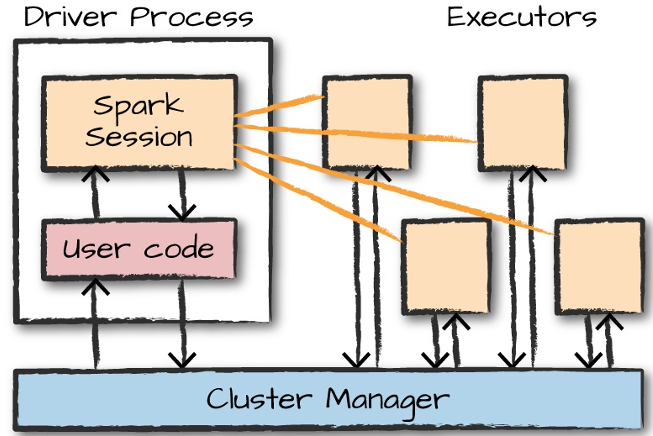
Spark Application Architecture
Spark Applications consist of a driver (the heart of a Spark Application) and a set of executors (the workers),
Both the driver and executors are JVM (Java Virtual Machine) processes
Only the driver contains the Spark Session object
Driver and Executors

- Maintaining information about the Spark Application
- Responding to a user’s program or input
- Analysing, distributing, and scheduling work across the executors
The executors actually carry out the work that the driver assigns them and are responsible for only two things:
- Executing code assigned to it by the driver
- Reporting the state of the computation on that executor back to the driver node.
How does Spark execute any code?

The relationship between the SparkSession and Spark’s Language API
- Spark Session:
a. There is a SparkSession object available to the user, which is the entrance point to running Spark code.
from pyspark.sql import SparkSession

spark = SparkSession.builder.appName("Spark Demo").getOrCreate()

df = spark.read.csv("data.csv", header=True, inferSchema=True)
df_filtered = df.filter(df.age > 30)
df_filtered.show()- PySpark → P4J → JVM :
When using Spark from Python, you don’t write explicit JVM instructions

PySpark’s main() method calls Java’s main() method through Py4J (a library that lets Python code call Java objects) into the JVM driver.
- JVM-side Spark engine:
a. The driver receives these instructions
b. Spark SQL’s (one of Spark’s APIs) Catalyst optimiser (query optimisation engine) parses your DataFrame operations into a logical plan,
Filter (age > 30)
  +- Relation[data.csv]
optimises it, and produces a physical plan (the final execution plan),
*(1) Filter (isnotnull(age) && (age > 30))
+- FileScan csv [age, name, ...] ...- Task scheduling:
a. The driver divides this physical plan into smaller tasks, schedules them and sends them to executors
b. Executors run the actual computation on partitions (small chunks) of your data.
- Returning the Results :
a. While returning the result, through a .show() or .collect(), Spark gathers the data from all the executors and brings it into the driver node
b. The driver reconverts this code (still Java code) into Python code using Py4J and sends it back to the Python process to display it on the console

And that’s Spark’s architecture, end to end. SparkSession gets you in the door, Py4J translates your code into the JVM, Catalyst turns it into a plan, the driver hands out the work, and executors get it done.
But we’ve been glossing over one thing this whole time: what exactly is Spark operating on? We’ve mentioned “DataFrames” and “partitions” without really unpacking either.
That’s Part 3. We’ll get into DataFrames, partitions, transformations, lazy evaluation, and actions, the pieces that actually make Spark’s execution model click. Stay tuned!
메타데이터
- post_id
- 2cddb671714b
- slug
- spark-02-the-spark-architecture-2cddb671714b
- url
- https://medium.com/h7w/spark-02-the-spark-architecture-2cddb671714b
- canonical_url
- https://medium.com/h7w/spark-02-the-spark-architecture-2cddb671714b
- author_url
- https://medium.com/@sidshe37
- status
- ok
- fetched_at
- 2026-07-17 09:25:19