Whaaat ? You’re Still Not Using z ?!
Unlock Warp-Speed Navigation with Your Shell History
Whaaat ? You’re Still Not Using z ?!
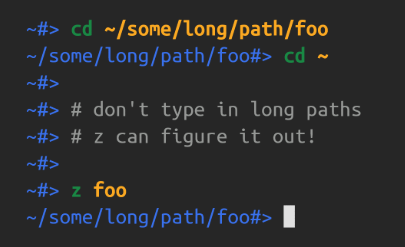
z cd history
Unlock Warp-Speed Navigation with Your Shell History
If you’re still wasting time typing out full paths or awkwardly tab-completing your way around your filesystem like it’s 1999, it’s time for a wake-up call.
Let me introduce you to **z** — the tiny shell tool that makes cd feel like time travel.
🚀 What Is z ?
z is a shell script that tracks the directories you cd into and lets you jump to them with fuzzy matching based on frequency and recency. Think of it as your shell’s memory on steroids.
Instead of this:
cd ~/projects/2025/clients/chisely.io/frontendJust do:
z chiselyor even:
z fronBoom. You’re there. z knows what you meant.
🛠️ Installation (It’s Just One File)
For bash/zsh:
git clone https://github.com/rupa/z.git ~/.z
echo “. ~/.z/z.sh” >> ~/.bashrc # or ~/.zshrc
source ~/.bashrc # or ~/.zshrc
Basic Usage
z fooJump to directory matching “foo”z bar bazMatch directories with both “bar” and “baz”z -lList your most used directoriesz -r fooSearch based on recencyz -t fooSearch based on frequency
🧠 How Does It Work?
It justs logs every cd you do into a .z file. It ranks entries by frecent score: a mix of frequency and recency.
When you z <keyword>, it finds the best match.
So the more you use it, the smarter it gets.
🎯 Pro Tip — combine with fzf for interactive version
Use z -l | fzf to combine with fuzzy finders.
zi() { cd "$(z -l | sort -rn | awk '{$1=""; print substr($0,2)}' | fzf)" }메타데이터
- post_id
- 3e542f098ce5
- slug
- whaaat-youre-still-not-using-z-3e542f098ce5
- url
- https://medium.com/@thekit-14747/whaaat-youre-still-not-using-z-3e542f098ce5
- canonical_url
- https://medium.com/@thekit-14747/whaaat-youre-still-not-using-z-3e542f098ce5
- author_url
- https://medium.com/@thekit-14747
- status
- ok
- fetched_at
- 2026-07-29 23:11:35


