The HTTP Basics to Advanced: Beginner Friendly Guide to How the Web Works
What Is a Protocol?
The HTTP Basics to Advanced: Beginner Friendly Guide to How the Web Works
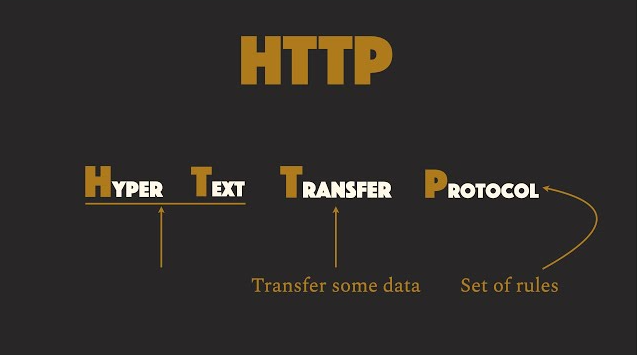
What Is a Protocol?
A protocol is a set of rules that two or more devices follow to communicate and exchange data reliably over a network.
Common Types of Protocols (Grouped by Layer)
Let’s organize them based on the OSI Model (7-layer network model) and usage category.
- Application Layer Protocols (Most relevant for developers)

- Transport Layer Protocols

- Network Layer Protocols

- Security Protocols

- Other Useful Protocols

What is HTTP (Hypertext Transfer Protocol)?
- HTTP is an application-layer network protocol used for transmitting data over the web.
- It is a reliable protocol that depends on TCP in the transport layer.
- It defines a set of rules for sending hypertext between two machines over a network.
- Uses a client-server model where the client sends requests, and the server sends responses.
- It will define how a machine will format, read and transmit hypertext from one machine to another.
- Throughout the years, HTTP has developed to become a more general purpose application layer protocol and is now capable of not just transmitting hypertext but mostly any kind of data images, text, json etc.

HyperText is a text/document that contains links (hyperlinks) to other texts or documents.
How HTTP Works:
- The client initiates a request to the server.
- The server accepts the request, processes it, and sends back a response.
- The communication happens over TCP/IP.
Evolution of HTTP:
HTTP/0.9 (1991)
- It supported only the
GETmethod, had no headers or status codes, and could only transfer plain HTML files.
HTTP/1.0 (1996)
- Introduced HTTP headers, status codes, and content types.
- Supported POST and HEAD methods.
- No persistent connections — each request establishing a brand new, TCP connection.
Creating a new TCP connection is expensive because it involves multiple network handshakes, increases latency, and consumes additional server and network resources.
HTTP/2 (2015):
- Binary protocol instead of text for better performance.
- Multiplexing: Multiplexing allows multiple requests and responses to be sent simultaneously over a single TCP connection, improving performance and reducing latency.
- Header compression using HPACK to reduce overhead.
HTTP/3 (Upcoming/Recent):
- Uses QUIC protocol over UDP for faster connection setup.
- Reduced latency with zero-round-trip time (0-RTT) for better performance.
- Built-in encryption with TLS 1.3.
- Resilient to packet loss compared to TCP.
HTTP Request Structure:
- URL: Specifies the resource location on the server.
- Request Headers: Contain metadata like content type, authentication, and caching details.
- Method: Defines the action to perform (e.g., GET, POST, PUT, DELETE).
- Body: Carries data for POST, PUT, or PATCH requests (optional for others).
URL Structure
protocol://ip-address:portExample:
https://192.168.1.1:443A URL is made up of three main parts:
- Protocol → Defines the communication rules used between the client and server, such as HTTP or HTTPS.
- IP Address → Identifies the server or machine on the network.
- Port → Specifies the particular service or application running on the server.
In simple terms, the protocol tells how to communicate, the IP address tells where to communicate, and the port tells which service to communicate with.
HTTP Methods:
- GET: Retrieve data from the server.
- POST: Send data to the server to create or update resources.
- PUT: Update an existing resource.
- DELETE: Remove a resource.
- PATCH: Partially update a resource.
HTTP Response Structure:
- Code: Contains HTTP version, status code, and status message.
- Headers: Provide metadata about the response.
- Body: Contains the response data (HTML, JSON, etc.).
Common HTTP Status Codes:
- 1xx (Informational): Request received, processing continues.
- 2xx (Success): Request successfully processed (e.g., 200 OK).
- 3xx (Redirection): Further action needed (e.g., 301 Moved Permanently).
- 4xx (Client Error): Bad request or unauthorized access (e.g., 404 Not Found).
- 5xx (Server Error): Server failed to fulfill a valid request (e.g., 500 Internal Server Error).
What is an API?
- API stands for Application Programming Interface.
- An API is a set of rules and protocols that allows two software systems to communicate with each other.
- It defines how requests and responses should be structured, enabling seamless data exchange.
How APIs Work:
- A client sends a request to the server through the API.
- The server processes the request and sends back a response.
- Communication usually happens over HTTP/HTTPS.
Types of APIs:
- Web APIs: Accessible over the web using HTTP/HTTPS.
- Library/Framework APIs: Used internally within software systems.
- Operating System APIs: Allow applications to interact with OS resources.
- Remote APIs: Enable interaction with resources located on another server.
API Architectures:
REST (Representational State Transfer):
- Stateless and uses standard HTTP methods.
- Supports multiple formats (JSON, XML).
SOAP (Simple Object Access Protocol):
- Uses XML for message formatting.
- Provides stricter standards for security and reliability.
GraphQL:
- Query language for APIs.
- Allows fetching specific data with a single request.
gRPC (Google Remote Procedure Call):
- Uses Protocol Buffers (Protobuf) for data serialization.
- Supports bi-directional streaming and low latency.
- Ideal for microservices and distributed systems.
Components of an API Request:
- Endpoint: URL where the API is accessed.
- Headers: Metadata (e.g., authentication, content type).
- Method: Defines the type of operation (GET, POST, PUT, DELETE).
- Body: Contains data sent in write operations.
HTTP Status Codes in APIs:
- 2xx: Success (e.g., 200 OK, 201 Created).
- 4xx: Client errors (e.g., 400 Bad Request, 404 Not Found).
- 5xx: Server errors (e.g., 500 Internal Server Error).
Authentication in APIs:
- API Keys: Unique keys for identifying clients.
- OAuth: Token-based authentication for secure access.
- JWT (JSON Web Tokens): Encoded tokens for stateless authentication.
메타데이터
- post_id
- 4dbcdd0b3b3a
- slug
- the-http-basics-to-advanced-beginner-friendly-guide-to-how-the-web-works-4dbcdd0b3b3a
- url
- https://medium.com/@iamsanjeevkrsingh/the-http-basics-to-advanced-beginner-friendly-guide-to-how-the-web-works-4dbcdd0b3b3a
- canonical_url
- https://medium.com/@iamsanjeevkrsingh/the-http-basics-to-advanced-beginner-friendly-guide-to-how-the-web-works-4dbcdd0b3b3a
- author_url
- https://medium.com/@iamsanjeevkrsingh
- status
- ok
- fetched_at
- 2026-06-09 15:37:30