Quick Guide: Configuring Separate Client-Side mTLS for Production and Sandbox Key Types in WSO2 API…
Photo by FlyD on Unsplash
Quick Guide: Configuring Separate Client-Side mTLS for Production and Sandbox Key Types in WSO2 API Manager
Photo by FlyD on Unsplash
From WSO2 API Manager 4.4.0 onward, client-side Mutual Transport Layer Security (mTLS) is supported for both Production and Sandbox key types. This guide provides a step-by-step approach to using this feature effectively.
Example Scenario:
Let’s configure mTLS as the transport layer security, without enabling any application-level security.
Steps to Configure mTLS for Production and Sandbox
1. Create an API with Separate Endpoints
- Create an API in WSO2 API Manager, specifying two separate endpoints: one for Production and one for Sandbox.
2. Configure Transport Level Security
- Navigate to API Configurations → Runtime from the left-hand menu.
- Under the Transport Level Security section:
- Select HTTPS and Mutual SSL.
- Under the Application Level Security section:
- Deselect all selected options to disable application-level security.
In the above setting, Mutual SSL under Transport Level Security will be made mandatory by default.
3. Add Client Certificates
- Under the Transport Level Security section, click the Add Certificate button.
- In the popup that appears, provide the following details:
- Key Type: Choose whether the certificate applies to Production or Sandbox (e.g., Production).
- Business Plan: Select a plan (e.g., Silver).
- Alias: Provide a unique alias for the certificate (e.g., abc).
- Certificate: Upload the client certificate file.
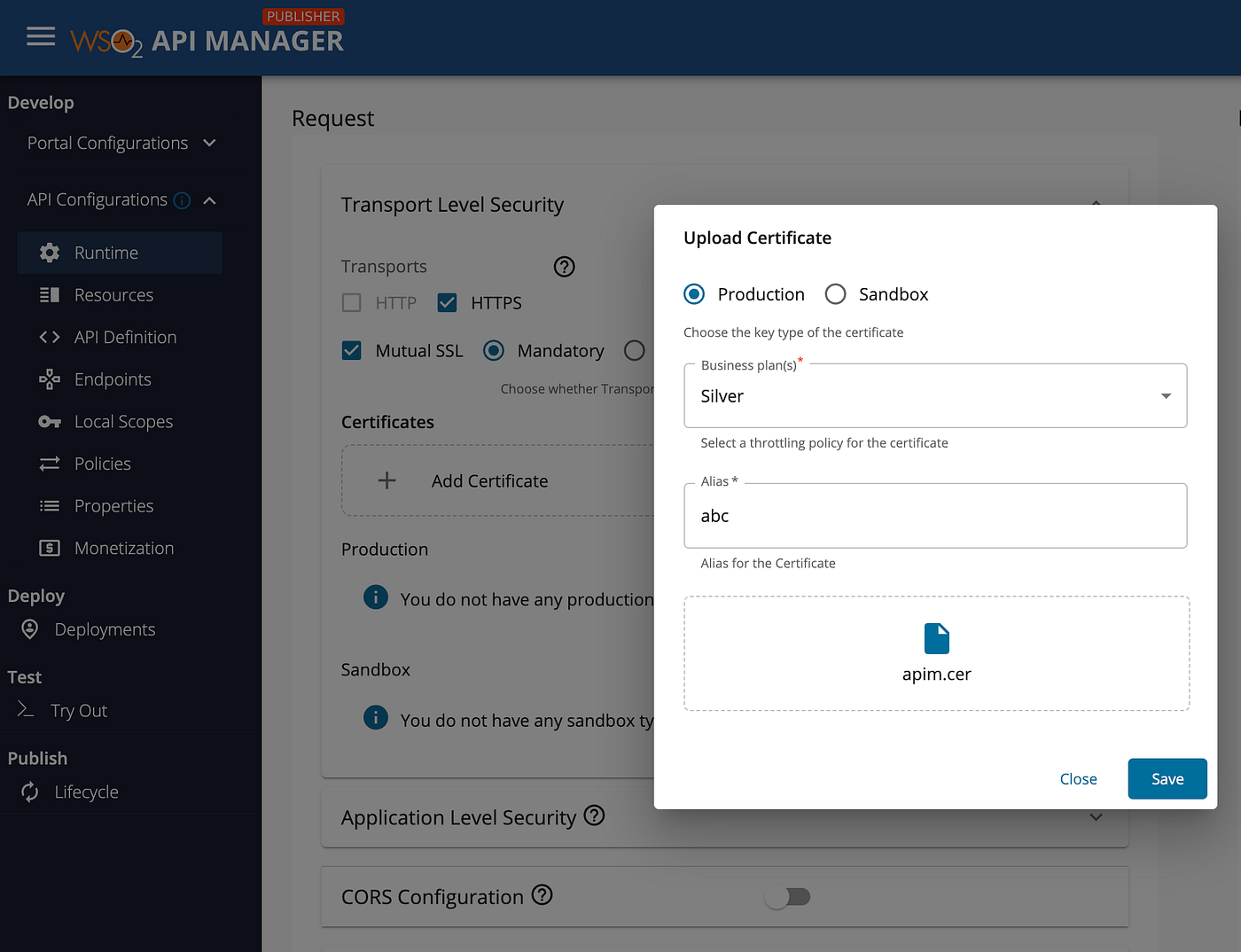
Upload client certificate from the Publisher portal of WSO2 API Manager
- Save the entry. The uploaded certificate will now be listed under either the Production Certificates or Sandbox Certificates list.

List of added certificate entries
4. Save and Deploy the API
- After saving the client certificate, click Save and deploy the API.
5. Invoke the API with the Production Certificate
To test the Production endpoint, you will use the uploaded certificate as the key.
Follow these steps:
- Retrieve the gateway access URLs from the Deployments section in the left-menu.

Accessing Gateway URLs
- Use Postman to invoke the Production endpoint:
- Open Postman and go to Settings → Certificates.
- Under Client Certificates, click Add Certificate.

Add client certificate in Postman
- Provide the required details:
- Host:
localhost:8243 - Certificate file: Upload the previously saved Production certificate.
- Passphrase: Add the passphrase if one was set during certificate generation.

Add client certificate information
- Append the resource path to the gateway URL. For example:
https://localhost:8243/cats/1.0.0- Send the request.

Invoking the API
The API should respond with data from the Production endpoint configured during API creation.
Summary
With this setup, you can securely invoke separate Production and Sandbox endpoints in WSO2 API Manager using client-side mTLS. This configuration ensures secure communication by validating the client certificate for the respective key type.
메타데이터
- post_id
- 566b2d84f2c3
- slug
- quick-guide-configuring-separate-client-side-mtls-for-production-and-sandbox-key-types-in-wso2-api-566b2d84f2c3
- url
- https://medium.com/@rusirij/quick-guide-configuring-separate-client-side-mtls-for-production-and-sandbox-key-types-in-wso2-api-566b2d84f2c3
- canonical_url
- https://medium.com/@rusirij/quick-guide-configuring-separate-client-side-mtls-for-production-and-sandbox-key-types-in-wso2-api-566b2d84f2c3
- author_url
- https://medium.com/@rusirij
- status
- ok
- fetched_at
- 2026-07-22 03:47:22