Swift Package Manager Deep Dive: Building Scalable, Modular iOS Architectures
Introduction
Swift Package Manager Deep Dive: Building Scalable, Modular iOS Architectures
Introduction
Swift Package Manager (SPM) is no longer just a dependency tool — it is a first-class build system, module system, and dependency resolver integrated into the Swift ecosystem. If you are still treating it like CocoaPods-lite, you are leaving architectural power on the table.
At scale, SPM becomes the backbone of modular architecture, build performance, and dependency governance. This guide breaks down how to actually use it like a senior engineer — not just how it works.
The Core Mental Model (If You Get This Wrong, Everything Breaks)
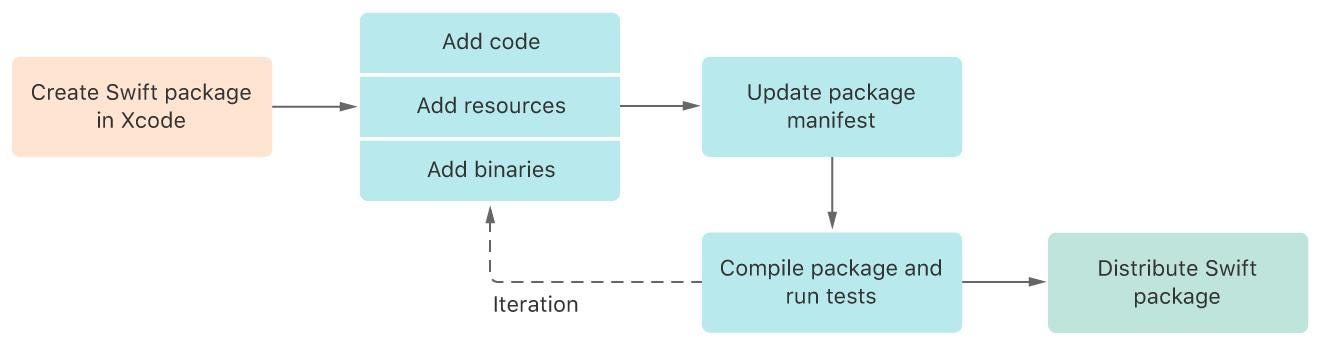

SPM is three things:
- Resolver → figures out dependency versions
- Builder → compiles targets
- Linker → links modules into products
Everything is defined in one file: Package.swift.
The hierarchy:
Package ├── Targets (actual code modules) ├── Products (what you expose) └── Dependencies (external packages)
If you confuse targets and products, your package design will collapse.
Targets vs Products: The Most Misunderstood Concept
Target = implementation Product = API surface
This is not semantics. This is encapsulation control.
Example mistake:
You create 5 targets and assume all are usable externally.
Wrong.
Only targets listed in products are importable.
Correct design:
products: [
    .library(name: "AppCore", targets: ["Core"])
]
targets: [
.target(name: "Core"),
.target(name: "InternalUtils") // hidden
]If you expose everything, you destroy modularity and future flexibility.
Target Types: When Each One Actually Matters

Strategic Insight:
- Plugins + executable targets = automation layer
- Most teams ignore this → slower builds, manual workflows
Dependency Wiring: Where Most Engineers Fail
Declaring a dependency is not enough.
You must:
Step 1 — Declare
.package(url: "...", from: "1.0.0")Step 2 — Wire into target
.target(
    name: "App",
    dependencies: [
        .product(name: "Library", package: "Library")
    ]
)
If step 2 is missing → “No such module” error
Versioning Strategy: Avoid Self-Inflicted Failures
SPM uses Semantic Versioning.
What you should use 90% of the time:
from: "1.2.0"What breaks systems:
.exact("1.2.3")Why?
Because diamond dependency conflicts become unsolvable.
App
    /   \
  LibA  LibB
    \   /
Alamofire- LibA → needs
>=5.6 - LibB → needs
=5.4
No overlap → build fails.
Fix priority:
- Upgrade dependency
- Relax your constraints
- Fork (last resort)
If you use .exact casually, you are the problem.
Resources Handling: Subtle but Critical
SPM does NOT use Bundle.main.
Use:
Bundle.moduleWhy?
Packages have their own bundle namespace.
Using Bundle.main:
- Works in app
- Fails in package
- Breaks in production
Package.resolved: The File People Misuse
Think of it like this:
Package.swift→ intentPackage.resolved→ reality

Why?
Without it:
- Dev A → different versions
- Dev B → different versions
- CI → different versions
Result: non-reproducible builds
Real-World Modular Architecture Using SPM
Bad team:
App → MassiveTarget
Good teams:
App ├── Core ├── Networking ├── UIComponents ├── FeatureHome └── FeatureProfile
Rules:
- One responsibility per target
- One direction dependency flow
- No cycles
If your targets depend on each other randomly → your architecture is already broken.
Common Mistakes (Brutally Honest)
1. One giant target
You kill:
- Incremental builds
- Parallel compilation
- Reusability
2. Exposing internal modules
You lock your API forever.
3. Not using plugins
You miss:
- Code generation
- Build automation
- Dev productivity
4. Ignoring dependency graph
Then act surprised when builds fail.
Run:
swift package show-dependencies5. Using .exact everywhere
You create unsolvable graphs.
CLI Commands You Should Actually Use
swift build
swift test
swift run
swift package update
swift package show-dependencies
swift package reset
f you are not using CLI, you don’t fully understand SPM.
Final Mental Model (Keep This)
- Target = code
- Product = what you expose
- Dependency = external code
Package.swift→ desired statePackage.resolved→ locked state
Debug checklist:
- Dependency declared?
- Product wired to target?
- Target exposed?
Miss one → failure.
Closing Thought
SPM is not just replacing CocoaPods. It is enabling:
- True modular architecture
- Deterministic builds
- Scalable dependency graphs
메타데이터
- post_id
- 6bff01314dfe
- slug
- swift-package-manager-deep-dive-building-scalable-modular-ios-architectures-6bff01314dfe
- url
- https://medium.com/@singh.amarpune/swift-package-manager-deep-dive-building-scalable-modular-ios-architectures-6bff01314dfe
- canonical_url
- https://medium.com/@singh.amarpune/swift-package-manager-deep-dive-building-scalable-modular-ios-architectures-6bff01314dfe
- author_url
- https://medium.com/@singh.amarpune
- status
- ok
- fetched_at
- 2026-06-13 12:55:53




