JSX, Components & Props — The Mental Model Every React Developer Actually Needs
After 4+ years of building React apps — from tiny side projects to large-scale production systems — I’ve watched hundreds of developers…
JSX, Components & Props — The Mental Model Every React Developer Actually Needs
After 4+ years of building React apps — from tiny side projects to large-scale production systems — I’ve watched hundreds of developers struggle with the same things. Not because the concepts are hard. But because nobody ever gave them the right mental model. This article is that mental model.
First, Let’s Kill a Common Misconception
Most tutorials say:
“JSX is HTML inside JavaScript.”
That’s not wrong, but it’s incomplete — and incomplete mental models create bugs.
Here’s the more accurate version:
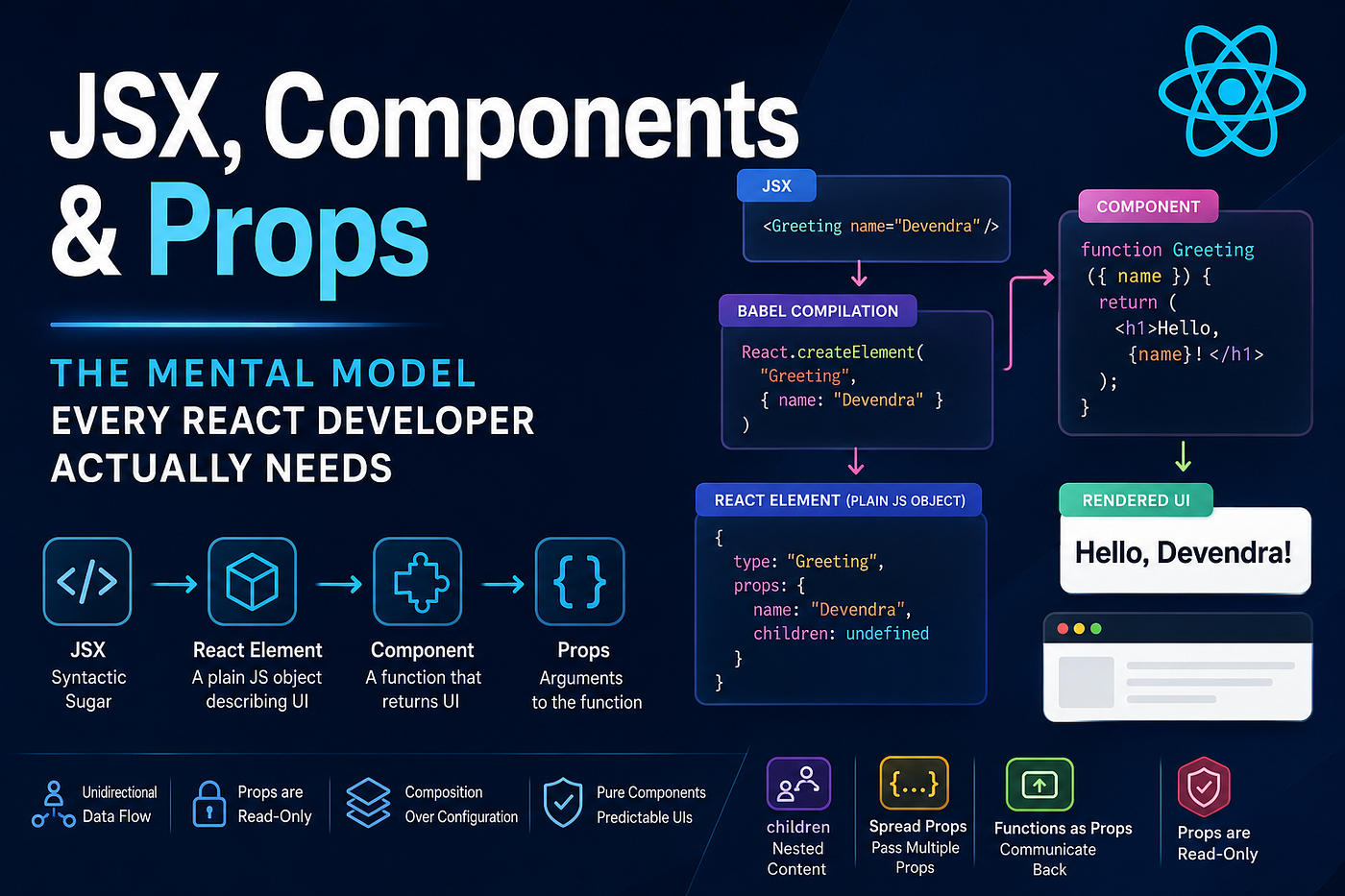
JSX is syntactic sugar for
React.createElement()calls.
When you write this:
const element = <h1 className="title">Hello World</h1>;Babel compiles it to this:
const element = React.createElement("h1", { className: "title" }, "Hello World");And React.createElement returns a plain JavaScript object — a React element:
{
  type: "h1",
  props: {
    className: "title",
    children: "Hello World"
  }
}
That’s it. A React element is just a JavaScript object describing what you want on screen. React reads this object tree and figures out how to update the actual DOM. This object tree is what people call the Virtual DOM.
Why does this matter?
Because once you internalize that JSX → function call → plain object, you stop being confused by things like:
- Why you can’t use
ifstatements directly inside JSX (a function call can't have anifinside an argument — you use ternaries or move logic out) - Why
classbecomesclassName(becauseclassis a reserved word in JS) - Why you must return a single root element (a function returns one value)
What Is a Component, Really?
A component is a function that returns a React element (or null).
function Greeting() {
  return <h1>Hello, Devendra!</h1>;
}
That’s it. No magic. No class required (in modern React). Just a function.
React calls this function when it needs to figure out what to put on screen. If your data changes, React calls the function again, gets a new element object, compares it with the old one, and updates only what changed in the real DOM. This comparison process is called reconciliation.
The Two Rules That Govern Components
Rule 1: Component names must start with a capital letter.
// ✅ React treats this as a component
<Greeting />
// ❌ React treats this as a native DOM element (like <div>)
<greeting />Why? Because in JSX, lowercase = native DOM tag, uppercase = your custom component. This is how React knows to call your function versus creating a <greeting> HTML element.
Rule 2: A component must return one root element.
// ❌ This will throw an error
function Card() {
  return (
    <h2>Title</h2>
    <p>Description</p>
  );
}
// ✅ Wrap in a parent
function Card() {
return (
<div>
<h2>Title</h2>
<p>Description</p>
</div>
);
}// ✅ Or use a Fragment (renders nothing extra in the DOM)
function Card() {
return (
<>
<h2>Title</h2>
<p>Description</p>
</>
);
}Props — The Communication Channel Between Components
If components are functions, then props are the arguments you pass to those functions.
function Greeting(props) {
  return <h1>Hello, {props.name}!</h1>;
}
// Usage
<Greeting name="Devendra" />React collects everything you write as attributes on the JSX tag, bundles them into a single object called props, and passes it to your function. That's the entire mechanism.
Destructuring Props (The Modern Way)
Instead of writing props.name everywhere, destructure directly in the parameter:
function Greeting({ name, role }) {
  return (
    <div>
      <h1>Hello, {name}!</h1>
      <p>Role: {role}</p>
    </div>
  );
}
<Greeting name="Devendra" role="Senior Engineer" />Much cleaner. This is the pattern you’ll see in every professional React codebase.
Default Props — The Right Way
What if role is not passed? Define defaults inline:
function Greeting({ name, role = "Developer" }) {
  return (
    <div>
      <h1>Hello, {name}!</h1>
      <p>Role: {role}</p>
    </div>
  );
}
// role will be "Developer" if not provided
<Greeting name="Devendra" />The children Prop — React's Most Underrated Feature
When you nest content inside a component tag, React automatically passes that content as props.children.
function Card({ children }) {
  return (
    <div className="card">
      {children}
    </div>
  );
}
// Usage
<Card>
<h2>My Title</h2>
<p>Some description here.</p>
</Card>This pattern — composition via children — is how you build flexible, reusable components. Instead of trying to pass every possible variation as a prop, you let the parent decide what goes inside.
This is how component libraries like shadcn/ui and Material UI build almost everything. A <Dialog>, a <Card>, a <Button> — all accept children and render them wherever they choose.
Passing Any JavaScript Value as a Prop
Curly braces {} in JSX mean: evaluate this as JavaScript. This means you can pass any JS value — strings, numbers, booleans, arrays, objects, and even functions.
function UserCard({ name, age, isAdmin, hobbies, onDelete }) {
  return (
    <div>
      <h2>{name}</h2>
      <p>Age: {age}</p>
      {isAdmin && <span>Admin</span>}
      <ul>
        {hobbies.map(h => <li key={h}>{h}</li>)}
      </ul>
      <button onClick={onDelete}>Delete</button>
    </div>
  );
}
<UserCard
name="Devendra"
age={28}
isAdmin={true}
hobbies={["coding", "teaching", "gaming"]}
onDelete={() => console.log("deleted")}
/>A few things to notice here:
- String values can use
"quotes"directly - Everything else (numbers, booleans, arrays, objects, functions) needs
{curly braces} - Passing a function as a prop (like
onDelete) is how you send data back up from child to parent — this pattern is called lifting state up
The One Rule That Protects Your Entire App
Props are read-only. Never mutate them.
// ❌ Never do this
function Greeting({ user }) {
  user.name = "Modified"; // This will cause silent bugs
  return <h1>{user.name}</h1>;
}
// ✅ Create a new value instead
function Greeting({ user }) {
const displayName = user.name.toUpperCase();
return <h1>{displayName}</h1>;
}Props flow one direction: parent → child. This is called unidirectional data flow, and it’s the architectural decision that makes React apps predictable. If a child needs to change something in the parent, it does so by calling a function the parent passed down as a prop — never by touching the prop object directly.
Spread Props — A Powerful (And Dangerous) Pattern
When you have many props to pass, use the spread operator:
function Input({ label, ...inputProps }) {
  return (
    <div>
      <label>{label}</label>
      <input {...inputProps} />
    </div>
  );
}
// All extra props (type, placeholder, onChange, etc.) flow straight to <input>
<Input
label="Email"
type="email"
placeholder="you@example.com"
onChange={handleChange}
/>This ...rest pattern is extremely common in component libraries. You capture the props you care about (label) and forward everything else to the underlying DOM element.
The danger: Spreading arbitrary props onto DOM elements can cause React warnings about unknown HTML attributes. Be deliberate about what you spread and where.
Component Composition — The Senior Developer’s Secret Weapon
Junior developers think in terms of components that do one specific thing.
Senior developers think in terms of component shapes — patterns that stay flexible.
Here’s the evolution:
Level 1 — Prop drilling (beginner)
function Button({ text, color, icon }) {
  return <button style={{ color }}>{icon} {text}</button>;
}
Every new variation requires a new prop. This doesn’t scale.
Level 2 — Children composition (intermediate)
function Button({ children, variant }) {
  return <button className={`btn btn-${variant}`}>{children}</button>;
}
<Button variant="primary">
<Icon name="save" /> Save Changes
</Button>Now the caller decides what goes inside. Much more flexible.
Level 3 — Slot pattern (advanced)
function PageLayout({ header, sidebar, children }) {
  return (
    <div className="layout">
      <header>{header}</header>
      <aside>{sidebar}</aside>
      <main>{children}</main>
    </div>
  );
}
<PageLayout
header={<Navbar />}
sidebar={<FilterPanel />}
>
<ProductList />
</PageLayout>Named “slots” (just props that accept JSX) give you full control over structure without creating rigid coupling. This is how you build layouts that actually survive changing requirements.
The Mental Model, Summarized
Concept What it actually is JSX Syntactic sugar for React.createElement() React Element A plain JS object describing UI Component A function that returns a React element Props The arguments passed to that function children A special prop for nested JSX content Prop mutation Forbidden — always treat props as read-only
The Rule That Scales
The entire React component model rests on one principle:
Given the same props, a component should always return the same output.
This is called a pure component. When your components are pure — no side effects during render, no prop mutation, no external state changes, React can optimize, reuse, and reason about them efficiently.
Break purity, and you invite bugs that are nearly impossible to trace.
Follow it, and you’ll build UIs that are predictable, testable, and maintainable at any scale.
Enjoy coding champs.👍🏻
메타데이터
- post_id
- 7ab2d9bc0573
- slug
- jsx-components-props-the-mental-model-every-react-developer-actually-needs-7ab2d9bc0573
- url
- https://medium.com/@ddhote780/jsx-components-props-the-mental-model-every-react-developer-actually-needs-7ab2d9bc0573
- canonical_url
- https://medium.com/@ddhote780/jsx-components-props-the-mental-model-every-react-developer-actually-needs-7ab2d9bc0573
- author_url
- https://medium.com/@ddhote780
- status
- ok
- fetched_at
- 2026-07-11 04:49:25