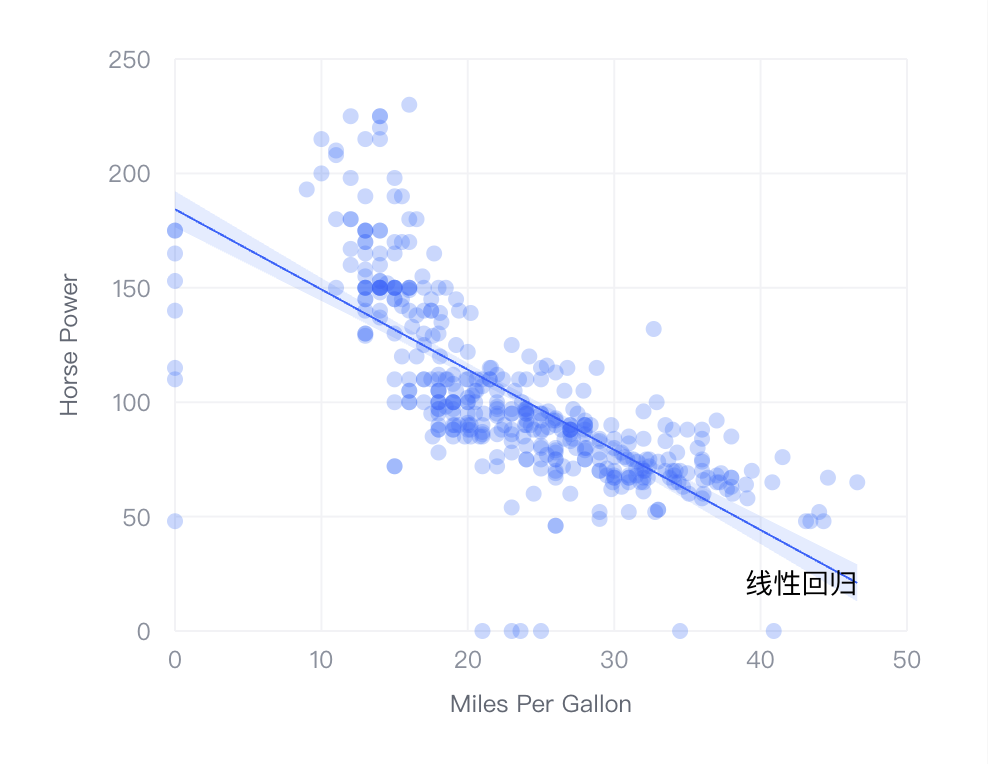
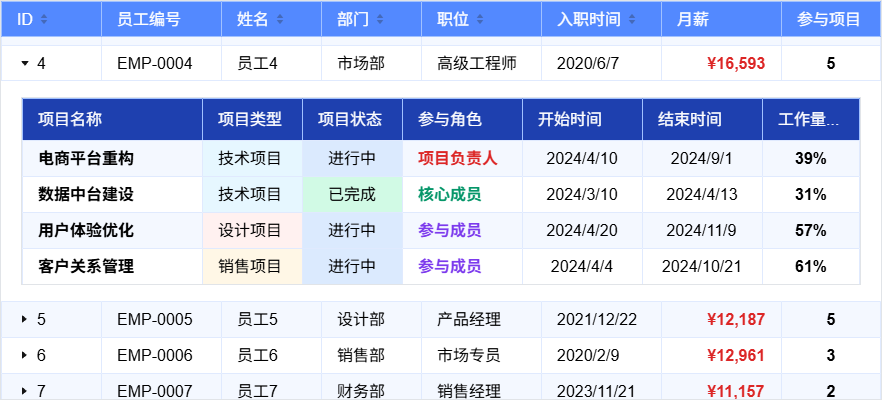
VTable-Sheet: Redefining Web Spreadsheet Open Source Solution
title: VTable-Sheet: Redefining Web Spreadsheet Open Source Solution
VTable-Sheet: Redefining Web Spreadsheet Open Source Solution
title: VTable-Sheet: Redefining Web Spreadsheet Open Source Solution
key words: VisActor,VChart,VTable,VStrory,VMind,VGrammar,VRender,Visualization,Chart,Data,Table,Graph,Gis,LLM
Introduction
VTable-Sheet is a lightweight, high-performance spreadsheet component designed for modern web applications. It adopts Canvas rendering technology, supports smooth display and editing of massive data, and provides developers with a feature-complete, easy-to-integrate spreadsheet solution.
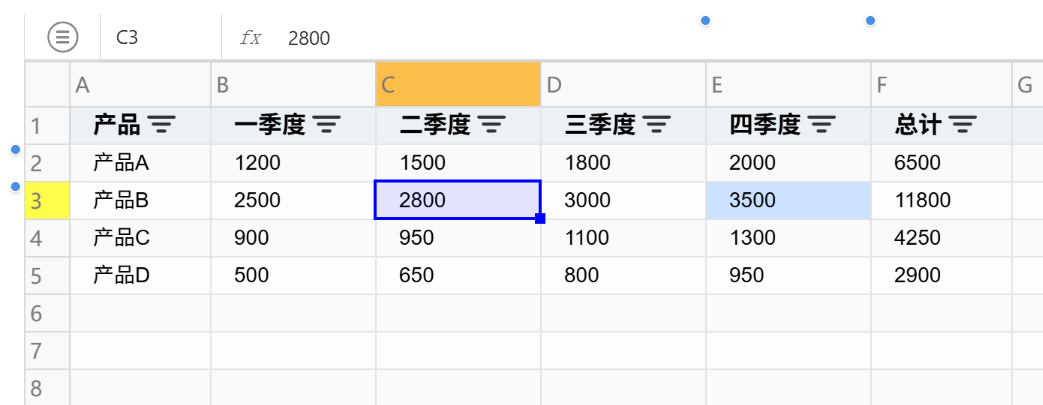
Core Capabilities
- High Performance: Based on Canvas rendering technology, supports million-level data rendering in seconds, ensuring smooth user experience.
- Complete Features: Provides Excel-level formula calculation, data filtering, cell editing and other core functions to meet enterprise-level needs.
- Flexible Extension: Plugin-based architecture design, supports custom function extensions, easily adapts to various business scenarios.
- Easy Integration: Simple API design, can be quickly integrated into projects with just a few lines of code, reducing development costs.
Quick Start
Get NPM Package
First, you need to install using the following command in your project root directory:
# Install using npm
npm install @visactor/vtable-sheet
# Install using yarn
yarn add @visactor/vtable-sheetImport VTable-Sheet
Import via NPM package
Use import to introduce vtable-sheet at the top of your JavaScript file:
import { VTableSheet } from '@visactor/vtable-sheet';
const sheetInstance = new VTableSheet(document.getElementById('container'), {
  showFormulaBar: true,  // Show formula bar
  showSheetTab: true,    // Show bottom sheet tab switcher
  sheets: [
    {
      sheetKey: 'sheet1',
      sheetTitle: 'Sales Data',
      columns: [
        { title: 'Product', width: 120 },
        { title: 'Sales', width: 100 },
        { title: 'Amount', width: 100 }
      ],
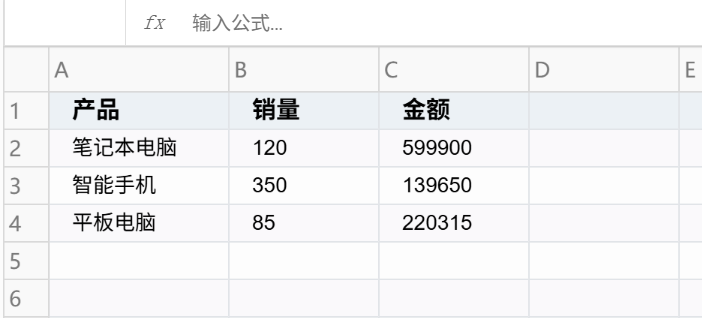
      data: [
        ['Laptop', 120, 599900],
        ['Smartphone', 350, 139650],
        ['Tablet', 85, 220315]
      ]
    }
  ]
});
Running effect:
Main Capabilities of VTable-Sheet
Flexible Data Display Capabilities
Cell Merging
Cell merging is a commonly used function in report creation. VTable-Sheet provides flexible merging capabilities, supporting merging and splitting of arbitrary cell areas.
import { VTableSheet } from '@visactor/vtable-sheet';
const sheetInstance = new VTableSheet(document.getElementById(CONTAINER_ID), {
    sheets: [{
      sheetKey: 'merge-demo',
      sheetTitle: 'Quarterly Sales Report',
      data: [
        ['2024 Sales Report', '', '', ''],
        ['', '', '', ''],
        ['Product Name', 'Q1 Sales', 'Q2 Sales', 'Q3 Sales'],
        ['Laptop', 1200000, 1500000, 1800000],
        ['Smartphone', 2500000, 2800000, 3200000],
        ['Total', 3700000, 4300000, 5000000]
      ],
      cellMerge: [
        {
          text: '2024 Sales Report',  // Merge title row
          range: {
            start: { col: 0, row: 0 },
            end: { col: 3, row: 1 }
          }
        },
        {
          text: 'Total',  // Merge total row title cell
          range: {
            start: { col: 0, row: 5 },
            end: { col: 0, row: 5 }
          }
        }
      ]
    }]
  });
Freeze Rows and Columns
When processing large datasets, the freeze rows and columns function can keep headers and key columns visible, facilitating data viewing and comparison.
import { VTableSheet } from '@visactor/vtable-sheet';
const sheetInstance = new VTableSheet(document.getElementById('container'), {
  sheets: [{
    sheetKey: 'frozen-demo',
    sheetTitle: 'Freeze Example',
    columns: [
      { title: 'ID', field: 'id', width: 60 },
      { title: 'Product', field: 'product', width: 100 },
      { title: 'Jan', field: 'jan', width: 80 },
      { title: 'Feb', field: 'feb', width: 80 },
      { title: 'Mar', field: 'mar', width: 80 }
    ],
    data: [
      [1, 'Laptop', 1200, 1500, 1800],
      [2, 'Phone', 2500, 2800, 3000],
      [3, 'Tablet', 900, 950, 1100],
      // ... more data rows
    ],
    frozenRowCount: 2,  // Freeze first two rows
  }]
});
Column Width and Row Height Adjustment
Flexible column width and row height adjustment allows users to freely adjust table layout based on content, supporting drag adjustment and double-click auto-fit.

Highlighting
When selecting cells, corresponding row and column headers are automatically highlighted, helping users quickly locate data positions.

Convenient Data Editing Features
Cell Editing
Simple and intuitive editing experience is the core of spreadsheets. Double-click cells to enter edit mode, supporting input and validation of multiple data types.

Row and Column Operations
VTable-Sheet provides intuitive row and column operation functions through the AddRowColumnPlugin:
- Visual Operations: Hover to show add buttons, click to add new rows/columns
- Flexible Insertion Position: Can insert new rows or columns at any position
- Custom Callbacks: Supports custom data content and format for new rows/columns
- Right-click Menu Integration: Combined with ContextMenuPlugin, provides complete insert, delete, hide and other operations
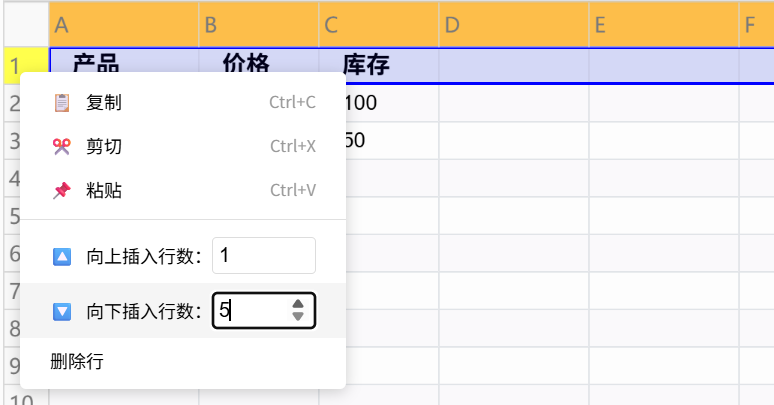

Operations are simple and intuitive, no need to remember complex shortcuts, hover to see operation hints.
Fill Handle Function
VTable-Sheet provides Excel-like fill handle functionality:
- Smart Data Pattern Recognition: Automatically recognizes number sequences, date sequences, text patterns, etc.
- Multiple Fill Modes: Supports copy fill and sequence fill modes
- Flexible Operation Methods: Drag fill or double-click quick fill
- Rich Built-in Rules: Supports date sequences, Chinese numbers, week sequences and other patterns

Usage is simple and intuitive: select cells, then drag the fill handle in the bottom-right corner to quickly fill data.
Keyboard Shortcut Support
VTable-Sheet supports common keyboard operations:
- Edit Shortcuts: Enter to confirm edit, Tab to switch cells, arrow keys for navigation
- Copy/Paste: Ctrl+C/V/X for copy/paste/cut, Ctrl+A for select all
- Area Selection: Shift+mouse for continuous selection, Ctrl+mouse for multiple selection
- Smart Editing: Double-click to edit, F2 to edit current cell
Excel users can use VTable-Sheet fluently without learning costs.
Powerful Data Analysis Features
Formula Calculation
VTable-Sheet integrates HyperFormula calculation engine, currently supporting common functions:
- Math Functions: SUM, AVERAGE, MAX, MIN, ROUND, etc.
- Logical Functions: IF, AND, OR, NOT, etc.
- Text Functions: CONCATENATE, LEFT, RIGHT, LEN, etc.
- Date Functions: TODAY, NOW, YEAR, MONTH, DAY, etc.
- Lookup Functions: VLOOKUP, INDEX, MATCH, etc.

Formula Editor
The formula editor is not just an input box, it provides intelligent hints, parameter hints, syntax highlighting and other functions, making formula writing easy and efficient.

Data Filtering
Supports filtering by value and filtering by condition:
- Filter by Value: Quickly filter required data through checkbox list
- Filter by Condition: Supports complex conditions like greater than, less than, contains, between, etc.
import { VTableSheet } from '@visactor/vtable-sheet';
const sheetInstance = new VTableSheet(document.getElementById('container'), {
  sheets: [{
    sheetKey: 'filter-demo',
    sheetTitle: 'Filter Example',
    filter: true,  // Enable filtering
    columns: [
      { title: 'Name', field: 'name', width: 100, filter: false },
      { title: 'Age', field: 'age', width: 80 },
      { title: 'Department', field: 'dept', width: 100 },
      { title: 'Salary', field: 'salary', width: 100 }
    ],
    data: [
      ['Zhang San', 25, 'Tech', 8000],
      ['Li Si', 30, 'Product', 12000],
      ['Wang Wu', 28, 'Tech', 9500],
      ['Zhao Liu', 35, 'Marketing', 15000]
    ]
  }]
});
Filter states can be saved and restored, supporting multi-column combination filtering.
Complete Data Organization and Management
Multi-Sheet Management
VTable-Sheet supports managing multiple sheets in one instance, similar to Excel’s workbook concept:
import { VTableSheet } from '@visactor/vtable-sheet';
const sheetInstance = new VTableSheet(document.getElementById('container'), {
  showSheetTab: true,  // Show bottom sheet tab switcher
  sheets: [
    {
      sheetKey: 'sales',
      sheetTitle: 'Sales Data',
      columns: [
        { title: 'Product', field: 'product', width: 100 },
        { title: 'Sales', field: 'sales', width: 80 },
        { title: 'Amount', field: 'amount', width: 100 }
      ],
      data: [
        ['Laptop', 120, 599900],
        ['Phone', 350, 139650]
      ],
      active: true  // Set as active sheet
    },
    {
      sheetKey: 'inventory',
      sheetTitle: 'Inventory Data',
      columns: [
        { title: 'Product', field: 'product', width: 100 },
        { title: 'Stock', field: 'stock', width: 80 }
      ],
      data: [
        ['Laptop', 50],
        ['Phone', 120]
      ]
    }
  ]
});
Supports dynamic adding, deleting, and switching sheets, each sheet can be independently configured with styles and functions.

Data Persistence
Provides complete state saving and restoration mechanism:
// Save current state
const config = sheetInstance.saveToConfig();
localStorage.setItem('sheet-state', JSON.stringify(config));
// Restore state
const savedConfig = JSON.parse(localStorage.getItem('sheet-state'));
const newInstance = new VTableSheet(document.getElementById('container'), savedConfig);
Savable states include: data content, filter conditions, active sheet, formula settings, merged cells, etc.
Import/Export Functions
Supports CSV, XLSX format import/export, convenient for data exchange with Excel and other tools:
// Export to Excel
sheetInstance.exportSheetToFile('xlsx');
// Import Excel file
sheetInstance.importFileToSheet();
Advanced Customization Features
Theme Customization
VTable-Sheet provides theme customization functionality, allowing custom visual styles for tables:
import { VTableSheet } from '@visactor/vtable-sheet';
const sheetInstance = new VTableSheet(document.getElementById('container'), {
  sheets: [{
    sheetKey: 'theme-demo',
    sheetTitle: 'Theme Example',
    columns: [
      { title: 'Name', field: 'name', width: 100 },
      { title: 'Department', field: 'dept', width: 100 },
      { title: 'Position', field: 'position', width: 120 }
    ],
    data: [
      ['Zhang San', 'Tech', 'Engineer'],
      ['Li Si', 'Product', 'Manager']
    ]
  }],
  theme: {
    // Row/column number style
    rowSeriesNumberCellStyle: {
      bgColor: '#f0f0f0',
      color: '#666666'
    },
    // Table theme
    tableTheme: {
      headerStyle: {
        bgColor: '#e6f7ff',
        color: '#0066cc',
        fontWeight: 'bold'
      },
      bodyStyle: {
        fontSize: 14,
        color: '#333333'
      },
      // Selection style
      selectionStyle: {
        cellBorderColor: '#1890ff'
      }
    }
  }
});
Built-in multiple beautiful themes (ARCO, BRIGHT, DARK, etc.), also supports extended custom themes.

Right-click Menu
VTable-Sheet provides complete right-click menu functionality, supporting custom menus for different areas:
Right-click menu supports:
- Area-specific Configuration: Headers, body, row/column number areas can be configured with different menus
- Built-in Functions: Copy, cut, paste, insert, delete, freeze, merge, etc.
- Custom Extensions: Supports adding custom menu items and handling logic
- Dynamic Adjustment: Dynamically show/hide menu items based on context
Plugin Architecture
VTable-Sheet adopts a plugin architecture, with many functions implemented through plugins. This design maintains core simplicity while providing extension space for community contributors. We welcome more developers to contribute plugins and enrich VTable-Sheet’s functionality together.
Specifically, VTable-Sheet adopts a layered architecture, decoupling the core engine, plugin functions, and upper-layer applications, bringing flexibility and extensibility.
- VTable (Core Engine): As the foundation of the entire system, VTable is a high-performance table rendering and interaction engine. It provides the underlying table component ListTable and a set of standard plugin interfaces.
- VTable-Plugins (Function Suite): This is an independent plugin library that provides reusable function modules such as filtering, right-click menus, auto-fill, etc. These plugins follow VTable’s standard interfaces and can be flexibly used by any VTable-based project.
- VTable-Sheet (Integrated Application): VTable-Sheet is a higher-level encapsulation built on VTable and consuming plugins from VTable-Plugins. It uses a plugin factory (table-plugins.ts) to dynamically load and configure required plugins based on user’s Sheet configuration, ultimately presenting a feature-complete spreadsheet to users.

Summary
VTable-Sheet is a growing open-source spreadsheet component, committed to providing excellent spreadsheet solutions for web applications.
It brings the powerful functionality of desktop Excel to the web while fully leveraging the advantages of web technology. Whether you’re building online office systems, data analysis platforms, financial reporting systems, or any web application that needs spreadsheet functionality, VTable-Sheet can handle it.
Welcome to Connect
Official Resources
- GitHub Repository: https://github.com/VisActor/VTable
- Official Documentation: https://visactor.io/vtable
- Online Demo: https://visactor.io/vtable/demo
Welcome to Connect
Finally, we sincerely welcome all friends interested in data visualization to participate in VisActor’s open source development:
VTable: VTable Official Website, VTable Github (Welcome to Star)
VisActor Official Website: www.visactor.io/ or www.viactor.com
Discord: discord.gg/3wPyxVyH6m
Feishu Group (External Network): Open Link to Scan QR Code

WeChat Official Account: Open Link to Scan QR Code

GitHub: github.com/VisActor
메타데이터
- post_id
- 866f8b1e9335
- slug
- vtable-sheet-redefining-web-spreadsheet-open-source-solution-866f8b1e9335
- url
- https://medium.com/@xuanhun9/vtable-sheet-redefining-web-spreadsheet-open-source-solution-866f8b1e9335
- canonical_url
- https://medium.com/@xuanhun9/vtable-sheet-redefining-web-spreadsheet-open-source-solution-866f8b1e9335
- author_url
- https://medium.com/@xuanhun9
- status
- ok
- fetched_at
- 2026-07-17 08:27:23