How to Easily Scrape Product Hunt Reviews
Pull user ratings, written feedback, and reviewer profiles from any Product Hunt product page. Batch it across competitors. Export in…
How to Easily Scrape Product Hunt Reviews
Pull user ratings, written feedback, and reviewer profiles from any Product Hunt product page. Batch it across competitors. Export in minutes. No infrastructure required.
Here’s a scenario I keep hearing from product teams: someone decides to do competitive research on Product Hunt. They open five product pages, start reading reviews, and three hours later they have a half-filled spreadsheet and a headache. The reviews are useful. The process of collecting them is not.
Product Hunt user reviews are different from most public feedback online. People aren’t writing for SEO or employer branding. They tried the product, they have opinions, and they wrote them down in a structured format: what’s great, what needs improvement, how it compares to alternatives. That’s genuinely hard to get elsewhere.
The catch is there’s no export button. No official ProductHunt API that hands you review data. Just a JavaScript-rendered page that pagination splits across dozens of endpoints. If you want the data, you either copy it manually or you build a scraper.
Most people don’t want to build a scraper. That’s what this actor is for.
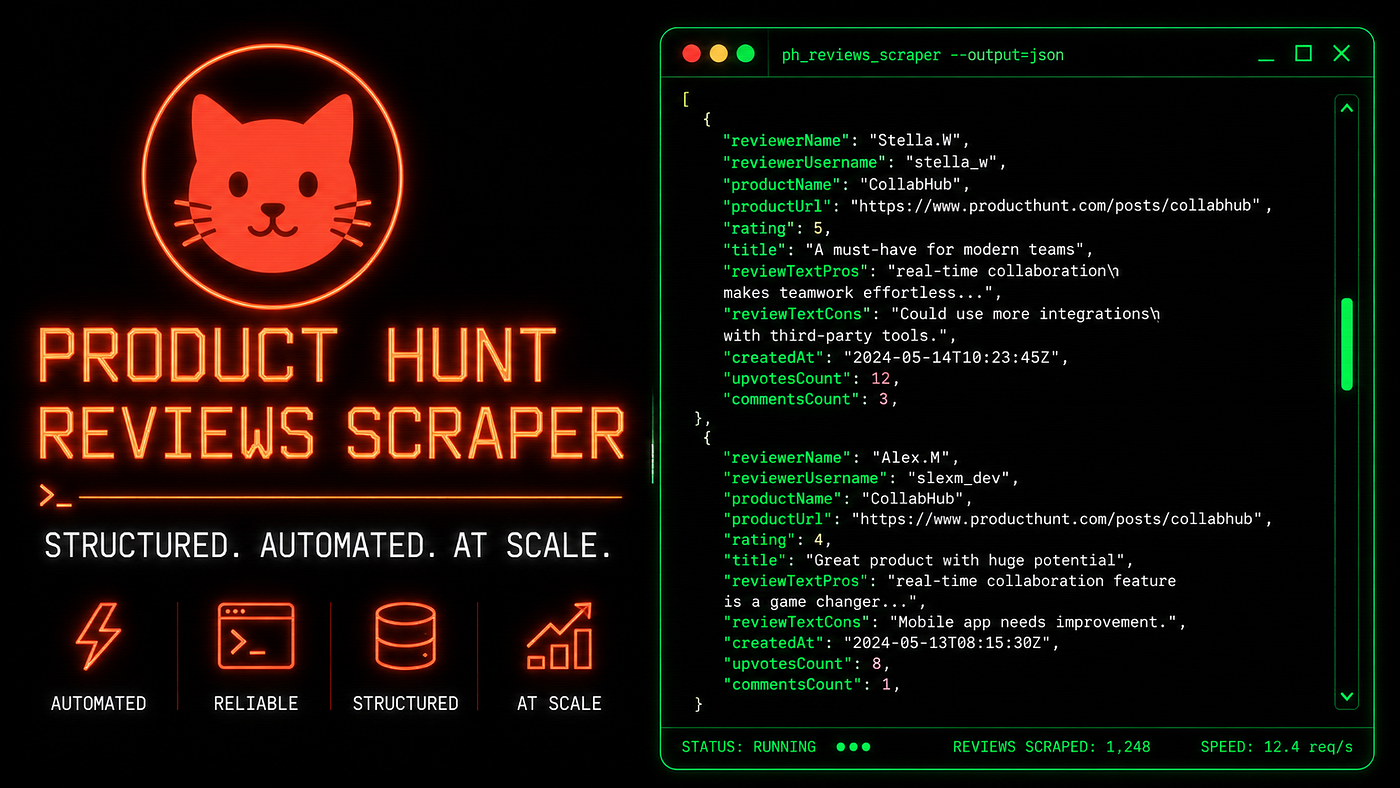
Turning Product Hunt’s paginated review pages into clean, exportable datasets.
Why building your own scraper isn’t worth it here
I’ve watched developers start down this path. The first version takes a day. It works on one product page. Then they discover Product Hunt loads reviews dynamically, so a plain HTTP request returns an empty shell. Now they need a headless browser.
Playwright or Puppeteer, then. Fine, that’s another half day. But now they need to handle pagination, because Product Hunt splits reviews across pages using ?page=N parameters and there's no obvious stopping point. Then they need proxies, because hitting the same endpoint repeatedly from the same IP triggers rate limiting. Then the page structure changes in a Product Hunt front-end update and the whole thing breaks on a Monday morning when someone actually needs it.
The real cost isn’t the code. It’s the maintenance. A scraper you build yourself is a scraper you own forever.
The simpler move: use a product reviews scraper that someone else already built, tested, and maintains.
What this actor does
The Product Hunt Reviews Scraper on Apify takes a product slug, handles all the browser automation and pagination internally, and returns one structured record per review. You give it figma. It gives you every Figma review on Product Hunt, parsed into clean fields.
Each record includes the reviewer’s name and profile URL, their avatar, their overall star rating (1 to 5), the full text of their “What’s great” section, their “What needs improvement” text, their “vs Alternatives” comparison, helpful vote count, view count, and a direct URL back to that specific review. It also captures the product name, slug, and URL so batched runs stay organized.
Pass multiple slugs in one run and it handles them sequentially. Results go into an Apify dataset. Export as JSON, CSV, XML, or Excel from the Storage tab. If you’re piping the data into another tool, the dataset API works cleanly with Python and JavaScript clients.
The “vs Alternatives” field alone is worth the run. That’s where users explain exactly why they chose this product over the competition, in their own words, without a sales deck involved.
Three ways to run it
On the Apify platform (no code)
Go to the actor page, click “Try for free,” and log in or create an account. In the input form, enter a product slug in the “Product slug” field. The slug is the part of the URL after /products/ on Product Hunt: for https://www.producthunt.com/products/notion/reviews, the slug is notion. Set "Max reviews" if you want to cap the output (default is 100, maximum is 1,000). Click "Start." When the run finishes, open the Storage tab and download your data. That's the whole workflow for the no-code path.

The Apify platform input screen for the Product Hunt Reviews Scraper, no code required.
Python SDK
Install apify-client and use the run-and-iterate pattern. This is the cleanest approach for feeding review data into a downstream pipeline:
from apify_client import ApifyClientclient = ApifyClient("YOUR_API_TOKEN")run_input = {
"productSlugs": ["figma", "notion", "chatgpt"],
"maxItems": 200,
"requestTimeout": 30
}run = client.actor("kawsar/product-hunt-reviews-scraper").call(run_input=run_input)for item in client.dataset(run["defaultDatasetId"]).iterate_items():
print(
item["productName"],
item["reviewerName"],
item["rating"],
item["reviewTextPros"]
)Replace productSlugs with productSlug (singular) if you're only pulling one product. The iterator streams results without loading the full dataset into memory, which matters when you're pulling thousands of reviews across a category.
JavaScript SDK
Install apify-client from npm and use the async pattern:
import { ApifyClient } from 'apify-client';const client = new ApifyClient({ token: 'YOUR_API_TOKEN' });const run = await client.actor('kawsar/product-hunt-reviews-scraper').call({
productSlugs: ['figma', 'notion', 'linear'],
maxItems: 150,
requestTimeout: 30
});const { items } = await client.dataset(run.defaultDatasetId).listItems();items.forEach(item => {
console.log(item.productName, item.reviewerName, item.rating, item.reviewTextCons);
});Inputs and outputs
The input schema is small. You need one or more product slugs, an optional review cap, and an optional request timeout. Slugs are case-sensitive and lowercase, matching how they appear in Product Hunt URLs.
{
  "productSlugs": ["figma", "notion", "linear"],
  "maxItems": 100,
  "requestTimeout": 30
}
Each output record maps one-to-one with a single review. Here’s what a real record looks like:
{
  "reviewId": "413579",
  "reviewerName": "Stella.W",
  "reviewerUrl": "https://www.producthunt.com/@stellawwwwwww",
  "reviewerAvatarUrl": "https://ph-avatars.imgix.net/...",
  "reviewerReviewCount": 4,
  "rating": 5,
  "reviewTextPros": "Figma enables real-time collaboration in a way that fundamentally changes how teams work together.",
  "reviewTextCons": "Performance degrades in very large or complex files.",
  "reviewVsAlternatives": "We chose Figma because it reduces setup friction and keeps everything in one place.",
  "reviewDateRaw": "4mo ago",
  "helpfulVotes": 1,
  "viewsCount": 217,
  "productName": "Figma",
  "productSlug": "figma",
  "productUrl": "https://www.producthunt.com/products/figma/reviews",
  "reviewUrl": "https://www.producthunt.com/products/figma/reviews#413579",
  "scrapedAt": "2026-04-20T10:30:00+00:00"
}
A few practical notes on running it:
- Slugs are case-sensitive. Use lowercase exactly as they appear in the Product Hunt URL.
- If a slug returns zero results, double-check it against the live Product Hunt page before assuming the product has no reviews.
- For products with several hundred reviews, set
maxItemshigher and expect the run to take a few extra minutes. - If one slug fails mid-run (network timeout, invalid slug), the actor logs the error and continues to the next one rather than stopping the whole job.

Python SDK call running a batch review extraction across three Product Hunt products.
Real use cases
The most useful competitive research comes from what users say when no one’s selling to them. Product Hunt reviews are close to that.
A B2B SaaS team building a new project management tool uses this actor to pull 300 reviews for three competing products every quarter. They feed the “cons” field into a simple keyword frequency script, find out which complaints recur most often, and use that to prioritize their roadmap. It replaced a quarterly user interview process that took six weeks to run.
Growth consultants use the “vs Alternatives” field as win/loss data without the sales team involvement. If 40 reviews for Product A mention Product B by name and explain why they switched, that’s market positioning intelligence you can act on.
Content strategists mine the “pros” field for language. Real users describing real value, without brand voice polish. That language lands better in landing page copy than anything a copywriter invents in isolation.
Founders building in a crowded category track their own product’s review sentiment over time. If four reviews in one month mention the same friction point, that’s a product signal worth acting on before it shows up in churn numbers.
What you can build with this data
The actor itself is a data source. What you do with that data is where it gets interesting.
A competitive intelligence dashboard is the most obvious build. Pull reviews for five to ten products in your category weekly. Track average ratings over time. Flag any product that drops more than 0.3 stars in a 30-day window, which often signals a major bug or pricing change. Sell access to this dashboard as a subscription to investors and product teams who cover the space. Apify’s scheduled runs handle the data refresh automatically.
An AI voice-of-customer tool is a strong indie hacker project. Feed batched review text into an LLM, prompt it to extract feature requests and categorized pain points, and generate a structured report. Charge agencies or founders a flat fee per report. The Product Hunt scraper handles the data collection side; you handle the prompt engineering and the client relationship.
A lead generation tool for SaaS sales teams is worth building if you work in B2B. Every reviewer who gave a competitor two or three stars and wrote a detailed complaint is a warm lead. You know their name, their public profile URL, and the exact friction they experienced. That’s not cold outreach anymore.
A weekly review digest newsletter is low-overhead and genuinely useful. Cover ten product categories. Scrape their reviews weekly. Summarize what’s getting praised and what’s getting criticized. Developers and founders who want to stay close to user feedback without reading hundreds of individual reviews will pay for a clean weekly summary they can skim in five minutes.
Finally, market research reports are a natural fit for consultants. Pull reviews for every product in a category before writing an analyst report. Aggregate the pros and cons at scale. The result is more representative than any survey you could run in the same time window.

Five things you can build on top of scraped Product Hunt review data.
Ready to pull Product Hunt review data without the manual work?
**Try the Product Hunt Reviews Scraper on Apify**
No infrastructure. No maintenance. Run it and get your data.
That team spending three hours copy-pasting reviews into a spreadsheet? They got their answer eventually. But the window for the feature decision had closed by then. The Product Hunt Reviews Scraper doesn’t make the analysis faster by a little. For a batch of five competitor products, it cuts the data collection phase from hours to minutes. What you do with that time is up to you.
메타데이터
- post_id
- 8d8862ddc5eb
- slug
- how-to-easily-scrape-product-hunt-reviews-8d8862ddc5eb
- url
- https://medium.com/@bigiByte/how-to-easily-scrape-product-hunt-reviews-8d8862ddc5eb
- canonical_url
- https://medium.com/@bigiByte/how-to-easily-scrape-product-hunt-reviews-8d8862ddc5eb
- author_url
- https://medium.com/@bigiByte
- status
- ok
- fetched_at
- 2026-06-09 15:37:30