Beyond the Bootloader: The 32-bit to 64-bit Leap in Rust OS-Dev
When GRUB hands control to your kernel entry point via the Multiboot2 protocol, your CPU is in 32-bit Protected Mode. Interrupts are likely…
Beyond the Bootloader: The 32-bit to 64-bit Leap in Rust OS-Dev
When GRUB hands control to your kernel entry point via the Multiboot2 protocol, your CPU is in 32-bit Protected Mode. Interrupts are likely off. The A20 line is enabled. Segment registers have been set up with flat 4 GiB descriptors. You’re running, but you’re still in the 1990s.
To write a real Rust kernel — one that can use 64-bit pointers, access more than 4 GiB of RAM, and benefit from the x86_64 calling convention — we need to leave that world behind and enter Long Mode.
This transition is not handled by a library. There’s no std. There’s no runtime. There’s nothing between you and the silicon except a handful of assembly instructions and a very specific sequence of CPU configuration steps. Get the sequence wrong, and you’ll triple-fault into a reboot. Get it right, and you’ll be calling Rust code from the most fundamental level of your system.
Let’s walk through every step.
The Architecture of Long Mode Entry
Before writing a single line, let’s understand what the CPU actually requires before it will enter 64-bit Long Mode. According to the Intel SDM (Vol. 3A, Section 9.8.5), the processor checks all of these in order:
- Long Mode is supported — confirmed via
CPUID - PAE is enabled — Physical Address Extension, bit 5 of
CR4 - CR3 points to a valid PML4 (P4) table — your page tables
- LME is set in EFER — the Long Mode Enable bit
- Paging is enabled — bit 31 of
CR0 - A 64-bit GDT is loaded — and a far jump reloads
CS
Each of these is a hard requirement. Miss one and the CPU either ignores your attempt silently or triple-faults. We’ll implement all six, in order.
1. The Pre-Flight Check: CPUID
CPUID is the CPU’s self-identification instruction. Before enabling anything, we need to confirm two things:
- The CPUID instruction itself is supported (not guaranteed in very old code)
- Long Mode (the LM bit) is available
Checking for CPUID Support
The CPUID instruction is available if and only if bit 21 of EFLAGS can be toggled. If the bit is read-only, the CPU predates CPUID. Here’s the check:
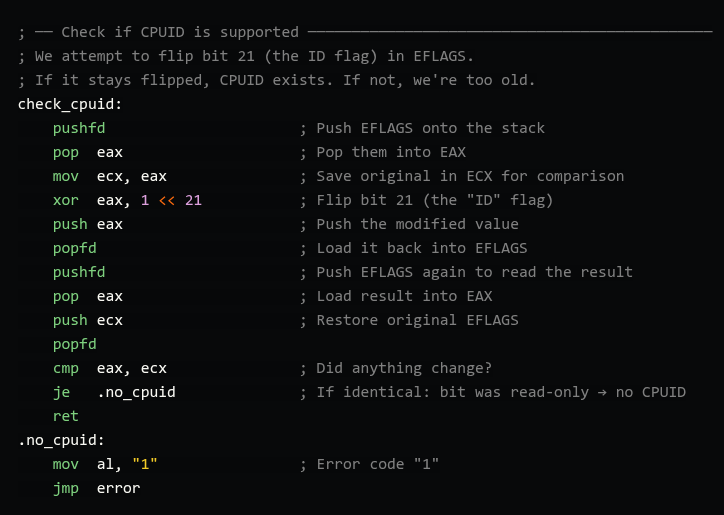
Checking for Long Mode Support
With CPUID confirmed, we query the “Extended Processor Info” leaf (0x80000001). Bit 29 of EDX in the response is the LM bit — “Long Mode Supported.”

Why not just skip this check? If you try to enter Long Mode on a CPU that doesn’t support it, the behavior is undefined — usually a triple fault. Worse, you might be running in a VM with unusual CPU configuration. Always check.
2. Setting Up Page Tables
This is the most involved part of the bootstrap. Long Mode requires paging to be active. You cannot enter it without valid page tables loaded into CR3.
We’re going to set up a minimal 4-level paging hierarchy (P4 → P3 → P2 → P1), also called PML4 → PDPT → PD → PT in Intel documentation. For the initial bootstrap, we’ll identity-map the first 1 GiB of physical memory using 2 MiB huge pages (so we only need P4, P3, and P2 — no P1 needed).
Understanding 4-Level Paging
A 64-bit virtual address is split into five fields:

Each table has 512 entries (2⁹), and each entry is 8 bytes, making each table exactly 4,096 bytes — one page. The CPU walks this structure on every memory access (unless TLB-cached).
Allocating the Tables in Assembly
In your linker script, declare BSS sections for the tables. They must be 4 KiB aligned:

Wiring Up the Hierarchy
Each table entry holds the physical address of the next level table (or the physical frame for leaf entries), combined with control bits in the lower 12 bits.
For our bootstrap:
- Bit 0 (Present): This entry is valid
- Bit 1 (Writable): The mapped memory can be written
- Bit 7 (Huge Page): Used in P2 entries to map 2 MiB at a time (skips P1)

Why huge pages here? Using 2 MiB pages means we don’t need a P1 table for the bootstrap. This keeps our setup minimal. You’ll add proper 4 KiB pages in Rust once you have a frame allocator.
Why identity mapping? After enabling paging, the CPU’s next instruction fetch uses the new virtual address space. If we didn’t identity-map the code that enables paging, we’d immediately page-fault. Identity mapping (virtual address = physical address) is the bootstrap solution.
3. Enabling PAE and Loading CR3
Before the EFER register will accept the Long Mode Enable (LME) bit, the CPU requires Physical Address Extension to be active.

CR3 is the root of your entire virtual address space. When you later context-switch between processes, you’ll swap CR3 to switch address spaces. For now, all kernel code shares this single PML4.
4. Setting the LME Bit in EFER
The Extended Feature Enable Register (EFER) is an MSR (Model Specific Register). Unlike general-purpose registers, MSRs are accessed through two special instructions:
rdmsr— reads the MSR whose index is inECXintoEDX:EAXwrmsr— writesEDX:EAXinto the MSR at indexECX
EFER’s MSR index is 0xC0000080. The LME bit is bit 8.

EFER also contains the NXE bit (bit 11), which enables the No-Execute bit in page table entries. Setting this now lets you later mark data pages as non-executable, a crucial security feature. You can OR in
1 << 11alongside the LME bit.
At this point, the CPU is in ”Long Mode Inactive” state. Long Mode is enabled in EFER, but not yet active — paging isn’t on yet. The CPU is holding its breath.
5. The Point of No Return: Enabling Paging
Now we flip the final switch. Setting bit 31 (PG) in CR0 activates paging. At this exact moment, the CPU transitions to ”Long Mode Active”— but only because all the prerequisites are satisfied:
- PAE is set in CR4 ✓
- A valid P4 table is in CR3 ✓
- LME is set in EFER ✓

- We’re now in Long Mode. But we’re not in 64-bit mode yet — we’re in IA-32e Compatibility Mode. The CPU is executing 32-bit code inside a 64-bit paging structure. We need one more step.
6. The 64-bit GDT and the Far Jump
The Global Descriptor Table (GDT) is a legacy structure from the 286 era, but it persists in 64-bit mode in a simplified form. In Long Mode, segmentation is largely disabled — base and limit fields are ignored for code and data. But the type bits still matter: you must load a GDT with a descriptor where the L bit (bit 53) is set to tell the CPU “this is a 64-bit code segment.”
The Minimal 64-bit GDT

Let’s unpack bit 53 specifically. Without the L-bit set, the CPU treats the segment as a 32-bit segment even in Long Mode. Your code will execute in compatibility mode forever, and 64-bit instructions will fault. The L-bit is the actual “flip the world to 64-bit” switch at the descriptor level.
Loading the GDT and Jumping

The jmp gdt64.code:long_mode_start is a far jump— it simultaneously changes EIP/RIP and reloads CS from the GDT. This is what flushes the instruction pipeline and forces the CPU to re-decode all subsequent instructions as 64-bit. Without this specific kind of jump, the processor’s decode unit might still think it’s in 32-bit mode even after you set the L-bit.
7. The Rust Entry Point
Your Rust kernel now needs a function that matches the symbol rust_main. In your main.rs (or lib.rs if building a library kernel):

And your Cargo.toml / target spec should be building for x86_64-unknown-none (or a custom target JSON), which disables the standard library and uses the panic = “abort” strategy.
8. Don’t Forget: The Stack
One thing easy to forget: you need a stack before you can call anything, including rust_main. The x86_64 ABI requires a stack pointer aligned to 16 bytes before a call instruction.
Set this up in your assembly before calling the page table setup:

The Full Transition Sequence (Summary)
Here’s the complete order of operations, which must not be reordered:

Common Mistakes and How to Debug Them
Triple fault on paging enable: Usually means CR3 points to garbage, the P4 table isn’t page-aligned, or the identity mapping doesn’t cover the code currently executing. Print the P4 address to a serial port before loading CR3.
Triple fault on the far jump: Your GDT descriptor is malformed, or the L-bit isn’t set. Double-check your dq expression for the code descriptor. Use a debugger (QEMU + GDB) and info registers right before the jump.
Rust code crashes immediately: Check your stack alignment. The x86_64 ABI requires RSP to be aligned to 16 bytes before the call instruction pushes the return address, meaning RSP must be 16-byte aligned at call time, which leaves it 8-byte aligned at function entry.
Code runs but produces garbage: You’re probably still in compatibility mode, not 64-bit mode. Verify the L-bit in your GDT descriptor. You can confirm by checking if 64-bit registers like rax behave correctly.
메타데이터
- post_id
- 9286f2fe965c
- slug
- beyond-the-bootloader-the-32-bit-to-64-bit-leap-in-rust-os-dev-9286f2fe965c
- url
- https://medium.com/@dhr1249.lm/beyond-the-bootloader-the-32-bit-to-64-bit-leap-in-rust-os-dev-9286f2fe965c
- canonical_url
- https://medium.com/@dhr1249.lm/beyond-the-bootloader-the-32-bit-to-64-bit-leap-in-rust-os-dev-9286f2fe965c
- author_url
- https://medium.com/@dhr1249.lm
- status
- ok
- fetched_at
- 2026-06-23 03:48:11




