Parallel Execution with Synchronization: A Practical Guide Using LangGraph
Imagine you have two functions:
Parallel Execution with Synchronization: A Practical Guide Using LangGraph
Imagine you have two functions:
- One fetches customer data
- Another fetches transaction history
Both are independent. So naturally, you want to run them in parallel.
But there’s a catch.
Once both finish, their outputs need to be combined and passed into another function that generates a final report.
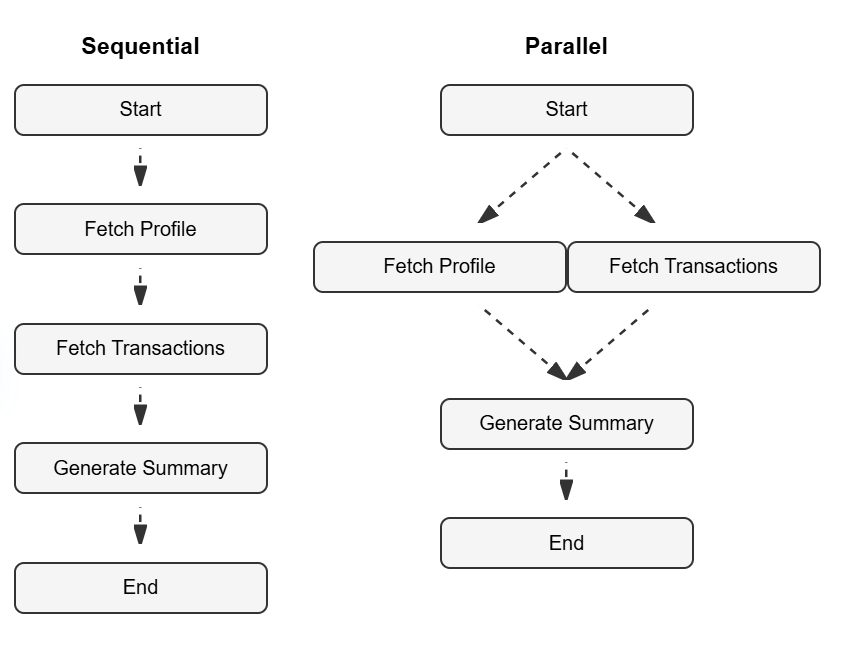
Sequential vs Parallel Workflows
How We Traditionally Handle This
In a typical system, this is where things start getting messy.
You would:
- Create threads or async tasks
- Start both functions in parallel
- Wait for both to complete
- Synchronize their outputs
- Pass the combined result to the next step
This means dealing with:
- Threading or async/await
- Task coordination
- Synchronization logic (waiting, joining, etc.)
The core business logic becomes secondary. Most of the effort goes into managing execution.
A Different Approach for Gen AI Workflows
In modern AI applications, especially when building pipelines, we don’t want to think in terms of threads or async flows.
We want to think in terms of:
- What depends on what
- What can run independently
- When results should come together
This is exactly where LangGraph fits in.
Understanding Nodes and Edges
Before looking at the implementation, it helps to understand how LangGraph models a workflow.
A graph is made up of two simple concepts:
- Nodes represent individual steps in your workflow
- Edges define how those steps are connected
In this example:
- Each function like
fetch_profile,fetch_transactions, andgenerate_summaryis a node - The connections between them define the execution flow
For instance:
- An edge from
STARTto two nodes means both can begin independently - Multiple edges pointing to a single node indicate that it depends on all of them
This structure allows you to express:
- Which tasks can run independently
- Which tasks must wait for others
Once these relationships are defined, the execution naturally follows the graph.
Modeling the Same Flow in LangGraph
Let’s take the same scenario:
- Fetch user profile
- Fetch recent transactions
- Generate a personalized summary
Here’s how it looks:
from langgraph.graph import StateGraph, START, END

class State(dict):
    pass

def fetch_profile(state):
    print("Fetching user profile")
    state["profile"] = {"name": "John"}
    return state

def fetch_transactions(state):
    print("Fetching transactions")
    state["transactions"] = ["order1", "order2"]
    return state

def generate_summary(state):
    print("Generating summary")
    return state

builder = StateGraph(State)

builder.add_node("profile", fetch_profile)
builder.add_node("transactions", fetch_transactions)
builder.add_node("summary", generate_summary)

# Parallel branches
builder.add_edge(START, ["profile", "transactions"])

# Merge results
builder.add_edge("profile", "summary")
builder.add_edge("transactions", "summary")

builder.add_edge("summary", END)

graph = builder.compile()
What’s Happening Here
This graph expresses the workflow in a very natural way:
- The process starts
- Two independent tasks branch out
- Their results converge into a final step
That’s it.
There is no explicit threading. No async/await. No manual synchronization.
How Execution Actually Works
LangGraph looks at the structure of your graph and determines execution from it.
- Nodes that don’t depend on each other can run concurrently
- Nodes with multiple incoming edges wait until all dependencies are complete
In this case:
profileandtransactionscan run at the same timesummaryruns only after both are finished
You are not writing parallel code directly. You are defining dependencies, and the system handles execution accordingly.
Why This Feels Different
The biggest shift is this:
You stop thinking about execution mechanics and start thinking about data flow
Instead of asking:
- How do I run these tasks in parallel?
- How do I synchronize them?
You ask:
- Which tasks are independent?
- Which task needs all the results?
Once that is clear, the graph naturally represents it.
A Small but Important Detail
When multiple nodes run independently, they should update different parts of the state.
For example:
- One node writes to
"profile" - Another writes to
"transactions"
This avoids conflicts and keeps the workflow predictable.
The Bigger Picture
Parallel execution has always been possible.
What changes with LangGraph is how simple it becomes to express.
You don’t manage concurrency. You design relationships.
And from those relationships, parallel execution and coordination emerge automatically.
Final Thought
In many AI pipelines, performance issues are not caused by slow models but by how workflows are structured.
When independent steps are forced to run sequentially, latency increases unnecessarily.
By modeling workflows as graphs and clearly defining dependencies, you unlock parallelism without adding complexity.
That’s the real advantage.
메타데이터
- post_id
- 941f55b729b1
- slug
- parallel-workflows-in-langgraph-941f55b729b1
- url
- https://medium.com/@joevishahmergil/parallel-workflows-in-langgraph-941f55b729b1
- canonical_url
- https://medium.com/@joevishahmergil/parallel-workflows-in-langgraph-941f55b729b1
- author_url
- https://medium.com/@joevishahmergil
- status
- ok
- fetched_at
- 2026-08-19 18:20:52



