Inside SQLite: What is Database Paging
If you have ever used SQLite, it can sometimes feel like a black box. You write a SQL query, hit enter, and the data is saved to a single…
Inside SQLite: What is Database Paging
If you have ever used SQLite, it can sometimes feel like a black box. You write a SQL query, hit enter, and the data is saved to a single file on your computer. But what is actually happening under the hood?
We can peek inside this black box using a simple command-line tool: “.dbinfo()”
If you run .dbinfo() on a SQLite database, it gives out a list of technical details about how the file is structured. But the very first (and most important) thing it usually tells you is this:
database page size : 4096
What does that mean? What exactly is a “database page”?
The Hardware Constraint: To understand database paging, we have to look at a fundamental limitation of computer hardware. Physical hard drives cannot read or write a single byte of data.
If you want to update a single character in your database from an ‘A’ to a ‘B’, the disk drive cannot just overwrite that one letter. Solid State Drives (SSDs) and Hard Disk Drives (HDDs) can only read and write data in fixed-size chunks called sectors. This is why I will use the term chunks often in this article. Think of it like a block of data’s that are divided evenly. Another important concept to keep in mind is that, Page size = Frame size. The term “Page” is correlated with databases and Virtual memory & the term “Frame” is correlated with actual Physical RAM.
Onto the Topic:
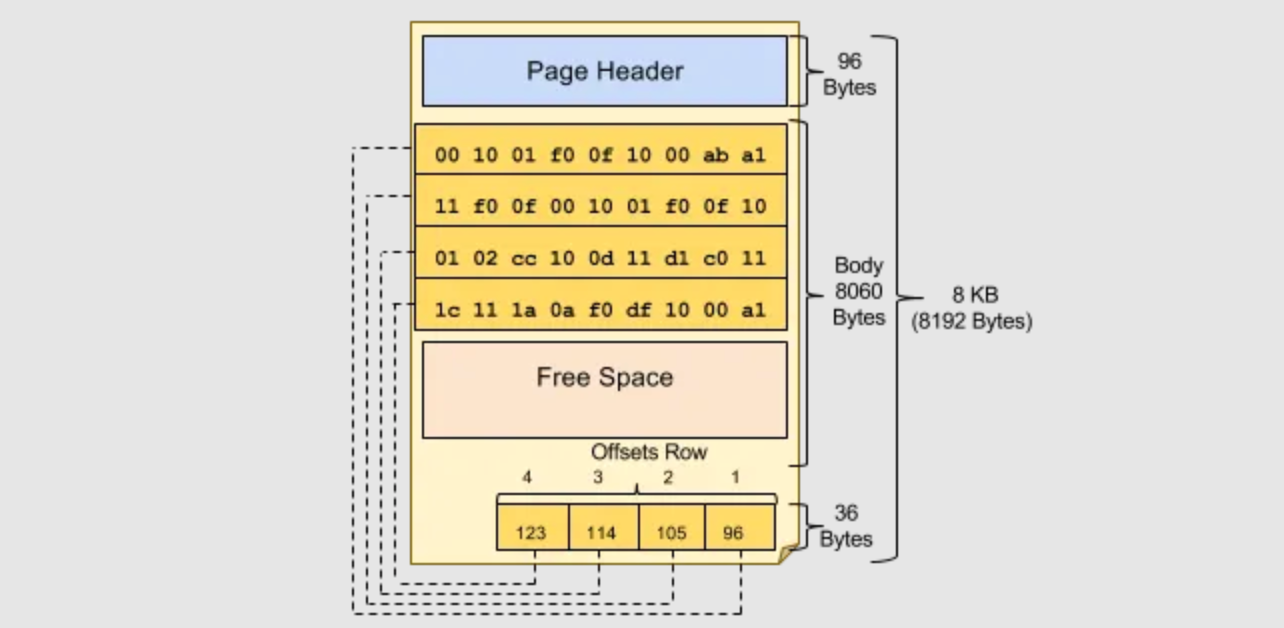
1. The Definition of a Page (The Physical State) To bridge the gap between your high-level SQL queries and the physical reality of hardware, SQLite uses pages.
A single SQLite database (.db) file is just an array of fixed-size chunks of data stacked back-to-back. These chunks are the Database Pages. Everything — your tables, indexes, and schema definitions is packed into these pages. To match the hardware efficiently, SQLite usually makes these pages 4096 bytes large.
2. The Page Cache / Buffer Pool (The Memory State) Reading directly from a physical disk is incredibly slow. To speed things up, the database engine uses a dedicated chunk of RAM called the Page Cache. (Note: If you are coming from traditional databases like PostgreSQL, this exact same concept is known as the Buffer Pool).
You can think of the Page Cache as a temporary staging area in your fast, volatile RAM. It holds copies of the database pages that the engine is currently working on.
3. The Read Operation (Cache Hits and Cache Misses) So, how does data transfer between the physical file and the Page Cache? Let’s say you run a query like *Select from Users**.

- The Request: SQLite calculates exactly which database page contains the user data.
- Cache Hit: It checks the Page Cache in RAM first. If a copy of that page is already sitting there, it reads the data instantly. This is a Cache Hit.
- Cache Miss: If the page is not in RAM, SQLite is forced to go to the hard drive, find the specific page inside the .db file, copy that entire 4096-byte chunk, and load it into the Page Cache before it can read your data. This is a Cache Miss.
4. The Anatomy of an Update Operation Finally, what happens when you run an update query? Because of database paging, you aren't just modifying a single row or a byte of data rather you are modifying an entire page in a specific flow:
- SQLite does not write directly to the hard drive. Instead, it finds the required page in the Page Cache (triggering a Cache Miss to load it from disk if necessary).
- It modifies the data directly inside the RAM. That specific page is now marked as “dirty” — meaning the one sitting in the RAM is now newer than the one stored on the hard drive.
- Eventually, SQLite flushes that dirty page from the Application RAM to the Operating System. The OS then syncs that updated block of data down to the physical disk hardware.
By grouping data into fixed-size pages and managing them, SQLite bridges the gap between SQL commands and the limitations of physical hardware.
The next time you run a simple Update or an insert statement, you won't just see a black box. You will know exactly how many layers that data had to travel through—from a Cache Miss, to a dirty page in RAM, all the way to the physical sectors of your hard drive. Understanding these internals is exactly what separates developers who just use databases from engineers who understand them.
References:
1 — https://15445.courses.cs.cmu.edu/fall2025/notes/04-bufferpool.pdf
2 — https://medium.com/databases-in-simple-words/breaking-down-the-anatomy-of-a-database-page-90e751d018fe
메타데이터
- post_id
- b369593ada79
- slug
- inside-sqlite-what-is-database-paging-b369593ada79
- url
- https://medium.com/@adityarockstar183/inside-sqlite-what-is-database-paging-b369593ada79
- canonical_url
- https://medium.com/@adityarockstar183/inside-sqlite-what-is-database-paging-b369593ada79
- author_url
- https://medium.com/@adityarockstar183
- status
- ok
- fetched_at
- 2026-07-13 06:23:13