I Created /dev/mybuf... But How Did Linux Know Which Function to Call?
Part 3B-1 of my Linux Device Driver Journey on Raspberry Pi 5
I Created /dev/mybuf... But How Did Linux Know Which Function to Call?
Part 3B-1 of my Linux Device Driver Journey on Raspberry Pi 5
“Creating a device file was exciting. But the real magic happens when someone opens that file. How does Linux know which function inside our driver should run?”
At the end of the previous article, something amazing happened.
Our driver registered itself with the Linux kernel.
Linux even created a new device for us.
/dev/mybufFor the first time in this series, we had something that looked like a real Linux device.
But then I started wondering.
Suppose someone types
cat /dev/mybufHow does Linux know that it should call my code?
Or what happens when someone writes
echo "hello" > /dev/mybufSomewhere inside the kernel, Linux must decide
“This device belongs to Arun’s driver.”
Then it must call exactly the right function.
But how?
That’s exactly what we’ll learn in this article.
Every Device Driver Needs a Reception Desk
Imagine walking into a large hospital.
You don’t immediately meet the doctor.
First, you visit the reception desk.
The receptionist asks,
“Why are you here?”
Depending on your answer, they send you to the right department.
Linux works in almost the same way.
Whenever a program interacts with a device,
Linux first checks a table that tells it
- what to do when someone opens the device,
- what to do when someone reads from it,
- what to do when someone writes to it,
- what to do when someone closes it.
That table is called
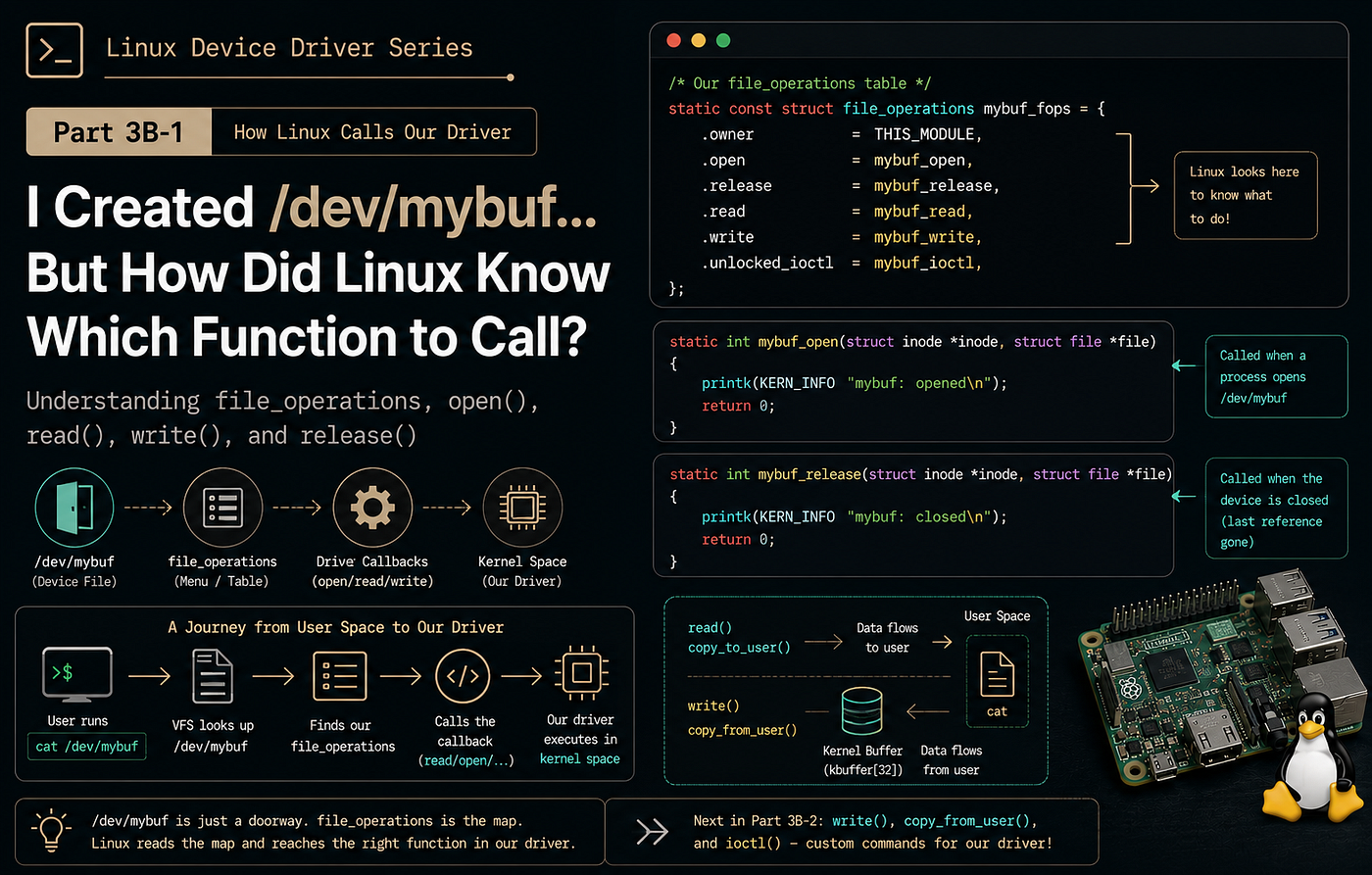
struct file_operationsIt is one of the most important structures in the Linux kernel.
Meet struct file_operations
Inside our driver we wrote
static const struct file_operations mybuf_fops = {
    .owner          = THIS_MODULE,
    .open           = mybuf_open,
    .release        = mybuf_release,
    .read           = mybuf_read,
    .write          = mybuf_write,
    .unlocked_ioctl = mybuf_ioctl,
};
At first glance, this looks like a simple structure.
But it completely changes how Linux communicates with our driver.
Think of it as a menu.
                Linux Kernel
                    |
Someone opens /dev/mybuf │ ▼ struct file_operations open() read() write() close() ioctl() │ ▼ Functions in our driverInstead of guessing what to do,
Linux simply looks inside this structure.
The Owner Field
The first member is
.owner = THIS_MODULEThis tells Linux,
“These functions belong to this kernel module.”
Why is that important?
Imagine a program opens our driver.
While it is still using the driver,
someone executes
sudo rmmod mybufIf Linux removed the module immediately,
the application would suddenly be executing code that no longer exists.
That would almost certainly crash the kernel.
Instead,
THIS_MODULE
tells Linux to keep our module alive while somebody is still using it.
It’s a simple line,
but it protects the kernel from a very dangerous situation.
What Happens When Someone Opens the Device?
Next,
.open = mybuf_openWhenever a program opens
/dev/mybufLinux immediately calls
mybuf_open()Our implementation is very small.
static int mybuf_open(struct inode *inode,
                      struct file *file)
{
    printk(KERN_INFO "mybuf: opened\n");
    return 0;
}
For now,
we simply print a message.
Later,
real drivers may
- initialize hardware,
- allocate memory,
- enable interrupts,
- verify permissions,
- or prepare communication.
Our driver keeps things simple.
What Are These Two Parameters?
The function receives
struct inode *inodeand
struct file *fileDon’t worry about their internals yet.
Just remember their roles.
The inode describes the device itself.
The file represents this particular open instance.
Imagine two terminal windows.
Both execute
cat /dev/mybufEach terminal gets its own
struct filebecause each one represents a different open session.
The device stays the same.
The users are different.
Returning Zero
Our function ends with
return 0;This tells Linux
“Everything went well.”
If something had gone wrong,
we could return an error instead.
For example,
return -EBUSY;might tell Linux
that the device is already in use.
Returning negative error codes is very common in kernel programming.
Closing the Device
Eventually,
every open operation must end.
That’s where
.release = mybuf_releasecomes in.
When the last user closes the device,
Linux calls
mybuf_release()Our implementation is
static int mybuf_release(struct inode *inode,
                         struct file *file)
{
    printk(KERN_INFO "mybuf: closed\n");
    return 0;
}
Again,
we simply log a message.
Real drivers often
- stop hardware,
- free resources,
- disable interrupts,
- or save state.
Reading From the Device
Now we reach one of the most important callbacks.
.read = mybuf_readWhenever somebody executes
cat /dev/mybufLinux calls
mybuf_read()Notice something interesting.
The user never calls this function directly.
They only execute
catLinux does the rest.
Usercat /dev/mybuf │ ▼Linux Kernel │ ▼mybuf_read() │ ▼Return bytes │ ▼cat prints themThat invisible journey is what makes Linux device drivers so elegant.
Understanding the Read Function
Our read callback begins like this.
static ssize_t mybuf_read(
        struct file *file,
        char __user *buf,
        size_t len,
        loff_t *offset)
There are four parameters.
Let’s understand them one by one.
file
This represents the currently opened device.
Linux passes it automatically.
buf
This is the user’s buffer.
The data we read must eventually be copied here.
Remember,
this memory belongs to user space.
We cannot write to it directly.
len
This tells us
how many bytes the application requested.
Suppose the application asks for
100 bytesbut our buffer contains only
11 bytesWe should return only those eleven bytes.
Not more.
offset
This one confuses many beginners.
Imagine a normal text file.
Hello WorldAfter reading it once,
the file position reaches the end.
Reading again immediately returns
EOFLinux expects device drivers to behave in a similar way.
That’s why our driver checks
if (*offset > 0)
    return 0;
Returning
0means
“There is nothing more to read.”
Without this check,
commands like
cat /dev/mybufwould never stop.
How Many Bytes Should We Copy?
Next,
our driver calculates
bytes_to_copy =
    (len < data_len) ? len : data_len;
This simply chooses
the smaller value.
Imagine
User requested 100 bytesDriver has 11 bytesThe driver copies only
11 bytesNow imagine
User requested 5 bytesDriver has 11 bytesThe driver copies
5 bytesThis prevents reading beyond the available data.
Crossing the Boundary Between Worlds
Finally,
we reach
copy_to_user()This is one of the most frequently used APIs in Linux drivers.
Remember,
our buffer lives inside the kernel.
The application lives in user space.
These two memory regions are isolated.
+----------------------+
|      User Space      |
|                      |
|        cat           |
+----------------------+

          ▲
   copy_to_user()
          ▼
+----------------------+
|     Kernel Space     |
|                      |
|      kbuffer[]       |
+----------------------+
Instead of exposing kernel memory directly,
Linux safely copies the requested bytes into the user’s buffer.
That’s exactly what
copy_to_user()does.
Updating the Offset
After copying,
our driver executes
*offset += bytes_to_copy;Now Linux knows
how much of the file has already been read.
The next read request reaches
EOFinstead of returning the same data forever.
It is a tiny line of code,
but without it,
our driver would behave incorrectly.
Looking Ahead
So far,
we’ve learned how Linux enters our driver.
We now understand
struct file_operationsTHIS_MODULEopen()release()read()copy_to_user()- file offsets
- EOF handling
But one big question remains.
Reading data is useful.
How does data travel in the opposite direction?
How does
echo "hello world" > /dev/mybufend up inside our kernel buffer?
In the next article,
we’ll follow that journey through write(), copy_from_user(), and finally explore how ioctl() lets us send custom commands to our driver.
메타데이터
- post_id
- c6663e55501f
- slug
- i-created-dev-mybuf-but-how-did-linux-know-which-function-to-call-c6663e55501f
- url
- https://medium.com/@aruncse2k20/i-created-dev-mybuf-but-how-did-linux-know-which-function-to-call-c6663e55501f
- canonical_url
- https://medium.com/@aruncse2k20/i-created-dev-mybuf-but-how-did-linux-know-which-function-to-call-c6663e55501f
- author_url
- https://medium.com/@aruncse2k20
- status
- ok
- fetched_at
- 2026-08-15 19:48:24