Top 6 Docker Alternatives, and the One Thing None of Them Fix
I migrated to Podman for the security. Then I read the runc advisory properly.
Top 6 Docker Alternatives, and the One Thing None of Them Fix
I migrated to Podman for the security. Then I read the runc advisory properly.
On November 5, 2025, the runc advisory landed: CVE-2025–31133, CVE-2025–52565, and CVE-2025–52881. Three container escapes, all ending the same way — an attacker gets a read-write path into the host’s /proc.
My first reaction was smug. We had moved off Docker eighteen months earlier. Podman on every build host, rootless where we could manage it, no root-owned daemon socket sitting there like an unlocked door.
Then I read the advisory properly. The runc maintainers noted that crun and youki likely had similar issues and would ship coordinated fixes. Podman shells out to crun on our Fedora hosts. I had replaced the layer above the vulnerability and quietly told myself I had fixed the layer below it.
We patched every host that week, same as the Docker shops.
Why everyone is shopping for a replacement anyway
The migration wave is real, and the reason is boring: money.
Docker Desktop is free for personal use, education, non-commercial open source, and companies with fewer than 250 employees and under $10M in annual revenue. Cross either threshold and every developer needs a seat.
As of August 2026, Docker’s published pricing is Pro at $9/user/month billed annually ($11 monthly), Team at $15 ($16 monthly), and Business at $24. For a 60-engineer org on Business, that’s a little over $17,000 a year, forever, for a local dev tool.
One thing that gets muddled constantly: this is a Docker Desktop licensing question, not a Docker question. Docker Engine on Linux is still Apache 2.0. If your CI runners are Linux, they were never the thing you were paying for.
The stack you’re actually replacing
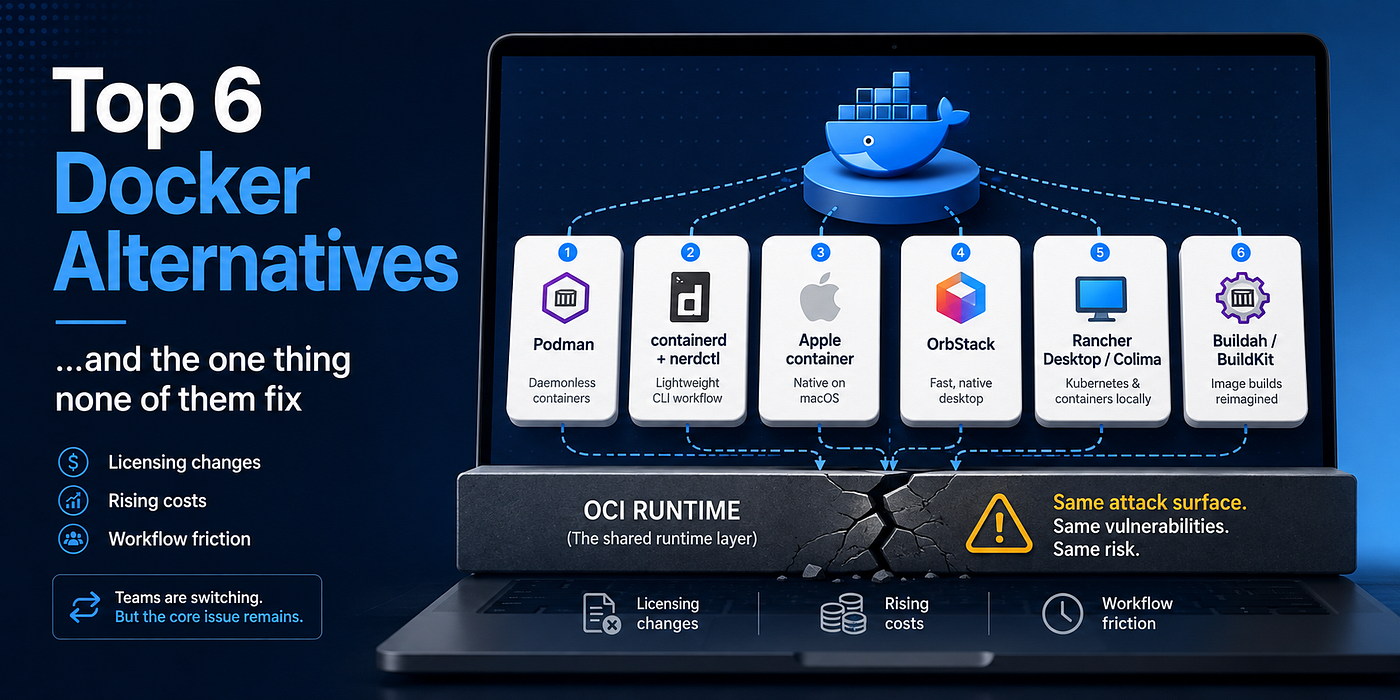
“Replace Docker” hides how many things Docker is. Roughly, top to bottom: the docker CLI, Compose, BuildKit, the dockerd daemon, containerd, and an OCI runtime — runc or crun.
Nearly every alternative on this list swaps the top four and keeps the bottom two. That’s the sentence I wish someone had put in front of me in 2024.
Docker itself is converging on the same substrate. Docker Engine v29 made the containerd image store the default for new installations and deprecated the legacy graph drivers outright.
Here’s what I run now before anyone tells me a migration changed our security posture:
#!/usr/bin/env bash
# runtime-audit.sh — what is actually executing your containers?
# Written for bash 5.x. Checked against Docker Engine 29.6.2, Podman 6.0.2,
# nerdctl 2.3.0 on Ubuntu 24.04.
set -uo pipefail

row() { printf '%-10s %-14s %s\n' "$1" "$2" "$3"; }

row TOOL VERSION "LOW-LEVEL RUNTIME"
printf '%.0s-' {1..50}; echo

if command -v docker >/dev/null 2>&1; then
  row docker \
    "$(docker version --format '{{.Server.Version}}' 2>/dev/null || echo unavailable)" \
    "$(docker info --format '{{.DefaultRuntime}}' 2>/dev/null || echo unavailable)"
fi

if command -v podman >/dev/null 2>&1; then
  row podman \
    "$(podman version --format '{{.Client.Version}}' 2>/dev/null || echo unavailable)" \
    "$(podman info --format '{{.Host.OCIRuntime.Name}}' 2>/dev/null || echo unavailable)"
fi

if command -v nerdctl >/dev/null 2>&1; then
  row nerdctl \
    "$(nerdctl version --format '{{.Client.Version}}' 2>/dev/null || echo unavailable)" \
    "set in /etc/containerd/config.toml"
fi

echo
echo "Runtime binaries present on this host:"
for rt in runc crun youki; do
  if command -v "$rt" >/dev/null 2>&1; then
    printf '  %-6s %s\n' "$rt" "$("$rt" --version 2>/dev/null | head -n1)"
  fi
done
On a containerd host, one config line settles the argument. From the official CRI config guide, containerd 2.x:
version = 3

[plugins."io.containerd.cri.v1.runtime".containerd]
  default_runtime_name = "crun"

[plugins."io.containerd.cri.v1.runtime".containerd.runtimes.crun]
  runtime_type = "io.containerd.runc.v2"

[plugins."io.containerd.cri.v1.runtime".containerd.runtimes.crun.options]
  BinaryName = "/usr/local/bin/crun"
BinaryName is the thing that runs your container. Everything above it is ergonomics, packaging, and licensing.
1. Podman
The default answer for teams leaving Docker Desktop on licensing grounds. Podman 6.0 shipped June 24, 2026.
Pros: No long-running root daemon. Rootless is the normal path, not a tuning exercise. Quadlet turns containers into real systemd units, which matters more than it sounds if you already manage systemd. Podman exposes a Docker-compatible API socket, so docker compose works unmodified:
# Podman 6.x, rootless, on a systemd host.
systemctl --user enable --now podman.socket
export DOCKER_HOST="unix://${XDG_RUNTIME_DIR}/podman/podman.sock"
loginctl enable-linger "$USER"   # socket survives logout
docker compose up -d
Cons: Podman 6 is a demolition release. CNI, iptables, slirp4netns, cgroups v1, BoltDB, Intel Macs, and Windows 10 are all gone. The nastiest one: Podman silently ignores leftover CNI config rather than erroring, so containers start healthy and have no network. The compat layer also targets the Docker v1.40 API, so exotic Compose features can drift.
Pick it if you’re on Linux with cgroups v2 and systemd. Skip it if you’re still on CNI or cgroups v1 — stay on the 5.x line until you’ve migrated.
2. containerd + nerdctl
The honest option: run what production already runs. nerdctl 2.3.0 landed in May 2026.
Pros: containerd is what EKS, GKE, and AKS execute. nerdctl is close enough to the Docker CLI that muscle memory survives, and it supports Compose, rootless mode, and lazy-pulling snapshotters.
Cons: No batteries. You assemble CNI, BuildKit, and snapshotter config yourself. And containerd carries its own CVE surface — in June 2026, five CRI plugin vulnerabilities were patched in 1.7.33, 2.0.10, 2.1.9, 2.2.5, and 2.3.2, including one scored 8.3 where an image LABEL could trigger host command execution.
Pick it if you want dev to match prod. Skip it if nobody on the team wants to own the plumbing.
3. Apple container
The genuinely new entry. Version 1.0.0 shipped June 9, 2026, a year after the WWDC 2025 preview, under Apache 2.0.
Pros: Every container gets its own lightweight VM via Virtualization.framework — no shared kernel between workloads. For a security engineer, that isolation boundary is qualitatively better than namespaces. It’s OCI-compatible both ways, and there’s no idling daemon. The 1.0 release added container machine for persistent Linux environments.
Cons: Apple silicon and macOS 26 only. That’s not a caveat, it’s a wall. The ecosystem is a year old, and Linux CI still needs something else.
Pick it if your team is uniformly on current Macs and you want isolation, not just a Docker clone. Skip it if anyone runs Windows or Linux locally.
4. OrbStack
The pragmatic Mac choice, and the one people get quietly annoyed about.
Pros: It runs real Docker Engine and Compose, so nothing in your workflow changes. Startup and file-sharing performance on Apple silicon were noticeably better than Docker Desktop in my own use — I’m not going to quote numbers I didn’t benchmark properly, but the difference was obvious enough that nobody asked to switch back.
Cons: You traded one license for another. OrbStack is free only for personal, non-commercial use — its terms also cap that at $10,000/year of related earnings — and commercial use is $8/user/month. It’s macOS-only and closed source.
Pick it if you’re a Mac shop optimizing developer experience and $8 is cheaper than $24. Skip it if “must be open source” is a real constraint.
5. Rancher Desktop and Colima
The free middle ground. Rancher Desktop 1.23.1 arrived in July 2026; Colima 0.10.0 in February 2026.
Pros: Both are open source and free for commercial use. Rancher Desktop bundles k3s, so you get a real single-node cluster without a second tool, and it lets you switch between containerd and dockerd. Colima is a thin, scriptable CLI over Lima.
Cons: They’re wrappers. When something breaks, the bug is usually in Lima, containerd, or the VM layer, and you debug down the stack. Rancher Desktop is Electron and feels it; Colima has no GUI and expects you to be comfortable with a config file.
Pick it if you want zero licensing exposure and can absorb some rough edges. Skip it if your team needs a supported product with someone to call.
6. Buildah and BuildKit — for CI, not the desktop
Half the time “we need a Docker alternative” really means “we can’t run privileged Docker-in-Docker on our Kubernetes runners.”
Pros: Both build OCI images without a privileged daemon. Buildah composes well with Podman and does rootless builds. BuildKit is the same engine docker buildx already uses, so cache semantics and multi-platform builds carry over.
Cons: Take the maintenance lesson seriously. Google archived Kaniko on June 3, 2025, stranding a tool that was load-bearing in a lot of regulated-industry pipelines until Chainguard forked it. Picking an unmaintained builder is a slow-motion CVE incident.
Pick it if your pain is privileged builds in CI, not the desktop. Skip it if you just need docker build on a laptop — this solves a different problem.
When this advice does not apply
If you’re under 250 employees and $10M revenue, Docker Desktop is free and this whole migration is a sprint you don’t need. Spend it on something else.
If your team is mixed Mac/Windows/Linux, cross off OrbStack and Apple container immediately. Standardizing beats optimizing.
If you lean hard on Testcontainers or unusual Compose features, budget real time for compatibility testing. The API compat layers are good, not perfect, and I’ve watched a team lose two weeks to a Compose edge case to save $9 a head.
And if your driver is security: switching runtimes barely moves the needle. Docker Desktop shipped its own critical container escape — CVE-2025–9074, CVSS 9.3, patched in 4.44.3 in August 2025 — but so did runc, so did crun, so did containerd. Rootless mode and a VM boundary are real improvements. A different CLI is not.
Takeaways
- Audit before you migrate. Run
docker info --format '{{.DefaultRuntime}}'andpodman info --format '{{.Host.OCIRuntime.Name}}'. If both say a runc-family binary, a migration changes your licensing, not your blast radius. - Licensing and security are separate decisions. Docker Desktop’s price is a procurement problem with a clean answer. Container escapes are an architecture problem that a CLI swap doesn’t touch.
- Podman is the safe default on Linux, but treat 6.0 as a breaking upgrade and check for CNI config before you roll it out.
- containerd + nerdctl gets dev closest to prod, at the cost of owning the plumbing yourself.
- Real isolation gains come from changing the boundary, not the tool — rootless mode, user namespaces, or a VM per container, as Apple’s
containerdoes. - Check the maintenance status of anything in your build path. Kaniko was fine right up until it wasn’t.
I write weekly about DevOps, backend engineering, and security — follow for the next one.
If this article saved you some debugging or build time, you can support my work on Buy Me a Coffee.
메타데이터
- post_id
- c6f5b8b575e1
- slug
- top-6-docker-alternatives-and-the-one-thing-none-of-them-fix-c6f5b8b575e1
- url
- https://blog.devops.dev/top-6-docker-alternatives-and-the-one-thing-none-of-them-fix-c6f5b8b575e1
- canonical_url
- https://blog.devops.dev/top-6-docker-alternatives-and-the-one-thing-none-of-them-fix-c6f5b8b575e1
- author_url
- https://medium.com/@danielvalev
- status
- ok
- fetched_at
- 2026-08-21 21:47:42







