Py for Network Engineers: Day 2 String
String overview
Py for Network Engineers: Day 2 String
String overview
Strings are ordered immutable sequence of caracteres linke “Rafael”.
In [1]: name = 'Rafael'
In [2]: name[0]
Out[2]: 'R'
In [3]: list(bytes(name, "utf-8"))
Out[3]: [82, 97, 102, 97, 101, 108]
In [4]: chr(82)
Out[4]: 'R'
In [5]: chr(97)
Out[5]: 'a'
The string ‘Rafael’ has a conjunction of five characters on each position as shown above. Among many tables for characters those most famous are ASCII (128 positions) and UTF8 (120 mil characters).
Docstring allows us put notes, comments spread over many lines:
"""
Doctstring

multiline

comments.
"""
"""Demo of pushing configurations"""
commands = "router ospf 1\n router-id 1.1.1.1\n networ 192.168.1.0 0.0.0.255 area 0\n"
print(commands)router ospf 1
router-id 1.1.1.1
networ 192.168.1.0 0.0.0.255 area 0Converting string
Someting converts strings into intergers and vice verse is useful.
In [1]: my_number = "4"
In [2]: type(my_number)
Out[2]: str
In [3]: 3 * my_number
Out[3]: '444'
In [4]: my_new_number = 4
In [5]: type(my_new_number)
Out[5]: int
In [6]: 3 * my_new_number
Out[6]: 12
In [7]: version = '15'
In [8]: string_new_number = str(my_new_number)
In [9]: type(string_new_number)
Out[9]: str
In [10]: print(string_new_number)
4
In [11]: float_number = float(my_new_number)
In [12]: print(float_number)
4.0
In [13]: type(float_number)
Out[13]: float
#! /usr/bin/env python3
version = "15"
interger_version = int(version)
if interger_version > 12:
print("VERSION CHECK PASSED")
else:
print("VERSION CHECK FAILED.")❯ python3 version_test.py
VERSION CHECK PASSEDInput function
Input function as a way to dynamically accept user’s input and by default inputs are strings.
#!/usr/bin/env python3

show_command = input("Enter the show command you wish to execute: ")
print(show_command)
❯ python3 input_check.py
Enter the show command you wish to execute: sh interface b
sh interface bConcatenation
keep in mind that concatenation must only work between strings
In [1]: greeting = "Hello my name is Rafael and my age is "
In [2]: age = 18
In [3]: type(greeting)
Out[3]: str
In [4]: type(age)
Out[4]: int

In [5]: print(greeting + age)
 - - - - - - - - - - - - - - - - - - - - - - - - - - - - - - - - - - - - - -
TypeError Traceback (most recent call last)
Cell In[5], line 1
 - → 1 print(greeting + age)
TypeError: can only concatenate str (not "int") to str

In [6]: print(greeting + str(age))
Hello my name is Rafael and my age is 18
#!/usr/bin/env python3
command_string = input("Enter the command you wish to send to the device: ")
commands_to_send = "enable\n" + command_string + "\n"
print(commands_to_send)❯ python3 concat_example.py
Enter the command you wish to send to the device: show vrf MGMT ip route
enable
show vrf MGMT ip routeFormatting strings
“Old” Style — Place holder
#!/usr/bin/env python3

name = input("What's your name? ")
age = input("what's your age? ")
massage1 = "Message 1: Hello {fname}, your age is {fage}".format(fname=name, fage=age)

print(massage1)

#Able to use index

message2 = "Message 2: Hello {}, your age is {}".format(name, age)
print(message3)

message3 = "Message 3: Hello {1}, your age is {0}".format(name, age)
print(message2)
❯ python3 format_example1.py
What's your name? CCIE
what's your age? 67796
Message 1: Hello CCIE, your age is 67796
Message 2: Hello CCIE, your age is 67796
Message 1: Hello 67796, your age is CCIE“new” Style — F-String
#!/usr/bin/env python3

device_name = "R1"
version_number = "15.8"

print(f"The device name is {device_name} and the version is {version_number}")
❯ python3 fstring_example.py
The device name is R1 and the version is 15.8String methods
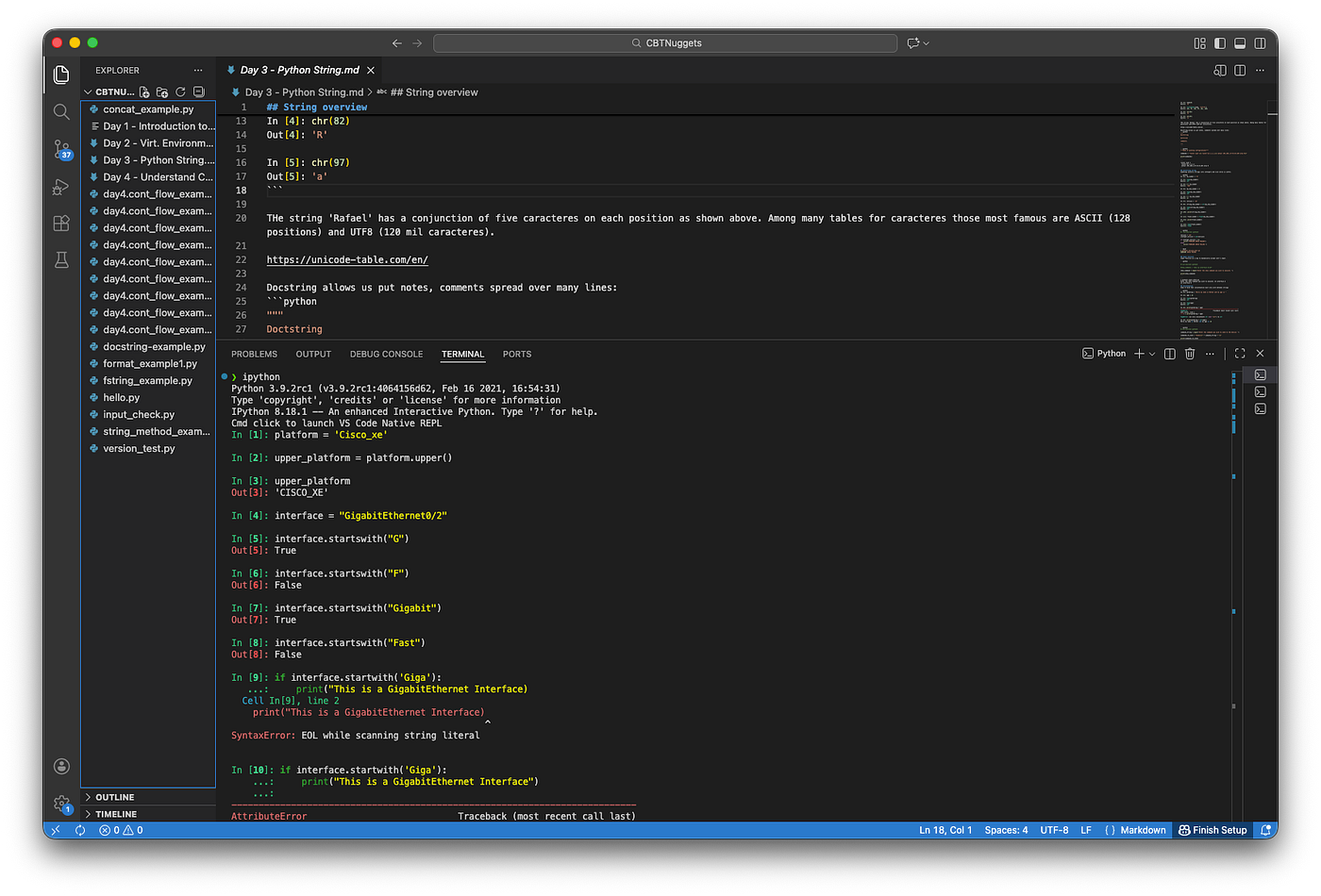
In [1]: platform = 'Cisco_xe'
In [2]: platform. #hit tab
capitalize() format() isidentifier() ljust() rfind() startswith()
casefold() format_map() islower() lower() rindex() strip()
center() index() isnumeric() lstrip() rjust() swapcase()
count() isalnum() isprintable() maketrans() rpartition() title()
encode() isalpha() isspace() partition() rsplit() translate()
endswith() isascii() istitle() removeprefix() rstrip() upper()
expandtabs() isdecimal() isupper() removesuffix() split() zfill()
find() isdigit() join() replace() splitlines()
In [2]: upper_platform = platform.upper()
In [3]: upper_platform
Out[3]: 'CISCO_XE'
In [13]: interface = "GigabitEthernet0/2"
In [14]: interface.startswith("Fast")
Out[14]: False
In [15]: interface.startswith("Gigabit")
Out[15]: True
In [16]: if interface.startswith('Giga'):
…: print("This is a GigabitEthernet Interface")
…:
This is a GigabitEthernet Interface#!/usr/bin/env python3
platform = input("What's your platform? ")
# show_command = input("what show command do you want to send? ").lower()
show_command = input("what show command do you want to send? ")
platform_to_test = platform.lower()
if platform_to_test == "cisco":
command_to_send = f"enable\n{show_command}\n"
print("-" * 30, "Sending commands")
print(command_to_send)❯ python3 string_method_example.py
What's your platform? Cisco
what show command do you want to send? show ip interface brief
- - - - - - - - - - - - - - - Sending commands
enable
show ip interface brief$WHOAMI

https://www.linkedin.com/in/rafaesil
What's Next
메타데이터
- post_id
- cd7b936e7d74
- slug
- py-for-network-engineers-day-2-string-cd7b936e7d74
- url
- https://medium.com/@rafaesil/py-for-network-engineers-day-2-string-cd7b936e7d74
- canonical_url
- https://medium.com/@rafaesil/py-for-network-engineers-day-2-string-cd7b936e7d74
- author_url
- https://medium.com/@rafaesil
- status
- ok
- fetched_at
- 2026-07-13 06:23:13