Reduce Image Size in Android |Kotlin
Image compression is a common requirement in Android development — especially if you’re uploading photos to a server, storing them locally…
Reduce Image Size in Android |Kotlin
Image compression is a common requirement in Android development — especially if you’re uploading photos to a server, storing them locally, or optimizing your app’s performance. Large images can slow down uploads, increase storage usage, and affect the overall user experience.
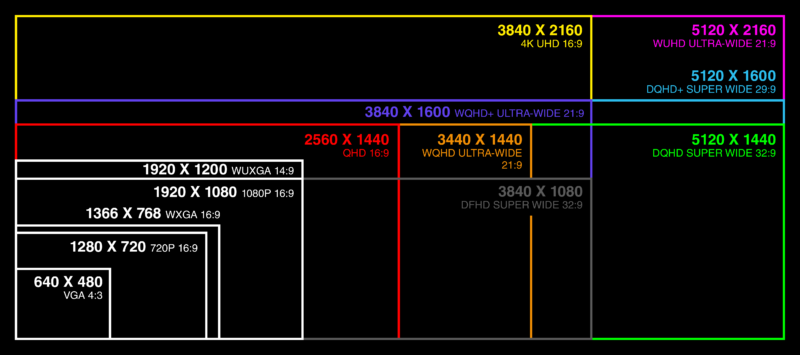
Image Resolutions
🔍 Why Do We Need Image Compression?
Modern mobile cameras click images that are 3MB to 10MB+, depending on resolution. Uploading such large files leads to:
- 🚫 Increased network usage
- 🐢 Slower uploads
- 💾 More storage consumption
- 📉 High memory usage on low-end devices
Compressing images before uploading/storing them solves all these issues.
I’ll show you the simplest way to reduce image size in Android using Kotlin, with the help of an open-source GitHub library: 👉 AndroidImageResizer
val MAX_SIZE = 1280 * 720 // resolution ratios
val resizedBitmapFile:Bitmap= ImageResizer.reduceBitmapSize(originalBitmapFile, MAX_SIZE)
🎯 Final Thoughts
Image compression is essential in any Android app that handles photos. With the AndroidImageResizer library, you can easily reduce large images with just a few lines of Kotlin code.
Let me know if you want:
- A code snippet for uploading the compressed file
- A comparison of image sizes before/after
- A custom cover image for your Medium blog
Happy coding! 🚀
Photo by Eden Constantino on Unsplash
메타데이터
- post_id
- cef473760db4
- slug
- reduce-image-size-in-android-kotlin-cef473760db4
- url
- https://medium.com/@jaya1999sankar/reduce-image-size-in-android-kotlin-cef473760db4
- canonical_url
- https://medium.com/@jaya1999sankar/reduce-image-size-in-android-kotlin-cef473760db4
- author_url
- https://medium.com/@jaya1999sankar
- status
- ok
- fetched_at
- 2026-07-14 10:29:40

