Visualizing the Stack Frame: How Buffer Overflows Actually Work
What is a stack?
Visualizing the Stack Frame: How Buffer Overflows Actually Work
What is a stack?
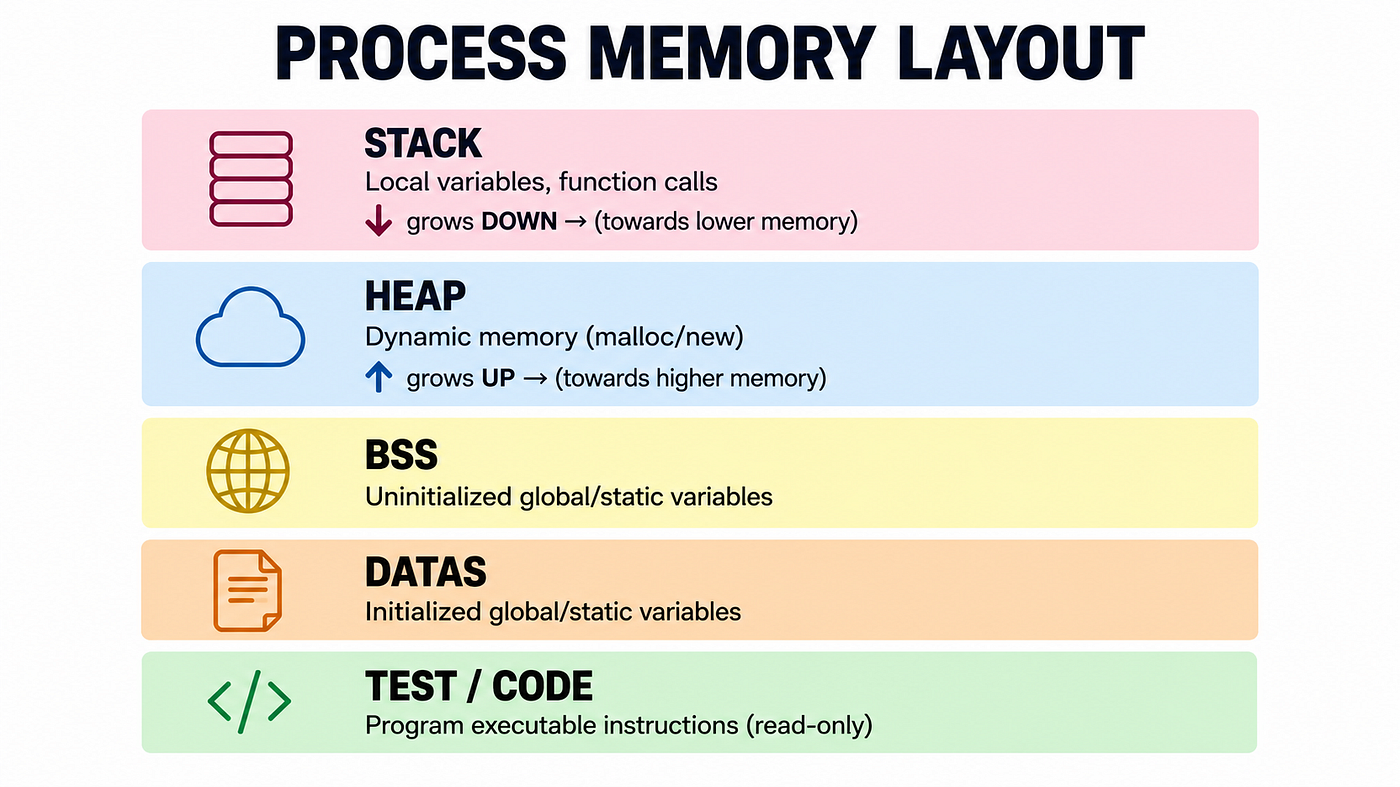
Every running process gets a region of memory called the stack. It’s used for:
- Local variables inside functions
- Function arguments (depending on calling convention)
- Return addresses — where execution should resume after a function finishes
- Saved register values
The stack works in LIFO order: the last thing placed on it is the first thing removed, and it grows downward—from high memory addresses toward low memory addresses.
Introducing the Stack Frame
Every time a function is called, the processor creates a stack frame. A stack frame is a dedicated portion of the stack that contains everything the function needs while it runs. You can think of it as the function’s temporary workspace.
Consider a simple example where function A() calls function B(). Before B() starts executing, the processor must save enough information to return to A() once B() finishes. It also needs to allocate space for B()'s local variables and temporary data. Creating a new stack frame allows both functions to maintain their own execution state without interfering with each other.
In a typical x86–64 program, a stack frame contains:
- Function arguments (depending on the calling convention)
- The return address
- The saved base pointer (
RBP), which marks the beginning of the current stack frame - Local variables, including buffers declared inside the function
- Saved registers, when necessary
Two CPU registers are responsible for managing the stack frame:
- RSP (Stack Pointer) always points to the top of the stack. Its value changes whenever data is pushed onto or popped from the stack.
- RBP (Base Pointer) provides a stable reference point for accessing local variables and function arguments through fixed offsets.
This layout is what makes classic stack buffer overflows possible. A local buffer is stored in the same stack frame as the function’s return address. If more data is written into the buffer than it can hold, the extra bytes continue into the surrounding memory. Eventually, they can overwrite the return address itself.
Now let’s see the problem in practice. For example, we have a C program, which looks like this:
void vulnerable(char *input) {
    char buffer[8];
    strcpy(buffer, input);
}

int main() {
    char user_input[100];
    gets(user_input);
    vulnerable(user_input);
    return 0;
}
At first glance, nothing looks particularly dangerous. main() reads input from the user and passes it to the vulnerable() function. Inside that function, a local buffer of 8 bytes is created, and the input is copied into it using strcpy().
So, what’s the problem?
The issue is that **strcpy() never checks how much space is available in the destination buffer**. It simply keeps copying bytes until it reaches the null terminator ('\0'). If the input is longer than 8 bytes, it doesn't stop—it continues writing beyond the end of buffer.
At this point, you might be wondering, “Where do those extra bytes go?”
Looking Under the Hood
Let’s see what happens when main() calls vulnerable() with a perfectly safe input: “HELLO”
vulnerable:
    push rbp
    mov  rbp, rsp
    sub  rsp, 16

    mov  rdx, rdi
    lea  rax, [rbp-8]
    mov  rsi, rdx
    mov  rdi, rax
    call strcpy

    leave
    ret
Here’s what each instruction does:
**push rbp** saves the caller's frame pointer.**mov rbp, rsp** establishes the base of the new stack frame.**sub rsp, 16** reserves 16 bytes on the stack for local variables.
Our buffer is located inside this reserved memory.
lea rax, [rbp-8] this loads the address of buffer into a register. The following instructions pass the function arguments, and finally:
call strcpy- copies the user’s input into buffer
Since our input is simply: HELLO, that means only six bytes are written
The leave instruction destroys the current stack frame and restores the previous one. The ret instruction then reads the saved return address from the stack and transfers execution back to main().
What Happens When the Buffer Isn’t Big Enough?
Now let’s try a different input:: AAAAAAAAAAAAAAAAAAAA
This time, the input contains 20 characters, but our buffer can only store 8.
strcpy() doesn't know that. It keeps copying until it reaches the null terminator, writing one byte after another. Once the first eight bytes fill the buffer, the remaining bytes continue into the rest of the stack frame.
Instead of stopping at the end of buffer, the function overwrites whatever comes next in memory.
Depending on the stack layout, that may include local variables, saved registers, the saved base pointer (RBP), and eventually the function's return address.

This is exactly what a stack buffer overflow looks like.
Why Overwriting the Return Address Matters
Under normal conditions, the stack contains a valid return address. When the function finishes, the ret instruction loads that address into the instruction pointer, and execution continues in main() exactly where it left off.
After a buffer overflow, that return address may no longer contain its original value.
In our example, the input consists entirely of the character 'A'. Since the ASCII value of 'A' is 0x41, the overwritten return address becomes: 0x4141414141414141
When ret executes, the processor does not verify whether this address is valid. It simply assumes the value on the stack is correct and attempts to continue execution there.
Of course, 0x4141414141414141 is not a valid executable address. The operating system detects the invalid jump and immediately terminates the process. On Linux, this usually results in a Segmentation Fault. On Windows, the program typically crashes with an Access Violation.
What Can an Attacker Do?
In our example, the program simply crashes because the return address becomes an invalid value (0x4141414141414141). However, a real attacker doesn't want the program to crash—they want to control where it goes next.
If an attacker can overwrite the return address with a carefully chosen value instead of random data, they may be able to redirect execution to code of their choosing. Depending on the vulnerability and the protections enabled on the system, this could allow an attacker to:
- Execute arbitrary code.
- Bypass the program’s normal logic.
- Gain unauthorized access to sensitive data.
- Escalate privileges.
- Crash the application, causing a denial-of-service.
Modern operating systems make these attacks much harder through multiple security mechanisms. Even so, the underlying issue remains the same: once a program writes past the end of a buffer, it can corrupt the data stored in the stack frame — including values that control the program’s execution.
Preventing Stack Buffer Overflows
Today, both programmers and modern systems include several layers of protection to prevent this type of vulnerability.
- Avoid Unsafe Functions
The simplest solution is to avoid functions that perform no bounds checking.
- Stack Canaries
Before returning from a function, the canary is checked. If it has been modified, the program immediately terminates instead of executing the corrupted return address. Modern compilers can place a random value, called a stack canary, between local variables and the return address.
3. Address Space Layout Randomization (ASLR)
ASLR randomly changes the locations of the program’s memory regions every time it starts. Even if an attacker manages to overwrite the return address, predicting where useful code resides becomes much more difficult.
메타데이터
- post_id
- d17ad406300f
- slug
- visualizing-the-stack-frame-how-buffer-overflows-actually-work-d17ad406300f
- url
- https://medium.com/@mirmdel/visualizing-the-stack-frame-how-buffer-overflows-actually-work-d17ad406300f
- canonical_url
- https://medium.com/@mirmdel/visualizing-the-stack-frame-how-buffer-overflows-actually-work-d17ad406300f
- author_url
- https://medium.com/@mirmdel
- status
- ok
- fetched_at
- 2026-07-22 05:46:05