How does your browser works and render pages
We use web browsers every day, whether for reading articles, checking emails, or streaming videos. But have you ever wondered what really…
How does your browser works and render pages
We use web browsers every day, whether for reading articles, checking emails, or streaming videos. But have you ever wondered what really happens behind the scenes when you type a web address and hit Enter? How does your browser fetch, interpret, and display a page so quickly?
Let’s break it down step by step.
1. Entering a URL and Making a Request
When you type a URL (e.g., https://example.com) into your browser:
- The browser first checks its cache to see if it has a saved copy of the site.
- If not, it uses the Domain Name System (DNS) to translate the human-friendly address (
example.com) into an IP address (like93.184.216.34). - The browser then establishes a connection to the server using HTTP/HTTPS protocols. With HTTPS, it also handles encryption and certificates to keep your data secure.
At this stage, the browser requests the HTML file that represents the page’s structure.
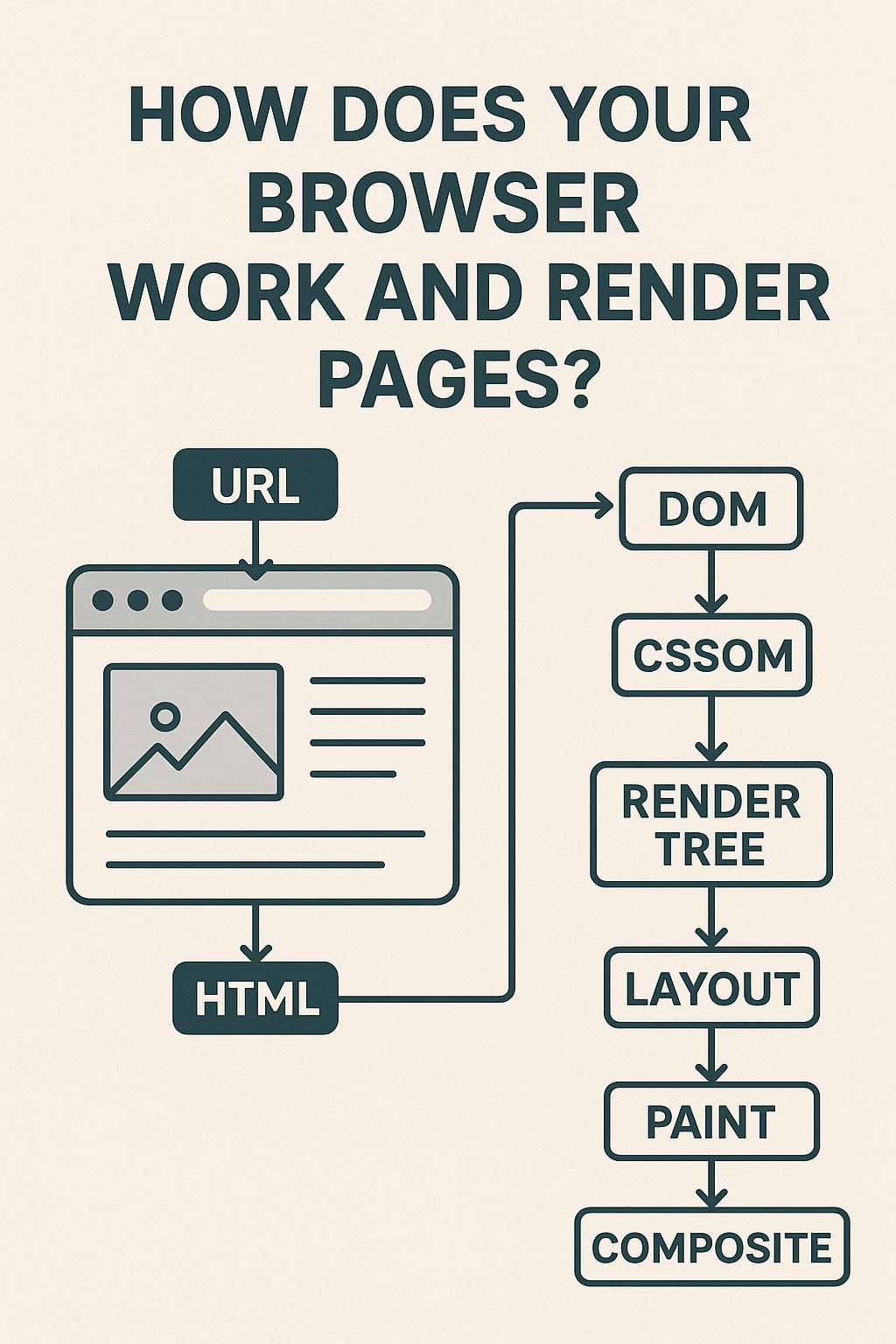
2. Parsing HTML and Building the DOM
Once the HTML file arrives, the browser doesn’t just display it raw. Instead:
- It parses the HTML line by line.
- From this, it builds a tree-like structure called the Document Object Model (DOM).
The DOM is essentially a structured map of all the elements on the page headings, paragraphs, images, links, etc.
3. Loading CSS and Constructing the CSSOM
Next, the browser downloads and processes CSS files. These define how elements should look fonts, colors, spacing, layouts.
From CSS, the browser builds another structure called the CSS Object Model (CSSOM).
At this point, the browser knows what is on the page (DOM) and how it should look (CSSOM).
4. JavaScript Execution
Most modern websites rely heavily on JavaScript.
- The browser downloads and runs JavaScript files.
- JavaScript can manipulate both the DOM and CSSOM (for example, adding new elements dynamically or changing styles when you click a button).
- To do this efficiently, browsers use a JavaScript engine like V8 (Chrome), SpiderMonkey (Firefox), or JavaScriptCore (Safari).
5. Rendering: Combining Everything
Now comes the magic rendering:
- Render Tree Construction: The browser combines DOM and CSSOM into a render tree, containing only the visible elements and their styles.
- Layout (Reflow): It calculates the position and size of every element on the screen.
- Painting: The browser fills pixels with colors, images, borders, and text.
- Compositing: Finally, different painted layers are combined, and the result is displayed on your screen.
This process happens incredibly fast often in milliseconds.
6. Optimizations and Repaints
If something changes (like resizing the window or clicking a button), the browser may need to recalculate layout or repaint elements. Modern browsers optimize heavily to minimize these operations so pages feel smooth and responsive.
7. The Role of the GPU
For animations, scrolling, and complex graphics, browsers often offload work to the GPU (Graphics Processing Unit). This makes rendering much faster and ensures smoother visuals.
Why This Matters
Understanding how browsers work helps developers:
- Write more efficient code (avoiding unnecessary reflows/repaints).
- Optimize loading performance (e.g., minimizing blocking scripts).
- Build better user experiences.
And as a user, it’s fascinating to know that every time you open a tab, your browser is orchestrating a highly optimized process just to bring a page to life.
✅ In short: Your browser is not just a window to the web. It’s a sophisticated engine that fetches, parses, styles, executes, and renders content all in fractions of a second.
메타데이터
- post_id
- d5b1e8b72673
- slug
- how-does-your-browser-works-and-render-pages-d5b1e8b72673
- url
- https://medium.com/@shubhamkeshari005/how-does-your-browser-works-and-render-pages-d5b1e8b72673
- canonical_url
- https://medium.com/@shubhamkeshari005/how-does-your-browser-works-and-render-pages-d5b1e8b72673
- author_url
- https://medium.com/@shubhamkeshari005
- status
- ok
- fetched_at
- 2026-08-01 17:22:33