Java HashMap: The Most Misunderstood Data Structure in Every South Indian Engineering College
You’ve been using it since second year. You’ve answered questions about it in five rounds of interviews. But can you explain what actually…
Java HashMap: The Most Misunderstood Data Structure in Every South Indian Engineering College
You’ve been using it since second year. You’ve answered questions about it in five rounds of interviews. But can you explain what actually happens when you call
put("Bala", 88)? Today, we find out.
Let Me Be Direct
Most developers treat HashMap like a black box.
You put something in. You get something out. It’s fast. End of story.
That’s a problem.
Because the moment it breaks — and it will break, in production, at the worst possible time — you won’t know where to look. You’ll stare at a ***ConcurrentModificationException or a `NullPointerException`*** and have no idea why.
That ends today.
We’re going inside. No shortcuts. No hand-waving. By the time you finish this, you won’t just use HashMap — you’ll understand it well enough to build one yourself.
Let’s go.
First, Understand the Problem
Imagine you’re a hostel warden at an NIT. Five thousand students. You need to find one student’s room number — fast.
You could walk through every floor, check every door. That’s O(n). With 5,000 students, that’s a very long walk.
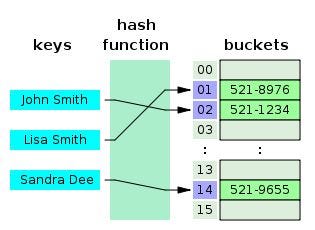
Or you could have a system where you take the student’s name, run a formula, and instantly know their room number. No walking. No searching. You just go there directly.
That formula is called a hash function. That system is called a HashMap.
Here’s the basic idea:
"Bala" → hash function → 4 → Go to slot 4 → Get 88No loop. No comparison of every element. You calculate exactly where the answer is and go there.
This is O(1). Constant time. Whether you have 10 entries or 10 million, the answer takes the same number of steps to find.
That’s the whole magic of HashMap. Everything else is just making sure that magic doesn’t break.
The Hash Function: The Brain of the Operation
A hash function takes your key — any object — and converts it into an integer.
Java’s ***String.hashCode()*** does it like this:
int hash = 0;
for (int i = 0; i < str.length(); i++) {
    hash = 31 * hash + str.charAt(i);
}
For
"Bala":
B = 66, a = 97, l = 108, a = 97

Step 1: hash = 31 × 0  + 66  = 66
Step 2: hash = 31 × 66 + 97  = 2143
Step 3: hash = 31 × 2143 + 108 = 66541
Step 4: hash = 31 × 66541 + 97 = 2062868
***"Bala".hashCode()= 2,062,868***
Why 31? Because 31 is a prime number. Prime numbers distribute values more uniformly — fewer clustering effects, fewer collisions. The Java engineers were being careful here.
Now, you can’t have an array of 2 million slots. The default HashMap has only 16 slots. So Java compresses the hash:
index = hash & (capacity - 1)
      = 2062868 & 15
      = 4
***"Bala"goes to slot 4.***
The Internal Structure: An Array of Nodes
This is where most textbooks fail you. They say “it’s a hash table” and move on. But what does that actually look like in memory?
HashMap is backed by a plain Java array called table. Each slot holds a Node object:
static class Node<K, V> {
    final int    hash;
    final K      key;
    V            value;
    Node<K, V>   next;  // ← This is crucial. More on it in a moment.
}
After you call:
map.put("Aarav", 95);
map.put("Bala",  88);
map.put("Chitra", 92);
The internal array looks like this:
table[0]  → null
table[1]  → null
table[2]  → Node { key="Aarav",  value=95  }
table[3]  → null
table[4]  → Node { key="Bala",   value=88  }
table[5]  → Node { key="Chitra", value=92  }
...
table[15] → null
When you call map.get("Bala"):
1. Compute: hash("Bala") → index 4
2. Go to table[4]
3. table[4].key.equals("Bala")? → YES → return 88
Two steps. That’s it.
Collisions: When Two Keys Fight for the Same Room
Here’s the thing about hash functions — they’re not perfect. Two different keys can produce the same index:
hash("Bala") & 15 = 4
hash("Zara") & 15 = 4  ← same slot!
This is called a collision. And it’s not rare. With 16 slots and many keys, collisions are almost certain.
Java handles this with Separate Chaining.
Remember that next pointer in the Node class? This is why it exists.
When a collision happens, the new node is chained to the existing one:
table[4] → Node("Bala", 88) → Node("Zara", 71) → nullThink of it like a hostel room that got double-allotted. Both students are there — you just have to check both.
When you call **map.get("Zara"):**
1. index = hash("Zara") & 15 = 4
2. table[4].key.equals("Zara")? → "Bala".equals("Zara") → NO
3. Follow .next
4. table[4].next.key.equals("Zara")? → YES → return 71
Hash finds the neighbourhood. equals() finds the exact address.
This is why there’s a contract in Java: if two objects are .equals(), they must have the same hashCode(). Violate this contract and your HashMap silently breaks. You'll put something in and never find it again.
// WRONG — breaks HashMap silently
class Student {
    String name;

    @Override
    public boolean equals(Object o) {
        return this.name.equals(((Student)o).name);
    }
    // hashCode() not overridden → disaster
}

// CORRECT
class Student {
    String name;

    @Override
    public boolean equals(Object o) {
        return this.name.equals(((Student)o).name);
    }

    @Override
    public int hashCode() {
        return name.hashCode();
    }
}
Java 8’s Secret Weapon: When Chains Become Trees
In a bad scenario, many keys could hash to the same slot. The chain becomes:
table[4] → Node1 → Node2 → Node3 → ... → Node1000 → nullSearching this is O(n). Your HashMap is now as slow as a plain array.
Java 8 solved this problem permanently. When a chain grows beyond 8 nodes, it converts from a linked list to a Red-Black Tree.
Linked list with 1000 nodes: up to 1000 comparisons
Red-Black Tree with 1000 nodes: up to 10 comparisons (log₂1000 ≈ 10)
This is why the performance table in Java 8+ looks like this:
Scenarioget() | put()
No collisions (best case) | O(1)
Short chains (normal case) | O(1)
averageLong chains — Java 7 | O(n)
worst caseLong chains — Java 8+ | O(log n) worst case
The constants for this behavior:
static final int TREEIFY_THRESHOLD    = 8;   // list → tree at 8 nodes
static final int UNTREEIFY_THRESHOLD  = 6;   // tree → list when it shrinks to 6
static final int MIN_TREEIFY_CAPACITY = 64;  // array must be ≥64 before treeifying
Why the 64 minimum? Because if the array is small, it’s better to resize it (spread nodes across more buckets) than to treeify (make searching faster within the same bucket). Resizing solves the root problem; treeifying only treats the symptom.
Load Factor: Knowing When to Move to a Bigger House
As you add more entries, the array fills up. More entries per slot means longer chains means slower lookups.
Load Factor is the measure of how “full” the HashMap is:
Load Factor = number of entries / capacityThe default load factor is 0.75. When it's exceeded, HashMap resizes.
Default capacity = 16
Resize threshold = 16 × 0.75 = 12

After 13th entry → RESIZE triggered!
When resizing happens:
- A new array is created — double the size (16 → 32)
- Every existing entry is re-hashed into the new array
- The old array is discarded
This is O(n) — expensive. Which is why, if you know you’re storing 1,000 entries upfront, you should tell HashMap from the start:
// Triggers multiple resizes while filling
HashMap<String, Integer> map = new HashMap<>();

// Smart: pre-sized to avoid resizing
// 1000 / 0.75 ≈ 1334 → next power of 2 = 2048
HashMap<String, Integer> map = new HashMap<>(2048);
Why always a power of 2? Because then this bitwise trick works perfectly:
index = hash & (capacity - 1)Bitwise AND is much faster than the modulo operator (%). The Java engineers squeezed every bit of performance here.
Now Build One Yourself:
Reading about it is one thing. Writing it is another. Here’s a complete, working HashMap implementation — every line explained:
public class MyHashMap<K, V> {

    // The node that holds each key-value pair
    private static class Node<K, V> {
        K key;
        V value;
        Node<K, V> next;  // for chaining on collision

        Node(K key, V value) {
            this.key   = key;
            this.value = value;
        }
    }

    private static final int   DEFAULT_CAPACITY    = 16;
    private static final float DEFAULT_LOAD_FACTOR = 0.75f;

    private Node<K, V>[] table;
    private int          size;
    private float        loadFactor;

    @SuppressWarnings("unchecked")
    public MyHashMap() {
        table      = new Node[DEFAULT_CAPACITY];
        loadFactor = DEFAULT_LOAD_FACTOR;
    }

    // Compute index from key
    private int hash(K key) {
        if (key == null) return 0;
        int h = key.hashCode();
        h = h ^ (h >>> 16);         // spread upper bits into lower — exactly what Java does
        return h & (table.length - 1);
    }

    public void put(K key, V value) {
        int index = hash(key);
        Node<K, V> current = table[index];

        // Key already exists? Update it.
        while (current != null) {
            if (current.key.equals(key)) {
                current.value = value;
                return;
            }
            current = current.next;
        }

        // New key — insert at head of chain
        Node<K, V> newNode = new Node<>(key, value);
        newNode.next = table[index];
        table[index] = newNode;
        size++;

        if ((float) size / table.length > loadFactor) {
            rehash();
        }
    }

    public V get(K key) {
        int index = hash(key);
        Node<K, V> current = table[index];

        while (current != null) {
            if (current.key.equals(key)) return current.value;
            current = current.next;
        }
        return null;
    }

    public void remove(K key) {
        int index = hash(key);
        Node<K, V> current = table[index];
        Node<K, V> prev    = null;

        while (current != null) {
            if (current.key.equals(key)) {
                if (prev == null) table[index] = current.next;
                else              prev.next    = current.next;
                size--;
                return;
            }
            prev    = current;
            current = current.next;
        }
    }

    public boolean containsKey(K key) {
        return get(key) != null;
    }

    @SuppressWarnings("unchecked")
    private void rehash() {
        Node<K, V>[] oldTable = table;
        table = new Node[oldTable.length * 2];
        size  = 0;

        for (Node<K, V> head : oldTable) {
            Node<K, V> current = head;
            while (current != null) {
                put(current.key, current.value);
                current = current.next;
            }
        }
    }

    public int size() { return size; }
}
Test it:
MyHashMap<String, Integer> marks = new MyHashMap<>();

marks.put("Aarav",  95);
marks.put("Bala",   88);
marks.put("Chitra", 92);

System.out.println(marks.get("Bala"));    // 88
System.out.println(marks.get("Zara"));    // null

marks.put("Bala", 95);
System.out.println(marks.get("Bala"));    // 95 — updated

marks.remove("Chitra");
System.out.println(marks.containsKey("Chitra")); // false
System.out.println(marks.size());                // 2
You just built a HashMap. From scratch. In Java.
The Gotchas That Will Burn You in Production
- HashMap is not thread-safe. If two threads call
put()simultaneously — especially during rehashing — data corrupts. UseConcurrentHashMapfor any multi-threaded code.
// Dangerous
HashMap<String, Integer> map = new HashMap<>();

// Safe
ConcurrentHashMap<String, Integer> map = new ConcurrentHashMap<>();
2. Iteration order is not guaranteed. Don’t rely on the order of map.keySet() or map.values(). Use LinkedHashMap if you need insertion order. Use TreeMap if you need sorted order.
3. Null keys behave differently. HashMap allows exactly one null key — it always goes to index 0. Hashtable doesn't allow null keys at all. Know which one you're using.
4. containsKey() vs get() == null. If a key maps to a null value, get() returns null — same as a missing key. Use containsKey() to tell them apart.
map.put("key1", null);
map.get("key1") == null;        // true — but key exists!
map.containsKey("key1");        // true — confirms the key is there
map.containsKey("missing");     // false
5. Custom objects as keys — the silent killer. If you override equals() but not hashCode(), two "equal" objects will hash to different buckets. You'll put something in and never find it:
Map<Student, Integer> map = new HashMap<>();
Student s1 = new Student("Aarav");
map.put(s1, 95);

Student s2 = new Student("Aarav");  // same name
map.get(s2);  // returns NULL — because hashCode() wasn't overridden
The Complete Picture:
┌─────────────────────────────────────────────────┐
│            JAVA HASHMAP — AT A GLANCE           │
├──────────────────────────┬──────────────────────┤
│ Default capacity         │ 16                   │
│ Default load factor      │ 0.75                 │
│ Resize at                │ size > capacity×0.75 │
│ Resize amount            │ Doubles (×2)         │
│ Collision strategy       │ Separate Chaining    │
│ Chain → Tree at          │ 8 nodes              │
│ Tree → Chain at          │ 6 nodes              │
│ Min capacity for trees   │ 64                   │
│ Tree type                │ Red-Black Tree       │
│ Null keys                │ Yes (1 max, index 0) │
│ Thread-safe              │ NO                   │
│ Ordered                  │ NO                   │
├──────────────────────────┼──────────────────────┤
│ get() / put() average    │ O(1)                 │
│ get() / put() worst      │ O(log n) — Java 8+   │
│ Rehash cost              │ O(n)                 │
└──────────────────────────┴──────────────────────┘
What Separates Good Developers from Great Ones
Every engineer who got placed from your college uses HashMap. Most of them could not explain what happens during rehashing, or why Java introduced Red-Black Trees in Java 8, or why you must override both hashCode() and equals().
That gap — between using a tool and understanding it — is where senior engineers are made.
You now know:
- Why HashMap exists and what problem it solves
- How the hash function computes an index
- How
put()andget()work internally, step by step - How collisions are handled through chaining
- Why Java 8 introduced treeification — and when it kicks in
- What load factor and rehashing mean, and how to avoid unnecessary rehashing
- Every gotcha that burns developers in production
- How to build a HashMap yourself from scratch
This isn’t trivia. This is the foundation. Everything else in Java collections — LinkedHashMap, TreeMap, ConcurrentHashMap, WeakHashMap — is built on these same principles.
Go explore them. You’re ready.
— — — — — — — — — — — — — — — — — — — — — — — — — — — — — — — — — — — — — —
If this piece made HashMap click for you, share it with the person in your team who’s still scared of data structures. The best way to learn is to teach.
메타데이터
- post_id
- df849151239e
- slug
- java-hashmap-the-most-misunderstood-data-structure-in-every-south-indian-engineering-college-df849151239e
- url
- https://medium.com/@katukurijaswanth2/java-hashmap-the-most-misunderstood-data-structure-in-every-south-indian-engineering-college-df849151239e
- canonical_url
- https://medium.com/@katukurijaswanth2/java-hashmap-the-most-misunderstood-data-structure-in-every-south-indian-engineering-college-df849151239e
- author_url
- https://medium.com/@katukurijaswanth2
- status
- ok
- fetched_at
- 2026-06-09 15:37:30