What’s the Deal With KDP Categories and Back End Keywords (2024)?
As a new publisher on KDP, this can leave you scratching your head — for good reason. This is a very important part of your strategy and…
Photo by Lukas Müller on Unsplash
What’s the Deal With KDP Categories and Back End Keywords (2024)?
As a new publisher on KDP, this can leave you scratching your head — for good reason.
This is a very important part of your strategy and if you get it wrong, you could get your book banned or worse, your account blocked.
Photo by Shubham Dhage on Unsplash
You have selected your title, and sub-title, composed your book description in KDP and have arrived here:
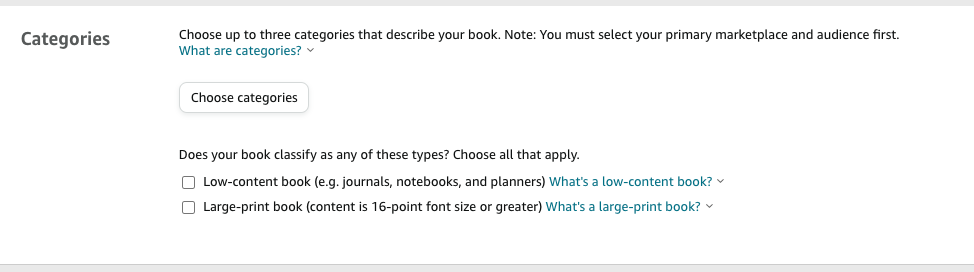
Snapshot of Amazon KDP Category Section
Categories:
You have up to three Amazon Store Categories to choose from based on the primary marketplace you want your book to show up in.
Important: Amazon reserves the right to change your categories to ensure a positive customer experience, and Amazon does this all the time based on where they think your book should be ranked.
Each category is made up of the following:
- Broad Category — your general category
- Sub-Category — more descriptive category (can be more than one)
- Placement — most descriptive subcategory (niche) about your book
For example, you are publishing a book on how to train your cat:
- Broad Category: Crafts, Hobby & Home
- Sub-Category: Pets and Animal Care
- Sub-Category: Cats
- Placement: Training

Snapshot of Amazon KDP Category Section
There are tons of U-tube tutorials and various advice available, some reliable and some not, but the best thing for your business is to follow Amazon’s tips for choosing categories. You can click here to go directly to the KDP Category information section, which I recommend reviewing before you publish. The more accurate you are, the better you will rank within that category.
Pro-tip: When you select your placement, it’s a good idea to click on it and check to see if this is indeed the correct placement category for your book. For the example above, clicking on “Training” takes you to the Amazon.com page shown below, showing the other books in your chosen category. In this case, there is another book on “training your cat” so this is the correct placement for this book.

Snapshot from Amazon.com
It is worth noting that KDP does monitor categories and keywords and has shut down accounts as of late for those trying to manipulate the metadata, sometimes months after a book has been published. (For instance, this would entail putting your book into a category that isn’t related, in an effort to get a top ranking.)
Keywords:
Your backend keywords operate like SEO (search engine optimization) words, helping Amazon’s algorithm understand the content of your book and increase its visibility in search results.
— First and foremost, your best keywords/keyword phrases should be in your title and book description for your best ranking.

Snapshot from Amazon KDP
-Amazon gives you 7 boxes of 50 characters per box to use for specific phrases and category-specific words that didn’t fit in your title, etc.
Amazon uses an indexing and ranking system. Your book will be indexed in a specific category, such as “Cat Training”. Then based on the algorithm you will be ranked within this indexed phrase, with top rankings showing on page 1 when this particular phrase is entered by a customer. See below for an example.
- The indexed phrase here is “cat care books”, with 60,000 books ranking within that phrase.

Snapshot of Amazon.com
So how do you fill out your boxes?
First what NOT to do:

Snapshot of Keywords to Avoid in Amazon KDP
Amazon’s number one goal is to ensure a positive customer experience, so any of the violations listed above could be considered manipulating metadata, which results in a banned book, etc. For example, don’t repeat keywords used in your title because you are already ranking for these.
Best practices:
My philosophy is less is more. You want to rank well within your indexed phrase, so using more words could lower your ranking within that phrase.
There are different recommended ways to fill out the boxes, and I’ve decided to go with the following method to see how my books rank. Many different opinions are circulating, so you’ll want to find out what method works best for your particular niche.
- Don’t use punctuation, quotations, etc. when filling out the boxes.
-My Method:
- I’ve been using 3 boxes with specific niche phrases that I want to rank for (not necessarily filling the entire box).
- I dedicate 2 boxes to category niche words that I haven’t used yet — think what would a customer of my book type in.
- I use the last 2 boxes for leftover words that haven’t been used yet, if possible.
- Note that Amazon will use all combinations of words in one of your boxes…. For instance, it will rank for a single word, two words, three words, etc. Let’s say you typed in “cat training notebook”. Amazon would rank you for cat training notebook, cat training, cat, training notebook, and notebook.
Overall, you should have researched your niche in advance and you want to have a top ranking within your niche index. Other things come into play as well, (advertising, reviews, etc), but having solid categories and keywords is an important foundation for success.
Thank you for reading. I hope this basic explanation and breakdown of KDP categories and keywords help you on your KDP journey. Follow me for more articles as I continue my KDP adventures!
Remember that you will get out of the business what you put into it. Treat this like a business, and it will pay off.
For a free mini journal click here: Link to free journal
메타데이터
- post_id
- e0fdc9956cc9
- slug
- whats-the-deal-with-kdp-categories-and-back-end-keywords-2024-e0fdc9956cc9
- url
- https://medium.com/@theschererjournalcollective/whats-the-deal-with-kdp-categories-and-back-end-keywords-2024-e0fdc9956cc9
- canonical_url
- https://medium.com/@theschererjournalcollective/whats-the-deal-with-kdp-categories-and-back-end-keywords-2024-e0fdc9956cc9
- author_url
- https://medium.com/@theschererjournalcollective
- status
- ok
- fetched_at
- 2026-06-24 16:30:55