Building a Multi-Tenant SaaS in Angular: The Architecture Decisions That Actually Matter
We serve 50+ lending partners out of a single Angular codebase. Each partner has its own branding, its own permission matrix, its own…
Building a Multi-Tenant SaaS in Angular: The Architecture Decisions That Actually Matter
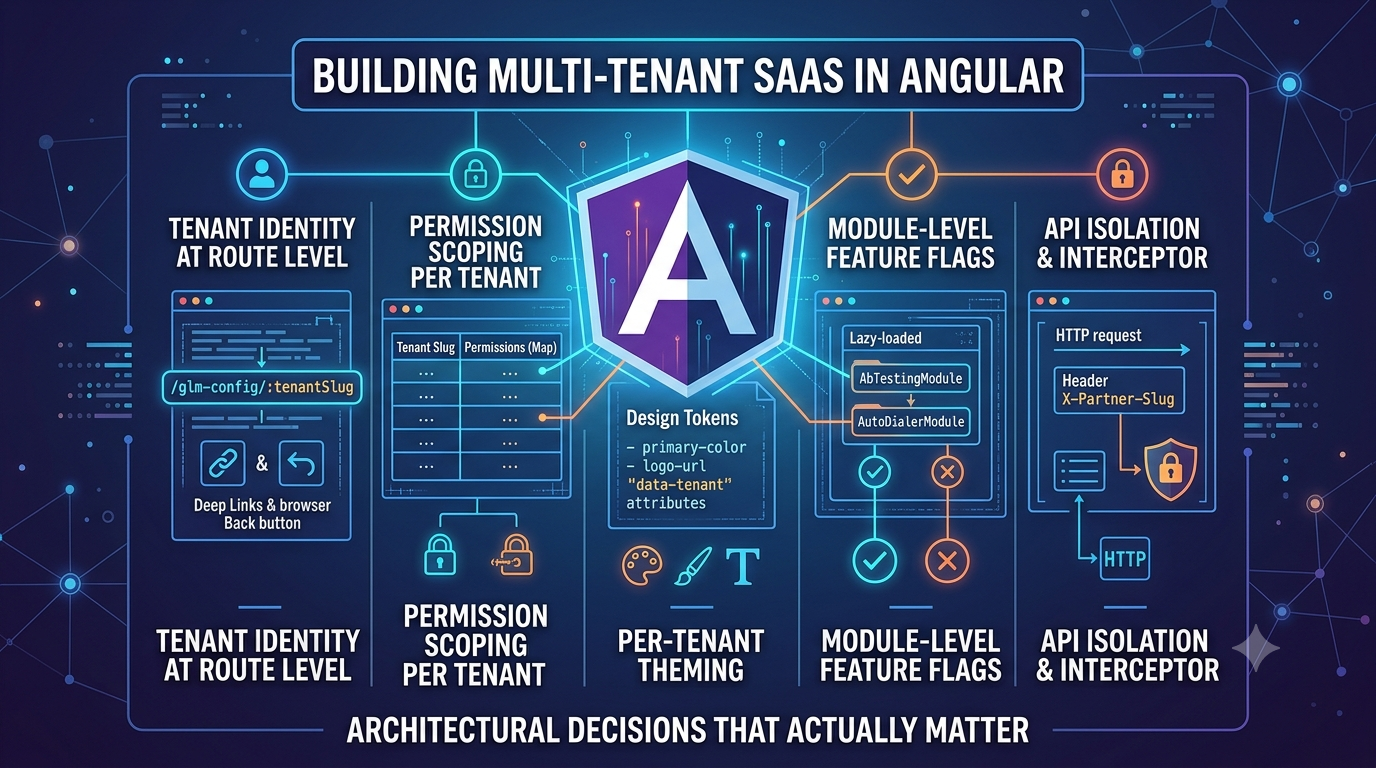
We serve 50+ lending partners out of a single Angular codebase. Each partner has its own branding, its own permission matrix, its own subset of features, and its own users who should never see anything that belongs to another partner.
When I joined NBFC, the “multi-tenant” solution was a pile of if (partnerId === ‘HDFC’) conditionals scattered through components. There were 47 of them. I know because I counted before I deleted them.
This is the architecture we replaced it with, the decisions that actually mattered, and the ones I got wrong the first time.
## Decision 1: Tenant Identity at the Route Level
The first question in any multi-tenant frontend is: how do the application and each component know which tenant they’re serving?
Bad answer: session storage. You’ll be reading it from every service, passing it through component inputs, and eventually discovering you can’t deep-link to a tenant-specific URL.
Good answer: the URL is the source of truth.
We prefix every route with the partner slug:
/glm-config/hdfc/policies
/glm-config/bajaj/policies
/glm-config/idfc/partners
The routing module extracts the tenant slug at the root level and makes it available as an observable through a TenantContextService:
// app-routing.module.ts
const routes: Routes = [
{
path: 'glm-config/:tenantSlug',
component: TenantShellComponent,
canActivate: [TenantGuard],
children: [
{
path: 'policies',
loadChildren: () =>
import('./policy-ui/policy-ui.module').then(m => m.PolicyUIModule)
},
{
path: 'partners',
loadChildren: () =>
import('./features/partners/partners.module').then(m => m.PartnersModule)
}
]
}
];
// tenant-context.service.ts
@Injectable({ providedIn: 'root' })
export class TenantContextService {
private readonly tenantSlug$ = this.router.events.pipe(
filter(e => e instanceof NavigationEnd),
map(() => {
let route = this.activatedRoute.snapshot;
while (route.firstChild) route = route.firstChild;
return route.paramMap.get('tenantSlug') ?? null;
}),
distinctUntilChanged(),
shareReplay(1)
);
readonly currentTenant$ = this.tenantSlug$.pipe(
switchMap(slug => slug ? this.api.getTenantConfig(slug) : of(null))
);
constructor(
private router: Router,
private activatedRoute: ActivatedRoute,
private api: ApiService
) {}
}Every component and service that needs tenant context subscribes to currentTenant$. No session storage reads. Deep links work. The browser back button works.
Decision 2: Permission Scoping Per Tenant
This was the first thing I got wrong.
My initial approach was a flat permissions array on the user object: [‘policy:read’, ‘policy:write’, ‘partners:read’]. Global permissions. Not scoped to tenant.
The problem surfaced immediately: a user could be an admin for Partner A and read-only for Partner B. Flat arrays can’t represent this.
The model we landed on is a map of tenant slug to permission set:
interface UserPermissions {
tenantPermissions: {
[tenantSlug: string]: string[];
};
globalPermissions: string[];
}
// permission.service.ts
@Injectable({ providedIn: 'root' })
export class PermissionService {
hasPermission(permission: string): Observable<boolean> {
return combineLatest([
this.authService.currentUser$,
this.tenantContext.tenantSlug$
]).pipe(
map(([user, tenantSlug]) => {
if (!user) return false;
// Global permissions (e.g. super-admin) take precedence
if (user.permissions.globalPermissions.includes(permission)) return true;
// Tenant-scoped permissions
if (!tenantSlug) return false;
const tenantPerms = user.permissions.tenantPermissions[tenantSlug] ?? [];
return tenantPerms.includes(permission);
})
);
}
}The route guard uses this to block navigation:
@Injectable({ providedIn: 'root' })
export class PermissionGuard implements CanActivate {
canActivate(route: ActivatedRouteSnapshot): Observable<boolean | UrlTree> {
const requiredPermission = route.data['permission'] as string;
return this.permissionService.hasPermission(requiredPermission).pipe(
map(hasAccess => hasAccess || this.router.createUrlTree(['/unauthorized']))
);
}
}
And in route configuration:
{
path: 'policies',
component: PolicyListComponent,
canActivate: [PermissionGuard],
data: { permission: 'policy:read' }
}
Decision 3: Per-Tenant Theming Without a CSS Explosion
With 50 partners, you can’t maintain 50 separate stylesheets. What you want is a small set of design tokens that drive the visual identity, applied at runtime.
We use CSS custom properties scoped to a [data-tenant] attribute on the root element:
// theme.service.ts
@Injectable({ providedIn: 'root' })
export class ThemeService {
applyTenantTheme(tenantConfig: TenantConfig): void {
const root = document.documentElement;
const theme = tenantConfig.theme;
root.setAttribute('data-tenant', tenantConfig.slug);
root.style.setProperty(' - primary-color', theme.primaryColor);
root.style.setProperty(' - primary-dark', theme.primaryDark);
root.style.setProperty(' - accent-color', theme.accentColor);
root.style.setProperty(' - logo-url', `url('${theme.logoUrl}')`);
root.style.setProperty(' - font-family', theme.fontFamily ?? 'Inter, sans-serif');
}
}
// In component styles - reference tokens, never hardcode colors
.primary-button {
background-color: var( - primary-color);
font-family: var( - font-family);
&:hover {
background-color: var( - primary-dark);
}
}
.header-logo {
background-image: var( - logo-url);
background-size: contain;
background-repeat: no-repeat;
}The tenant config (including theme tokens) is fetched once when the user navigates into a tenant context and cached for the session. No per-component theme lookup, no @Input() theme threading through the component tree.
Decision 4: Module-Level Feature Flags
Not all features are available to all partners. Some partners have A/B testing enabled, some have co-lending workflows, some have just the core policy configuration.
We represent this as a feature flag map on the tenant config:
interface TenantConfig {
slug: string;
displayName: string;
theme: TenantTheme;
features: {
abTesting: boolean;
coLending: boolean;
autoDialer: boolean;
leegality: boolean;
};
}
The lazy-loaded modules check the flag before they register their routes:
// In TenantShellComponent, dynamically build child routes
buildTenantRoutes(config: TenantConfig): Route[] {
const routes: Route[] = [
{
path: 'policies',
loadChildren: () =>
import('./policy-ui/policy-ui.module').then(m => m.PolicyUIModule)
}
];
if (config.features.abTesting) {
routes.push({
path: 'abtesting',
loadChildren: () =>
import('./abtesting/abtest.module').then(m => m.AbtestModule)
});
}
if (config.features.autoDialer) {
routes.push({
path: 'autodialer',
loadChildren: () =>
import('./autodialer/autodialer.module').then(m => m.AutodialerModule)
});
}
return routes;
}
This means the autodialer bundle never loads for a partner who doesn’t have it enabled. The route doesn’t exist. A user who manually types the URL gets a 404. No permission check needed because there’s no route to guard.
Decision 5: API Isolation — One HTTP Header to Rule Them All
All our HTTP requests include a X-Partner-Slug header that the backend uses to scope queries. This is set centrally in the auth interceptor:
// auth.interceptor.ts
intercept(req: HttpRequest<unknown>, next: HttpHandler): Observable<HttpEvent<unknown>> {
return this.tenantContext.tenantSlug$.pipe(
first(),
switchMap(tenantSlug => {
let headers = req.headers.set('Authorization', `Bearer ${this.authService.getToken()}`);
if (tenantSlug) {
headers = headers.set('X-Partner-Slug', tenantSlug);
}
return next.handle(req.clone({ headers }));
})
);
}
The backend enforces that every API call is scoped to the partner in the header. If a user somehow hits an endpoint with the wrong slug (manually crafted request), the backend rejects it. Defense in depth.
The Mistake I Made: Shared Singleton Services
Angular’s providedIn: ‘root’ creates a singleton for the lifetime of the application. When you have stateful services — like a currently loaded policy set, or a partner-specific form config — and a user navigates from one tenant context to another, the singleton holds stale data from the previous tenant.
The fix is to either:
-
Tie service state to the tenant slug and reset it on slug changes, or
-
Scope services to a
TenantShellModulerather than root, so they’re created and destroyed with the tenant shell component.
We use option 2 for anything that holds partner-specific state:
// In TenantShellModule
@NgModule({
providers: [
PolicyCacheService, // Scoped to tenant shell, not root
PartnerFormConfigService
]
})
export class TenantShellModule {}
When the user navigates to a different partner slug, the old TenantShellModule is destroyed and a new one is created. The singleton problem disappears.
Key Takeaways
-
Put tenant identity in the URL, not in session storage. Deep links, browser history, and shared URLs all work correctly.
-
*Permission scoping must be per-tenant per-user, not a flat global array. Model it as a map from the start.
-
CSS custom properties are the right tool for runtime theming. Avoid per-tenant stylesheets; maintain design tokens instead.
-
Feature flags at the routing level are more secure than permission checks. If the route doesn’t exist, there’s nothing to guard.
-
Scope stateful services to the tenant module, not root. Singleton state from a previous tenant context is a hard-to-debug bug.
-
The HTTP interceptor is the right place for tenant context headers. Every API call gets it automatically, with no per-call boilerplate.
The 47 if (partnerId === ‘HDFC’) conditionals we deleted took three weeks of refactoring. The new architecture took four days to design and two weeks to implement. We’ve added eight new partners in the eighteen months since. None of them required a conditional in component code.
메타데이터
- post_id
- f1ca05557502
- slug
- building-a-multi-tenant-saas-in-angular-the-architecture-decisions-that-actually-matter-f1ca05557502
- url
- https://blog.stackademic.com/building-a-multi-tenant-saas-in-angular-the-architecture-decisions-that-actually-matter-f1ca05557502
- canonical_url
- https://blog.stackademic.com/building-a-multi-tenant-saas-in-angular-the-architecture-decisions-that-actually-matter-f1ca05557502
- author_url
- https://medium.com/@ronikdedhia
- status
- ok
- fetched_at
- 2026-07-08 18:29:56