Configure Jest & React Testing Library in Vite
I faced lot of issues in doing setup for jest and react testing library. So thought it might be useful for you as well.
Configure Jest & React Testing Library in Vite
I faced lot of issues in doing setup for jest and react testing library. So thought it might be useful for you as well.
- Install the necessary dev dependencies
npm i -D jest
ts-jest
jest-environment-jsdom
identity-obj-proxy
@testing-library/react- Added Jest support files
jest.support.ts (same as vite.config.ts level)
import '@testing-library/jest-dom';fileMock.js (Create new folder mocks at the vite.config.ts level). create new file called fileMock.js.
module.exports = 'test-file-stub';in tsconfig.app.json, add this line. type already exists, just add jest, @testing-library/jest-dom
"types": ["vite/client", "jest", "@testing-library/jest-dom"],in package.json add this config below scripts
"jest": {
    "testEnvironment": "jsdom",
    "transform": {
      "^.+\\.(t|j)sx?$": [
        "ts-jest",
        {
          "tsconfig": "tsconfig.jest.json",
          "diagnostics": false
        }
      ]
    },
    "moduleNameMapper": {
      "\\.(css|less|scss|sass)$": "identity-obj-proxy",
      "\\.(jpg|jpeg|png|gif|webp|svg)$": "<rootDir>/__mocks__/fileMock.js"
    },
    "setupFilesAfterEnv": [
      "<rootDir>/jest.setup.ts"
    ]
  }
Then add test folder within src and then add your test files.
eg, Login.test.tsx
test("Testing component loaded", () => {
    // steps for test
})
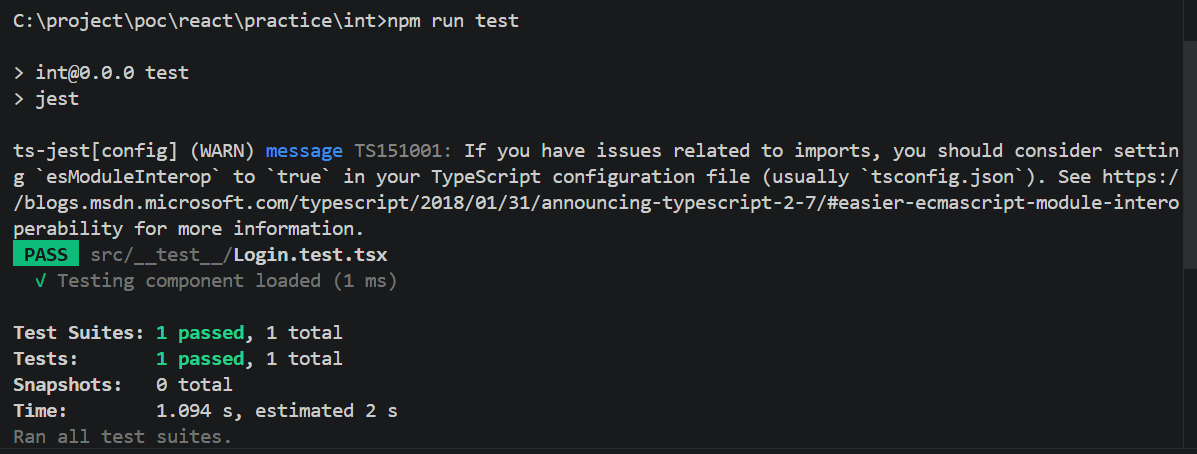
Run npm run test to see the test results.
package.json
{
  "name": "int",
  "private": true,
  "version": "0.0.0",
  "type": "module",
  "scripts": {
    "dev": "vite",
    "build": "tsc -b && vite build",
    "lint": "eslint .",
    "preview": "vite preview",
    "test": "jest",
    "test:watch": "jest --watchAll",
    "test:coverage": "jest --coverage"
  },
  "jest": {
    "testEnvironment": "jsdom",
    "transform": {
      "^.+\\.(t|j)sx?$": [
        "ts-jest",
        {
          "tsconfig": "tsconfig.jest.json",
          "diagnostics": false
        }
      ]
    },
    "moduleNameMapper": {
      "\\.(css|less|scss|sass)$": "identity-obj-proxy",
      "\\.(jpg|jpeg|png|gif|webp|svg)$": "<rootDir>/__mocks__/fileMock.js"
    },
    "setupFilesAfterEnv": [
      "<rootDir>/jest.setup.ts"
    ]
  },
  "dependencies": {
    "@reduxjs/toolkit": "^2.12.0",
    "react": "^19.2.6",
    "react-dom": "^19.2.6",
    "react-redux": "^9.3.0",
    "react-router-dom": "^7.17.0"
  },
  "devDependencies": {
    "@babel/core": "^7.29.0",
    "@eslint/js": "^10.0.1",
    "@rolldown/plugin-babel": "^0.2.3",
    "@testing-library/jest-dom": "^6.9.1",
    "@testing-library/react": "^16.3.2",
    "@types/babel__core": "^7.20.5",
    "@types/jest": "^30.0.0",
    "@types/node": "^24.12.3",
    "@types/react": "^19.2.14",
    "@types/react-dom": "^19.2.3",
    "@vitejs/plugin-react": "^6.0.1",
    "babel-plugin-react-compiler": "^1.0.0",
    "eslint": "^10.3.0",
    "eslint-plugin-react-hooks": "^7.1.1",
    "eslint-plugin-react-refresh": "^0.5.2",
    "globals": "^17.6.0",
    "identity-obj-proxy": "^3.0.0",
    "jest": "^30.4.2",
    "jest-environment-jsdom": "^30.4.1",
    "ts-jest": "^29.4.11",
    "typescript": "~6.0.2",
    "typescript-eslint": "^8.59.2",
    "vite": "^8.0.12"
  }
}
That’s sums up the article
메타데이터
- post_id
- f4f077995926
- slug
- configure-jest-react-testing-library-in-vite-f4f077995926
- url
- https://medium.com/@barathkumark/configure-jest-react-testing-library-in-vite-f4f077995926
- canonical_url
- https://medium.com/@barathkumark/configure-jest-react-testing-library-in-vite-f4f077995926
- author_url
- https://medium.com/@barathkumark
- status
- ok
- fetched_at
- 2026-06-18 00:10:23