How We Remediated the Windows UEFI CA 2023 Secure Boot Certificate Update Using SCCM and HP BIOS…
Real-world enterprise remediation using SCCM Configuration Baselines, PowerShell automation, and HP BIOS updates.
How We Remediated the Windows UEFI CA 2023 Secure Boot Certificate Update Using SCCM and HP BIOS Automation
Real-world enterprise remediation using SCCM Configuration Baselines, PowerShell automation, and HP BIOS updates.
Introduction
Recently, many enterprise IT environments began dealing with challenges related to Microsoft’s Windows UEFI CA 2023 Secure Boot certificate update.
At first, the issue appeared to be a normal Windows Update problem.
Devices were patched. Reboots were completed. Security updates installed successfully.
Yet some systems still remained stuck in incomplete Secure Boot servicing states.
In our environment, we noticed several Windows devices — primarily HP systems — reporting incomplete Secure Boot remediation even though the operating system itself appeared healthy.
After deeper investigation, we discovered the issue involved much more than standard Windows patching.
The remediation process depended on:
- BIOS and firmware readiness
- Secure Boot state
- Registry staging
- Scheduled task execution
- Multiple reboot cycles
- Platform compatibility
This article explains how we used:
- SCCM Configuration Items and Baselines
- HP BIOS remediation
- PowerShell automation
- Compliance reporting
to identify, remediate, and automate Secure Boot certificate servicing across enterprise-managed Windows devices.
Understanding the Problem
Several systems were showing registry states similar to:
UEFICA2023Status = NotStartedwhile also reporting:
WindowsUEFICA2023Capable = 1This indicated:
- The system was technically capable
- But the Secure Boot servicing process never fully completed
Many devices:
- passed standard Windows Update checks,
- had Secure Boot enabled,
- and were fully operational,
yet still remained in incomplete remediation states.
Microsoft and HP Documentation
During the investigation, the following public documentation helped guide the remediation strategy.
Microsoft Secure Boot Certificate Expiration and CA Updates
Microsoft Secure Boot Certificate Expiration and CA Updates
Microsoft Secure Boot Update Status Documentation
Secure Boot Certificate Update Status in the Windows Security App
Microsoft Secure Boot Playbook
Secure Boot Playbook for Certificates Expiring in 2026
HP Secure Boot and BIOS Guidance
HP Secure Boot and BIOS Guidance
What We Found During Investigation
After reviewing multiple systems, one major pattern became clear:
BIOS and firmware versions were heavily impacting remediation success.
Several older BIOS revisions prevented Secure Boot servicing from progressing correctly.
Even though:
- Windows Updates were installed,
- Secure Boot was enabled,
- and systems appeared compliant,
the remediation process silently stalled.
This became one of the most important discoveries during troubleshooting.
Key Registry Areas Used for Validation
Most of the investigation focused on two registry locations.
Secure Boot Servicing Registry
HKLM:\SYSTEM\CurrentControlSet\Control\SecureBoot\ServicingKey values:
UEFICA2023StatusWindowsUEFICA2023Capable
Secure Boot Available Updates Registry
HKLM:\SYSTEM\CurrentControlSet\Control\SecureBootKey value:
AvailableUpdates
Observed values included:
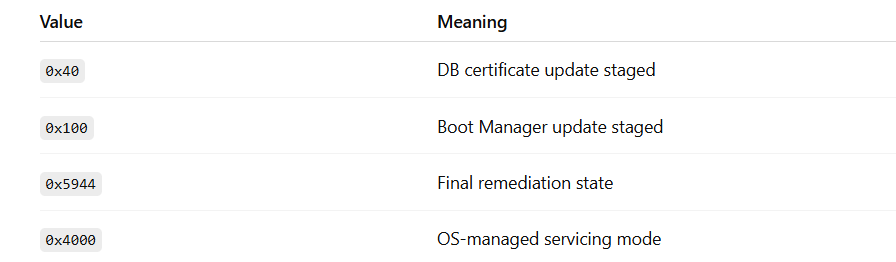
These values became useful during compliance validation and remediation tracking.
Using SCCM to Identify Impacted Systems
To scale the investigation, we used SCCM collections and compliance reporting to identify:
- HP devices
- Systems with outdated BIOS versions
- Devices stuck in incomplete Secure Boot servicing states
This gave us enterprise-wide visibility into the issue.
HP BIOS Remediation Using SCCM
Once firmware dependency was confirmed, we used:
HP Image Assistant (HPIA)
to automate BIOS and firmware remediation.
We packaged and deployed HPIA silently using SCCM.
Example deployment command:
HPImageAssistant.exe /Operation:Analyze /Action:Install /Selection:All /NonInteractive /QuietThis allowed devices to:
- Detect outdated BIOS versions
- Install required firmware updates
- Apply Secure Boot-related dependencies
- Reboot automatically when necessary
After BIOS remediation, many previously stuck systems began progressing successfully through Secure Boot servicing.
Building the SCCM Configuration Item
To automate compliance validation and remediation, we created an SCCM Configuration Item (CI).
The CI included:
- Discovery Script
- Remediation Script
The goal was to:
- Continuously monitor compliance
- Trigger remediation automatically
- Reduce manual troubleshooting
- Improve reporting visibility
Discovery Script Logic
The discovery script validated:
- Secure Boot servicing state
- Compliance status
- Registry values
We intentionally simplified the logic into only two states:
- COMPLIANT
- NON-COMPLIANT
The script checked:
UEFICA2023StatusWindowsUEFICA2023CapableAvailableUpdates
and logged all activity into:
C:\Windows\Temp\SecureBoot_CA2023_Discovery.logRemediation Script Logic
The remediation script handled staged Secure Boot servicing automatically.
The remediation process included:
- Secure Boot validation
- Registry staging
- Scheduled task execution
- Multi-stage remediation handling
The script staged remediation using:
0x400x1000x5944
depending on the device servicing state.
It also triggered:
\Microsoft\Windows\PI\Secure-Boot-Updateto initiate the servicing process.
All remediation actions logged into:
C:\Windows\Temp\SecureBoot_CA2023_Remediation.logSCCM Baselines and Automation
After creating the Configuration Item, we deployed it using SCCM Configuration Baselines.
This allowed SCCM to:
- Continuously evaluate compliance
- Automatically remediate systems
- Track remediation progress
- Provide enterprise-wide reporting
Instead of manually troubleshooting devices individually, SCCM automated the remediation lifecycle at scale.
Challenges Encountered
BIOS Dependency
Some systems appeared fully compliant at the OS level but still failed due to outdated BIOS versions.
Device Model Variations
Different hardware models behaved differently even on the same Windows version.
Reboots Alone Were Not Enough
Several devices required:
- Registry staging
- Scheduled task execution
- BIOS remediation
- Multiple reboot cycles
before compliance was achieved.
Lessons Learned
Modern Windows Security Depends on Firmware
This project reinforced how closely Windows security now depends on:
- BIOS
- UEFI
- Secure Boot
- Firmware servicing
SCCM Baselines Remain Extremely Valuable
Configuration Baselines provided:
- Automation
- Visibility
- Compliance reporting
- Continuous remediation
at enterprise scale.
Logging Matters
Detailed logging significantly reduced troubleshooting time during deployment and remediation phases.
Final Outcome
By combining:
- SCCM
- HP BIOS remediation
- HP Image Assistant
- Configuration Items
- Configuration Baselines
- PowerShell automation
we successfully stabilized Secure Boot certificate remediation across enterprise-managed Windows devices.
What initially appeared to be a standard Windows Update issue became a much deeper firmware and platform security remediation effort.
SCCM allowed us to automate, monitor, and remediate the issue safely at enterprise scale.
Final Thoughts
One of the biggest takeaways from this project was realizing how modern Windows security updates increasingly depend on firmware readiness and platform-level servicing — not just operating system patching.
Endpoint engineering today involves much more than software deployment alone.
Projects like this highlight how enterprise endpoint management now sits at the intersection of:
- Security
- Automation
- Firmware management
- Compliance
- Infrastructure engineering
Disclaimer
The information shared in this article reflects personal engineering experience and publicly available documentation references. All examples and scripts have been sanitized and generalized for educational purposes.
Tags
SCCM #MECM #SecureBoot #Windows11 #HP #HPIA #UEFI #PowerShell #EndpointManagement #CyberSecurity #ConfigurationManager #Firmware #WindowsSecurity #EnterpriseIT #DeviceManagement
메타데이터
- post_id
- 1600d67f9c4c
- slug
- how-we-remediated-the-windows-uefi-ca-2023-secure-boot-certificate-update-using-sccm-and-hp-bios-1600d67f9c4c
- url
- https://medium.com/@ureddy.techno/how-we-remediated-the-windows-uefi-ca-2023-secure-boot-certificate-update-using-sccm-and-hp-bios-1600d67f9c4c
- canonical_url
- https://medium.com/@ureddy.techno/how-we-remediated-the-windows-uefi-ca-2023-secure-boot-certificate-update-using-sccm-and-hp-bios-1600d67f9c4c
- author_url
- https://medium.com/@ureddy.techno
- status
- ok
- fetched_at
- 2026-06-21 12:17:11