How to Make API Documentation the Easy Way with Postman
If you’re like me, you probably hate making API documentation. It’s boring, takes a lot of time, and feels like extra work. I used to skip…
How to Make API Documentation the Easy Way with Postman

If you’re like me, you probably hate making API documentation. It’s boring, takes a lot of time, and feels like extra work. I used to skip it most of the time. But recently, I had no choice. I was working on a Web API that other software needed to use, and I had to make proper documentation.
That’s when I found an easy solution: Postman. Most of us already use Postman to test APIs, right? The good news is that Postman can now help you create documentation automatically with its AI tool. Here’s how you can do it.
Steps to Create API Documentation in Postman
Step 1: Add a Collection Description
First, open Postman. On the left side, click on the collection you want to document. Go to the Overview tab and write a short description of your collection. This helps explain what your API is about.

Overview page
Step 2: Use AI to Write API Descriptions
- Select one of the API requests in your collection.
- On the right-hand side, click the Documentation icon.
- In the description box, you’ll see the words “Add description. Generate with Postbot” (Postman’s AI helper). Click on “Generate with Postbot”.

Description textbox

Decription created by Postbot
That’s it! Postman’s AI will write the description for you, including details like parameters, example requests, and example responses. Do this for each API in your collection to finish your documentation.
Step 3: Publish Your Documentation
When your documentation is ready, you can share it:
- Go back to your collection and click on Overview.
- Click “View complete documentation” to open the full page.
- In the top-right corner, click Publish. Follow the setup instructions, and you’ll get a link to your documentation.
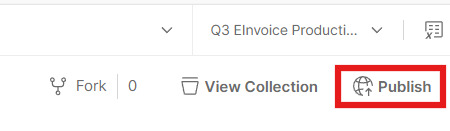

Config page in the web
Optional Step: Make It Easy to Find
Add the link to your API’s homepage or share it with your team so everyone can access the documentation easily.
Why This Feature is So Helpful
Postman makes documentation simple. You don’t have to write long explanations or worry about getting all the details right — Postbot does it for you. Even better, if you update your collection later, the documentation will update automatically. You don’t need to go back and fix it every time something changes.
Thanks to Postman, I now spend much less time on documentation and more time on actual coding. If you hate documentation as much as I do, give this a try. It’s a real lifesaver!
메타데이터
- post_id
- 3abca2befd04
- slug
- how-to-make-api-documentation-the-easy-way-with-postman-3abca2befd04
- url
- https://medium.com/@nabilt59/how-to-make-api-documentation-the-easy-way-with-postman-3abca2befd04
- canonical_url
- https://medium.com/@nabilt59/how-to-make-api-documentation-the-easy-way-with-postman-3abca2befd04
- author_url
- https://medium.com/@nabilt59
- status
- ok
- fetched_at
- 2026-06-27 07:40:21
