How VettoCRM Helps Veterinary Clinics Stop Losing Time, Clients, and Revenue
If you run a veterinary clinic, you know the daily reality: a receptionist flipping between a paper appointment book and a spreadsheet, a…
How VettoCRM Helps Veterinary Clinics Stop Losing Time, Clients, and Revenue
If you run a veterinary clinic, you know the daily reality: a receptionist flipping between a paper appointment book and a spreadsheet, a doctor who can’t pull up a patient’s vaccine history without digging through folders, and invoices that somehow never match what was actually done. It works — until it doesn’t. A missed follow-up, a double-booked slot, an expired medication sitting on the shelf.
VettoCRM was built to replace that patchwork. It’s a single system where your entire team — receptionists, doctors, and clinic owners — works together in real time, each seeing exactly what they need for their role.
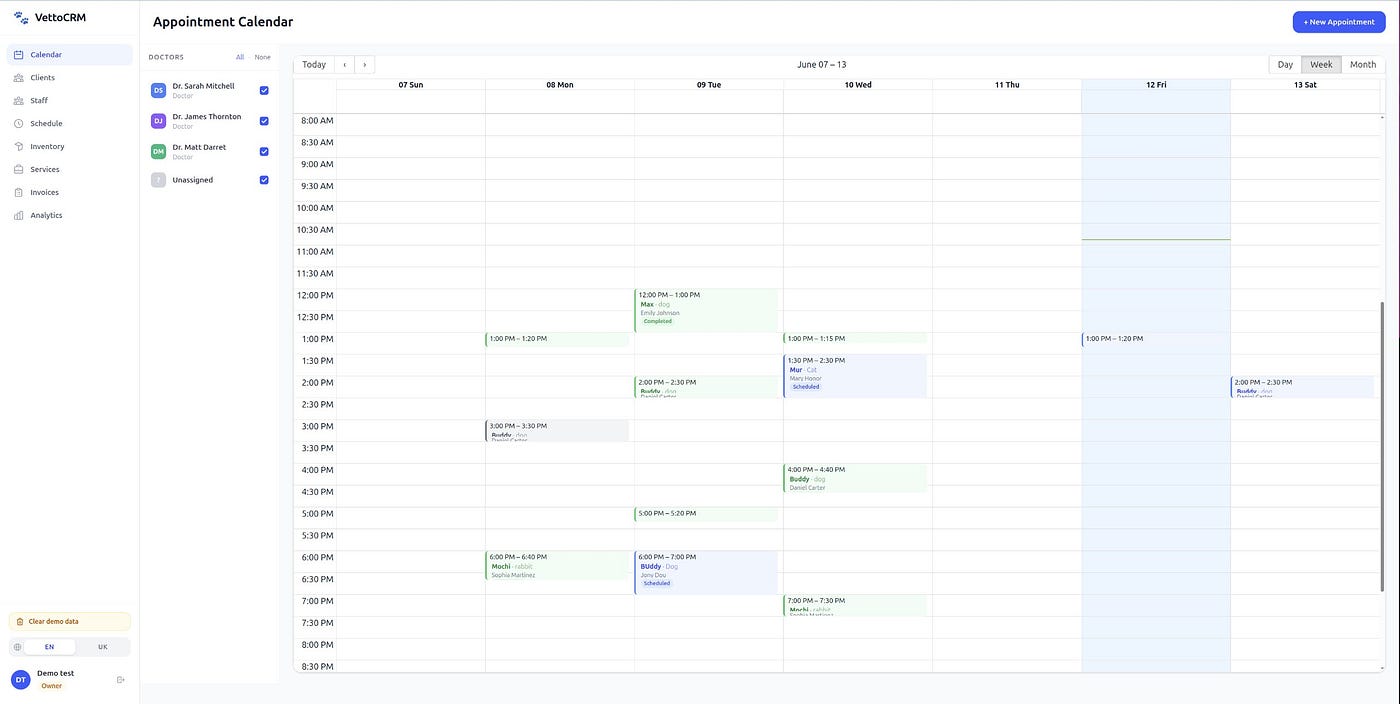
One Calendar for Your Entire Clinic
Scheduling is where most clinics lose time first. With VettoCRM, your receptionist sees the full daily schedule at a glance — open slots, booked appointments, who’s waiting in the lobby. Booking a new visit takes seconds: search the client by phone, pick the pet, choose a doctor, done.
Every appointment is color-coded by status so nothing falls through the cracks:
-
Blue — Scheduled (confirmed, not yet arrived)
-
Yellow— Checked In (the patient is in the lobby, the doctor sees them in their queue)
-
Green — Completed
Need to move an appointment? Drag it to a new time slot. Need to check the schedule from your phone between surgeries? The calendar automatically switches to a simple list view on mobile — no pinching, no squinting.

Your Clients and Their Pets — Always at Hand
Every pet owner has a profile: name, phone, email, notes. Every pet has a card with species, age, weight, and — critically — a visible red alert banner for allergies, aggression, or any medical flag your team needs to see before the animal walks through the door.
Search is instant. Start typing a phone number or a name, and the matching clients appear immediately. No more flipping through files or asking “have they been here before?”

A Doctor’s Workspace, Not Just a Form
When a doctor starts an exam, they see a split screen: the pet’s complete medical history on the left, the current visit form on the right. Diagnosis, treatment, clinical notes — everything is entered in one place while scrolling through past visits for context.
No switching between tabs. No asking the receptionist to find a paper chart. The history is right there, and it’s searchable.
When the visit is done, one click completes it and returns the doctor to their appointment queue. The record is saved, the appointment status updates automatically, and the receptionist sees it in real time.
Inventory That Warns You Before It’s Too Late
Track every medication, vaccine, and supply in your clinic. Each item shows current stock levels, pricing, and category. But the real value is what happens automatically:
-
Low-stock alerts — know when supplies are running low before you run out during a busy day
-
Expiration tracking — see which medications are expiring in 7, 14, 30, or 90 days so you can use them first or reorder
No more discovering an expired vaccine when a patient is already on the table.
Services and Pricing in One Place
Define your full service catalog — consultations, vaccinations, surgeries, lab work, grooming — each with its own price. When you create an invoice, these services are already there to select from. No manual entry, no inconsistent pricing, no “I thought the consultation was $50, not $60” conversations.

Invoicing Tied to Real Visits
Every invoice is connected to a specific appointment and patient. Line items pull directly from your services catalog and inventory — what was actually used during the visit becomes the invoice. Partial payments, outstanding balances, and payment history are all tracked per client.
For the clinic owner, this means no more reconciling what the doctor did with what the receptionist billed. It’s the same data.
Team Schedule at a Glance
See your entire staff’s weekly schedule in one view. Who’s working Monday morning? Is there a doctor available for Saturday? Plan shifts and coverage without passing around a shared Google Sheet or a whiteboard in the break room.

Analytics That Answer Real Business Questions
VettoCRM doesn’t just store your data — it shows you what’s actually happening in your clinic:
-
Revenue trends — is this month better or worse than last? What about compared to the same period last year?
-
Top services and products — what’s actually making you money?
-
Outstanding debt — how much are clients owing you right now?
-
Appointment load by hour— when are your busiest times? Should you open an extra slot on Wednesday afternoons?
-
Doctor performance — how many completed visits per doctor?
-
Cancellation rates — are no-shows increasing? Which days are worst?
-
Client growth — are you gaining or losing clients over time?
-
Client lifetime value— which clients bring the most revenue long-term?
These aren’t vanity metrics. They answer the questions that clinic owners actually ask when deciding whether to hire another doctor, extend hours, or run a promotion.
Three Roles, Three Experiences
Not everyone in your clinic needs to see everything. VettoCRM adapts based on who’s logged in:
Receptionist — sees the calendar, client database, and invoicing. Books appointments, checks patients in, creates invoices. Doesn’t see medical records — that’s the doctor’s domain.
Doctor— sees their personal appointment queue and the medical workspace. Focuses on patients, not admin. Starts visits, writes records, completes exams.
Clinic Owner — sees everything. Full access to analytics, staff management, settings, and all clinical data. The complete picture of how the business is running.
No one is overwhelmed with screens they don’t need. No one lacks access to what they do.
Works on Your Phone
Every screen in VettoCRM works on mobile. The sidebar becomes a bottom navigation bar. Tables become card lists. The doctor’s split-screen becomes tabs. Buttons and inputs are sized for fingers, not mouse cursors.
This matters because veterinarians don’t sit at a desk all day. You check the schedule between appointments. You look up a patient’s history while standing in the exam room. You glance at today’s revenue on your phone after the clinic closes. VettoCRM is designed for how you actually work.
Getting Started Takes Minutes
Register your account, name your clinic, invite your team. There’s no migration project, no consultant visit, no three-month onboarding. Your receptionist can start booking appointments the same day.
Who Is This For?
VettoCRM is built for small to mid-sized veterinary clinics that want to:
-
Stop losing appointments to scheduling confusion
-
Give doctors instant access to patient history
-
Track inventory before things expire or run out
-
See real financial data instead of guessing
-
Work from any device, anywhere
-
Keep things simple without sacrificing capability
If your clinic is still running on paper, spreadsheets, or a generic CRM that doesn’t understand the difference between a patient and a customer — VettoCRM was built for exactly this problem.
Interested? Visit vettocrm.com to request early access.
메타데이터
- post_id
- 3c1d4ce19de3
- slug
- how-vettocrm-helps-veterinary-clinics-stop-losing-time-clients-and-revenue-3c1d4ce19de3
- url
- https://medium.com/@evgeniy.python.developer/how-vettocrm-helps-veterinary-clinics-stop-losing-time-clients-and-revenue-3c1d4ce19de3
- canonical_url
- https://medium.com/@evgeniy.python.developer/how-vettocrm-helps-veterinary-clinics-stop-losing-time-clients-and-revenue-3c1d4ce19de3
- author_url
- https://medium.com/@evgeniy.python.developer
- status
- ok
- fetched_at
- 2026-06-20 20:29:01




