I Built a Space Shooter Game with Amazon Q CLI 👾💥🚀
#AmazonQCLI #awscommunity #gamechallenge
I Built a Space Shooter Game with Amazon Q CLI 👾💥🚀
#AmazonQCLI #awscommunity #gamechallenge
Hey folks! I recently took part in the Amazon Q CLI Game Challenge, where I used the AI-powered Amazon Q CLI to build a cool retro-style Space Shooter Game. It was fun, fast, and full of learning!
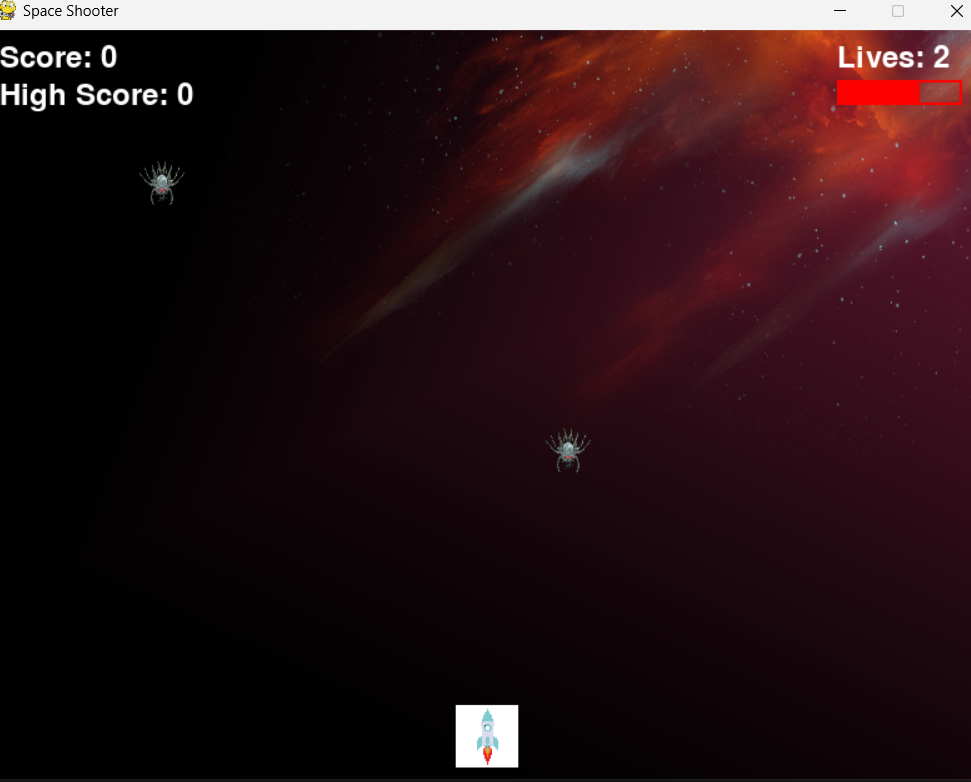
🎮 Game I Built: Space Shooter
I created a classic Space Shooter where you control a spaceship, shoot lasers, and destroy incoming enemies. The game has:
- Player-controlled spaceship
- Falling enemy ships
- Laser bullets
- Score tracking
- Game over condition when enemy hits the player
💡 Why I Chose This Game
- It’s fun and nostalgic
- Covers key game dev concepts: movement, shooting, collision
- A good test of Amazon Q CLI’s abilities to manage real-time actions
💬 How I Used Amazon Q CLI
I used the q chat in terminal to talk to Amazon Q like this:
Build a 2D space shooter game using PyGame with player spaceship, enemies, and bullets.Follow-ups I used:
- “Add explosion when enemy is hit”
- “Track score on top left corner”
- “Add background music and sound effects”
- “End game when enemy touches player”
Amazon Q CLI generated complete Python scripts, fixed errors when I pasted traceback, and even suggested adding improvements like difficulty scaling.
⚡ What Amazon Q CLI Did Best
- Generated clean, modular PyGame code
- Helped me add audio, collision, and scoring logic
- Suggested file structure for assets and sounds
- Handled tricky parts like frame rate & sprite collision
📸 Final Output
📂 Code -
import pygame
import random
import math

# Initialize Pygame and mixer for sound
pygame.init()
pygame.mixer.init()

# Set up the game window
WIDTH = 800
HEIGHT = 600
window = pygame.display.set_mode((WIDTH, HEIGHT))
pygame.display.set_caption("Space Shooter")

# Colors
WHITE = (255, 255, 255)
BLACK = (0, 0, 0)
RED = (255, 0, 0)
BLUE = (0, 0, 255)
YELLOW = (255, 255, 0)

# Load images
bg_img = pygame.image.load("background.jpg").convert()
bg_img = pygame.transform.scale(bg_img, (WIDTH, HEIGHT))
player_img = pygame.image.load("spaceship.png").convert_alpha()
player_img = pygame.transform.scale(player_img, (50, 50))
enemy_img = pygame.image.load("enemy.png").convert_alpha()
enemy_img = pygame.transform.scale(enemy_img, (40, 40))

# Load sounds
collision_sound = pygame.mixer.Sound("explosion.wav")
score_sound = pygame.mixer.Sound("point.wav")
pygame.mixer.music.load("background.mp3")
pygame.mixer.music.play(-1)

# Player
player_width = 50
player_height = 50
player_x = WIDTH // 2 - player_width // 2
player_y = HEIGHT - player_height - 10
player_speed = 5
player_lives = 3

# Enemy
enemy_width = 40
enemy_height = 40
enemies = []
for _ in range(3):
    enemies.append({
        'x': random.randint(0, WIDTH - enemy_width),
        'y': random.randint(-HEIGHT, 0),
        'speed': random.randint(2, 5)
    })

# Particles
particles = []

# Score
score = 0
high_score = 0
font = pygame.font.Font(None, 36)
title_font = pygame.font.Font(None, 64)

def create_explosion(x, y):
    for _ in range(20):
        angle = random.uniform(0, math.pi * 2)
        speed = random.uniform(2, 5)
        particles.append({
            'x': x,
            'y': y,
            'dx': math.cos(angle) * speed,
            'dy': math.sin(angle) * speed,
            'lifetime': 30
        })

def draw_ui():
    # Draw score
    score_text = font.render(f"Score: {score}", True, WHITE)
    high_score_text = font.render(f"High Score: {high_score}", True, WHITE)
    lives_text = font.render(f"Lives: {player_lives}", True, WHITE)

    window.blit(score_text, (10, 10))
    window.blit(high_score_text, (10, 40))
    window.blit(lives_text, (WIDTH - 120, 10))

    # Draw health bar
    health_width = (player_lives / 3) * 100
    pygame.draw.rect(window, RED, (WIDTH - 120, 40, 100, 20), 2)
    pygame.draw.rect(window, RED, (WIDTH - 120, 40, health_width, 20))

def update_particles():
    for particle in particles[:]:
        particle['x'] += particle['dx']
        particle['y'] += particle['dy']
        particle['lifetime'] -= 1

        if particle['lifetime'] <= 0:
            particles.remove(particle)

def draw_particles():
    for particle in particles:
        alpha = int((particle['lifetime'] / 30) * 255)
        particle_color = (255, random.randint(0, 255), 0, alpha)
        pygame.draw.circle(window, particle_color,
                         (int(particle['x']), int(particle['y'])), 2)

# Game states
MENU = 0
PLAYING = 1
GAME_OVER = 2
game_state = MENU

# Game loop
running = True
clock = pygame.time.Clock()

while running:
    # Event handling
    for event in pygame.event.get():
        if event.type == pygame.QUIT:
            running = False
        if event.type == pygame.KEYDOWN:
            if event.key == pygame.K_SPACE:
                if game_state == MENU:
                    game_state = PLAYING
                elif game_state == GAME_OVER:
                    # Reset game
                    score = 0
                    player_lives = 3
                    game_state = PLAYING

    if game_state == PLAYING:
        # Player movement
        keys = pygame.key.get_pressed()
        if keys[pygame.K_LEFT] and player_x > 0:
            player_x -= player_speed
        if keys[pygame.K_RIGHT] and player_x < WIDTH - player_width:
            player_x += player_speed

        # Enemy movement
        for enemy in enemies:
            enemy['y'] += enemy['speed']
            if enemy['y'] > HEIGHT:
                enemy['x'] = random.randint(0, WIDTH - enemy_width)
                enemy['y'] = random.randint(-HEIGHT, 0)
                enemy['speed'] = random.randint(2, 5)
                player_lives -= 1
                if player_lives <= 0:
                    game_state = GAME_OVER
                    if score > high_score:
                        high_score = score

            # Collision detection
            if (player_x < enemy['x'] + enemy_width and
                player_x + player_width > enemy['x'] and
                player_y < enemy['y'] + enemy_height and
                player_y + player_height > enemy['y']):

                score += 1
                collision_sound.play()
                create_explosion(enemy['x'], enemy['y'])
                enemy['x'] = random.randint(0, WIDTH - enemy_width)
                enemy['y'] = random.randint(-HEIGHT, 0)
                enemy['speed'] = random.randint(2, 5)

        # Update particles
        update_particles()

    # Drawing
    window.blit(bg_img, (0, 0))

    if game_state == MENU:
        title_text = title_font.render("SPACE SHOOTER", True, WHITE)
        start_text = font.render("Press SPACE to Start", True, WHITE)
        window.blit(title_text, (WIDTH//2 - title_text.get_width()//2, HEIGHT//3))
        window.blit(start_text, (WIDTH//2 - start_text.get_width()//2, HEIGHT//2))

    elif game_state == PLAYING:
        window.blit(player_img, (player_x, player_y))
        for enemy in enemies:
            window.blit(enemy_img, (enemy['x'], enemy['y']))
        draw_particles()
        draw_ui()

    elif game_state == GAME_OVER:
        game_over_text = title_font.render("GAME OVER", True, RED)
        restart_text = font.render("Press SPACE to Restart", True, WHITE)
        final_score = font.render(f"Final Score: {score}", True, WHITE)
        window.blit(game_over_text, (WIDTH//2 - game_over_text.get_width()//2, HEIGHT//3))
        window.blit(restart_text, (WIDTH//2 - restart_text.get_width()//2, HEIGHT//2))
        window.blit(final_score, (WIDTH//2 - final_score.get_width()//2, HEIGHT//2 + 50))

    pygame.display.update()
    clock.tick(60)

pygame.quit()
🧠 Lessons Learned
- Prompt clearly and iteratively — treat Q CLI like a coding buddy
- Use small improvements instead of asking for everything at once
- AI can handle full games, not just code snippets
메타데이터
- post_id
- 8c2dee998d60
- slug
- i-built-a-space-shooter-game-with-amazon-q-cli-8c2dee998d60
- url
- https://medium.com/@sum3dh/i-built-a-space-shooter-game-with-amazon-q-cli-8c2dee998d60
- canonical_url
- https://medium.com/@sum3dh/i-built-a-space-shooter-game-with-amazon-q-cli-8c2dee998d60
- author_url
- https://medium.com/@sum3dh
- status
- ok
- fetched_at
- 2026-06-12 07:40:50




