Rethinking SQL Server Agent Scheduling: An On-Demand Orchestration Pattern
Reducing Unnecessary SQL Server Agent Executions Through Application-Driven Scheduling
Rethinking SQL Server Agent Scheduling: An On-Demand Orchestration Pattern
Reducing Unnecessary SQL Server Agent Executions Through Application-Driven Scheduling
SQL Server Agent has long been the primary scheduling mechanism for automating recurring database operations. It is commonly used to execute stored procedures, SQL Server Integration Services (SSIS) packages, PowerShell scripts, Python programs, operating system commands, maintenance routines, and many other scheduled workloads.
For most implementations, the scheduling pattern is straightforward. A job executes at a predefined interval, determines whether work exists, executes the requested workload if necessary, and then exits. This model is simple to configure, reliable, and appropriate for many operational scenarios.
As systems evolve, however, the number of scheduled jobs often grows alongside the applications they support. Many of these jobs execute every minute or every few minutes, regardless of whether any new work has been submitted. Although each execution may complete within seconds, the scheduler still starts the job, allocates resources, queries the database, records execution history, and performs the same evaluation repeatedly throughout the day.
The challenge is not the execution time of an individual job. It is the cumulative cost of repeatedly performing work whose only purpose is to determine whether actual work exists.
In many application architectures, that question has already been answered.
The application receives the request, validates it, stores the information required for processing, and therefore knows exactly when new work becomes available. Continuously polling the database to rediscover that information becomes an architectural choice rather than a technical necessity.
This article presents an alternative orchestration pattern that changes how processing begins. Instead of relying on continuous polling, the application activates processing only when work is submitted. SQL Server Agent executes the requested workload, processes all pending requests associated with the current invocation method, and automatically returns to an idle state when processing is complete.
Although the implementation described throughout this article uses SSIS packages as the business workload, the orchestration pattern itself is independent of SSIS. The same design can be applied to virtually any SQL Server Agent job that executes on a recurring schedule.
Design Considerations
Replacing a polling-based scheduling model involves more than reducing the number of scheduled executions. Production environments introduce architectural and security constraints that influence how processing can be initiated and managed.
The orchestration pattern presented here was designed around the following considerations:
- Preserve the existing asynchronous interaction between the application and SQL Server Agent.
- Minimize changes to the existing application architecture.
- Avoid granting Sysadmin privileges to application users or service accounts.
- Support multiple workloads through a common orchestration mechanism.
- Eliminate unnecessary scheduled executions when no work exists.
- Automatically return the scheduling process to an idle state after processing completes.
- Remain fully compatible with SQL Server Agent’s existing security model.
These considerations influence every architectural decision that follows.
For example, allowing an application to activate a SQL Server Agent job schedule without elevated server permissions requires careful management of job ownership and execution context. Supporting multiple workloads through a common orchestration mechanism requires orchestration logic to remain independent of business processing. Likewise, returning the scheduler to an idle state requires a reliable mechanism for determining when processing has actually finished.
Rather than addressing these independently, the architecture combines them into a single orchestration framework that manages request registration, execution control, workload selection, secure execution, and automatic lifecycle management.
Understanding these constraints provides the context for examining why the traditional scheduling model can become inefficient.
Traditional Polling-Based Scheduling
Most recurring SQL Server Agent jobs follow the same processing cycle.
A scheduled execution begins at a predefined interval, checks whether work exists, executes the workload if necessary, and exits. The same sequence repeats at every scheduled interval regardless of whether new requests have been submitted.
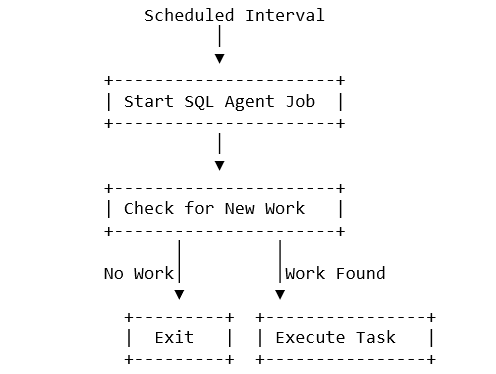
Figure 1. Polling-Based Scheduling
The execution cycle itself is not inefficient.
The inefficiency appears when the cycle repeats continuously even though the application already knows when processing should begin.
Consider a job scheduled to execute every minute.
If only a handful of requests are submitted throughout the day, the overwhelming majority of executions simply confirm that no work exists before terminating. As additional jobs are introduced, the scheduler spends an increasing amount of time performing repetitive evaluations instead of executing useful work.
The workload itself is not the issue.
Whether the job executes a stored procedure, an SSIS package, a PowerShell script, a Python program, or another SQL Server Agent workload makes little difference. The polling behaviour remains the same.
The opportunity for improvement lies in changing how execution is initiated rather than changing what executes.
From Polling to Application-Driven Scheduling
Instead of asking SQL Server Agent to determine when work exists, the responsibility for initiating processing can be transferred to the application.
This is possible because the application already knows when processing should begin.
When a user submits a request, uploads a file, or initiates a business operation, the application already possesses all the information required to begin downstream processing. Rather than waiting for the next scheduled execution to discover the request, the application can simply notify SQL Server Agent that work is available.
This changes the scheduling model considerably.
Instead of executing continuously and searching for work, SQL Server Agent remains idle until explicitly activated.
Once activated, it processes every pending request associated with the current invocation method before returning to an idle state.

Figure 2. Polling Compared with On-Demand Scheduling
The distinction between these approaches is subtle but important.
In a polling model, SQL Server Agent determines when processing should begin.
In an on-demand model, the application determines when processing should begin because it already knows when work has arrived.
SQL Server Agent continues to perform exactly what it was designed to do — execute scheduled workloads — but it no longer spends time repeatedly determining whether execution is necessary.
The remainder of the article examines the architecture that enables this behaviour while preserving asynchronous processing, maintaining SQL Server Agent’s security model, and supporting multiple workload types.
Architecture Overview
Changing how execution begins requires more than enabling and disabling a SQL Server Agent job schedule. The architecture must clearly separate responsibility for identifying new work, controlling execution, and performing business processing.
The solution consists of five logical components:

One design decision deserves particular attention.
Although referred to as a Processing Log, the table serves two distinct purposes.
Initially, it functions as an audit mechanism by recording processing requests submitted by the application.
Once processing begins, those same records become the execution queue that determines what should execute next.
No additional queue infrastructure is required because the information needed for orchestration already exists within the processing records themselves.
This dual-purpose design simplifies the overall architecture while preserving a complete execution history.

Figure 3. Overall Orchestration Architecture
The Orchestration Controller intentionally contains no business logic.
Its responsibility is to determine which workload should execute, supply the required execution parameters, monitor execution status, and decide whether processing should continue or end.
Keeping orchestration separate from business processing allows new workloads to be introduced without redesigning the orchestration framework itself.
The next section follows a single request through the complete execution lifecycle, from the moment it is submitted until SQL Server Agent returns to an idle state.
Execution Lifecycle
The architecture is easier to understand by following a single processing request from submission through completion.
Step 1 — Register the Processing Request
Processing begins when the application receives a request that requires asynchronous execution.
Rather than directly invoking the business workload, the application records the request in the Processing Log together with all information required for downstream processing. Depending on the workload, this information may include the invocation method, execution parameters, file names, record identifiers, timestamps, or other metadata required during execution.
At this point, no business processing has occurred. The request has simply been registered.
Step 2 — Activate Processing
Immediately after the request has been recorded, the application programmatically enables the SQL Server Agent job schedule responsible for orchestration.
The application does not execute the workload itself, nor does it wait for processing to complete. Its responsibility ends after two operations have been performed successfully:
- Register the processing request.
- Enable the SQL Server Agent job schedule.
This preserves the existing asynchronous interaction between the application and SQL Server Agent while eliminating the need for continuous polling.
Step 3 — Start the Orchestration Process
Once the schedule has been enabled, SQL Server Agent starts the orchestration job according to its configured schedule.
The first responsibility of the job is not business processing.
Instead, it starts the Orchestration Controller.
The controller coordinates execution rather than performing business logic. It determines what should execute, retrieves the required execution parameters, monitors execution status, and controls the overall processing lifecycle.
Separating orchestration from business processing allows additional workloads to be introduced without changing the orchestration framework itself.
Step 4 — Select the Business Workload
The Orchestration Controller queries the Processing Log for pending requests associated with the invocation method responsible for the current execution.
Once a matching request is identified, the controller retrieves the execution parameters and invokes the corresponding business workload.
The workload itself may be a stored procedure, an SSIS package, a PowerShell script, a Python program, or another SQL Server Agent task.
The orchestration process remains identical regardless of what is being executed.
Step 5 — Update Execution Status
After successful execution, the controller updates the processing status within the Processing Log.
Maintaining execution status serves two purposes.
First, it provides a complete operational history for monitoring, troubleshooting, and auditing.
Second, it prevents completed requests from being processed again during future executions.
Step 6 — Continue Processing
Rather than terminating after a single request, the controller immediately checks whether additional requests remain for the current invocation method.
This distinction is important.
The controller does not ask whether any requests remain in the Processing Log.
Instead, it determines whether additional requests remain for the invocation method currently being processed.
If matching requests exist, processing continues immediately without restarting SQL Server Agent.
Handling multiple requests during a single execution cycle reduces unnecessary job restarts while maintaining logical separation between independent processing methods.
Step 7 — Return to an Idle State
When no additional requests remain for the current invocation method, the orchestration process reaches its final stage.
The Orchestration Controller programmatically disables the SQL Server Agent job schedule.
Disabling the schedule prevents future scheduled executions until another application request explicitly activates processing again.
The result is a scheduling model in which SQL Server Agent executes only when processing has been requested rather than continuously polling to discover new work.

Figure 4. Execution Lifecycle
The execution lifecycle introduces one remaining design challenge.
Although the application can determine when processing should begin, SQL Server Agent restricts who is permitted to enable or disable job schedules.
Addressing that requirement requires careful use of SQL Server Agent’s existing security model.
Security Architecture
The orchestration pattern relies on enabling and disabling SQL Server Agent job schedules as part of its normal execution flow. Controlling job schedules, however, is governed by SQL Server Agent’s permission model and requires careful consideration to avoid granting unnecessary administrative privileges.
By default, schedule management is limited to principals with the appropriate SQL Server Agent permissions. These include the schedule owner, members of the Sysadmin server role, and members of the SQLAgentOperatorRole, which can enable or disable schedules through the documented SQL Server Agent procedures such as sp_update_schedule.
Although SQLAgentOperatorRole provides a least-privilege alternative to Sysadmin, it grants the ability to manage SQL Server Agent schedules beyond a single application-owned job. For this orchestration pattern, a more restrictive permission boundary is desirable.
Instead, the application service account is assigned ownership of both the SQL Server Agent job and its associated schedule. Aligning ownership of both objects allows the application to enable and disable its own schedule without requiring broader administrative permissions while keeping those permissions scoped only to the jobs owned by the application.
The execution context introduces another important design consideration.
Although the application service account owns the SQL Server Agent job and schedule, the business workload should execute under a dedicated operational identity rather than the application account itself.
For workloads that support SQL Server Agent Proxy Accounts — such as SSIS packages, PowerShell scripts, CmdExec tasks, and similar subsystems — the SQL Server Agent job step executes using a configured Proxy Account through the Run As option. This separates operational execution from schedule ownership while allowing each identity to perform a single, well-defined responsibility.
When processing completes, the Orchestration Controller must disable the SQL Server Agent job schedule using the permissions associated with the application service account that owns the schedule. Since the workload executes under the Proxy Account, the request to disable the schedule must execute in the security context of the schedule owner rather than the Proxy Account itself. This is typically achieved using SQL Server’s supported impersonation mechanisms, allowing the schedule update to execute with the permissions of the schedule owner without granting the Proxy Account direct ownership or elevated administrative rights.
Without this delegated execution context, the business workload would complete successfully, but the attempt to disable the SQL Server Agent job schedule would fail because the executing identity would not possess permission to modify the schedule. As a result, the schedule would remain enabled and continue executing according to its configured interval even though no additional work remained.

Figure 5. Security Model
Each identity performs a distinct responsibility.
- Application Service Account — Owns the SQL Server Agent job and its associated schedule, and controls schedule activation.
- Proxy Account — Executes the business workload using the required operational credentials.
- Delegated Owner Context — Performs schedule deactivation using the permissions of the schedule owner.
This separation preserves the principle of least privilege by limiting each identity to only the permissions required for its specific responsibility rather than relying on broad administrative roles.
References
- Microsoft Learn — SQL Server Agent Fixed Database Roles (SQLAgentUserRole, SQLAgentReaderRole, SQLAgentOperatorRole)
- Microsoft Learn — sp_update_schedule (Transact-SQL)
- Microsoft Learn — SQL Server Agent Proxy Accounts
Beyond SSIS
Although the implementation described in this article uses SSIS packages as the business workload, the orchestration pattern itself is independent of SSIS.
The Orchestration Controller determines what should execute.
It does not determine how the workload is implemented.
In an SSIS-based environment, the controller launches SSIS packages.
In another environment, the same controller could execute:
- PowerShell scripts
- Python programs
- CmdExec tasks
- Database maintenance routines
- Command-line utilities
- Custom executable applications
- Transact-SQL stored procedures (Unlike the preceding job step types, T-SQL job steps cannot use a proxy account. They always execute under the security context of the job owner.)
Only the executed workload changes.
The orchestration process remains the same.
This distinction significantly broadens the applicability of the pattern.
Any SQL Server Agent job that executes on a recurring schedule and first checks whether work exists can potentially adopt the same orchestration model.
The objective is not to replace existing business processes.
The objective is to replace unnecessary polling with application-driven scheduling while preserving the existing execution technology.
Operational Benefits
Each architectural decision contributes to a measurable operational outcome.
Application-driven scheduling eliminates unnecessary SQL Server Agent executions whose only purpose is determining whether work exists.
Because processing begins only after requests have been registered, SQL Server Agent no longer performs repeated polling throughout the day to discover pending work.
Using a centralized Orchestration Controller simplifies operational management by providing a common execution mechanism for multiple business workloads rather than maintaining separate scheduling logic for each process.
The dual-purpose Processing Log serves both as an execution queue and as a complete operational history, reducing architectural complexity while improving traceability.
The security model preserves SQL Server Agent’s existing permission boundaries through ownership, Proxy Accounts, and delegated execution rather than elevated server permissions.
Perhaps most importantly, the existing asynchronous interaction between the application and SQL Server Agent remains unchanged.
The application continues to submit processing requests without waiting for execution, allowing the orchestration pattern to be introduced with minimal impact on the surrounding application architecture.
These improvements are achieved without replacing SQL Server Agent or introducing an external orchestration platform.
The architecture changes only the mechanism used to initiate processing.
Conclusion
SQL Server Agent has long provided a reliable mechanism for scheduling recurring database operations.
The orchestration pattern presented in this article does not replace that capability.
Instead, it changes how scheduled execution is initiated.
Rather than requiring SQL Server Agent to repeatedly determine whether work exists, responsibility for initiating execution shifts to the application, which already possesses that information.
Once activated, the Orchestration Controller processes every pending request associated with the current invocation method, updates execution status, and automatically returns the scheduler to an idle state by disabling the SQL Server Agent job schedule when processing has completed.
Although the implementation described here uses SSIS packages as the business workload, the architectural pattern extends well beyond SSIS.
The same orchestration process can coordinate stored procedures, PowerShell scripts, Python programs, maintenance routines, command-line utilities, or virtually any workload supported by SQL Server Agent.
The executed technology may change.
The orchestration pattern does not.
By shifting execution from continuous polling to application-driven scheduling, the architecture preserves asynchronous processing, minimizes application changes, reduces unnecessary scheduler activity, improves resource utilization, simplifies operational management, and maintains SQL Server Agent’s existing security model without requiring elevated administrative privileges.
The most significant architectural change is not the workload being executed.
It is allowing the application to determine when processing should begin while allowing SQL Server Agent to focus exclusively on executing the requested work.
메타데이터
- post_id
- 938b9fa360f6
- slug
- rethinking-sql-server-agent-scheduling-an-on-demand-orchestration-pattern-938b9fa360f6
- url
- https://medium.com/towards-data-engineering/rethinking-sql-server-agent-scheduling-an-on-demand-orchestration-pattern-938b9fa360f6
- canonical_url
- https://medium.com/towards-data-engineering/rethinking-sql-server-agent-scheduling-an-on-demand-orchestration-pattern-938b9fa360f6
- author_url
- https://medium.com/@balurathinam79
- status
- ok
- fetched_at
- 2026-07-08 19:15:55