🧠 Understanding the Browser Rendering Pipeline: Code to Pixels
When you type a 🌐 URL in your 🧭 browser and press ⏎ Enter, a complex sequence of ⚙️ events is triggered under the hood. This process…
🧠 Understanding the Browser Rendering Pipeline: Code to Pixels
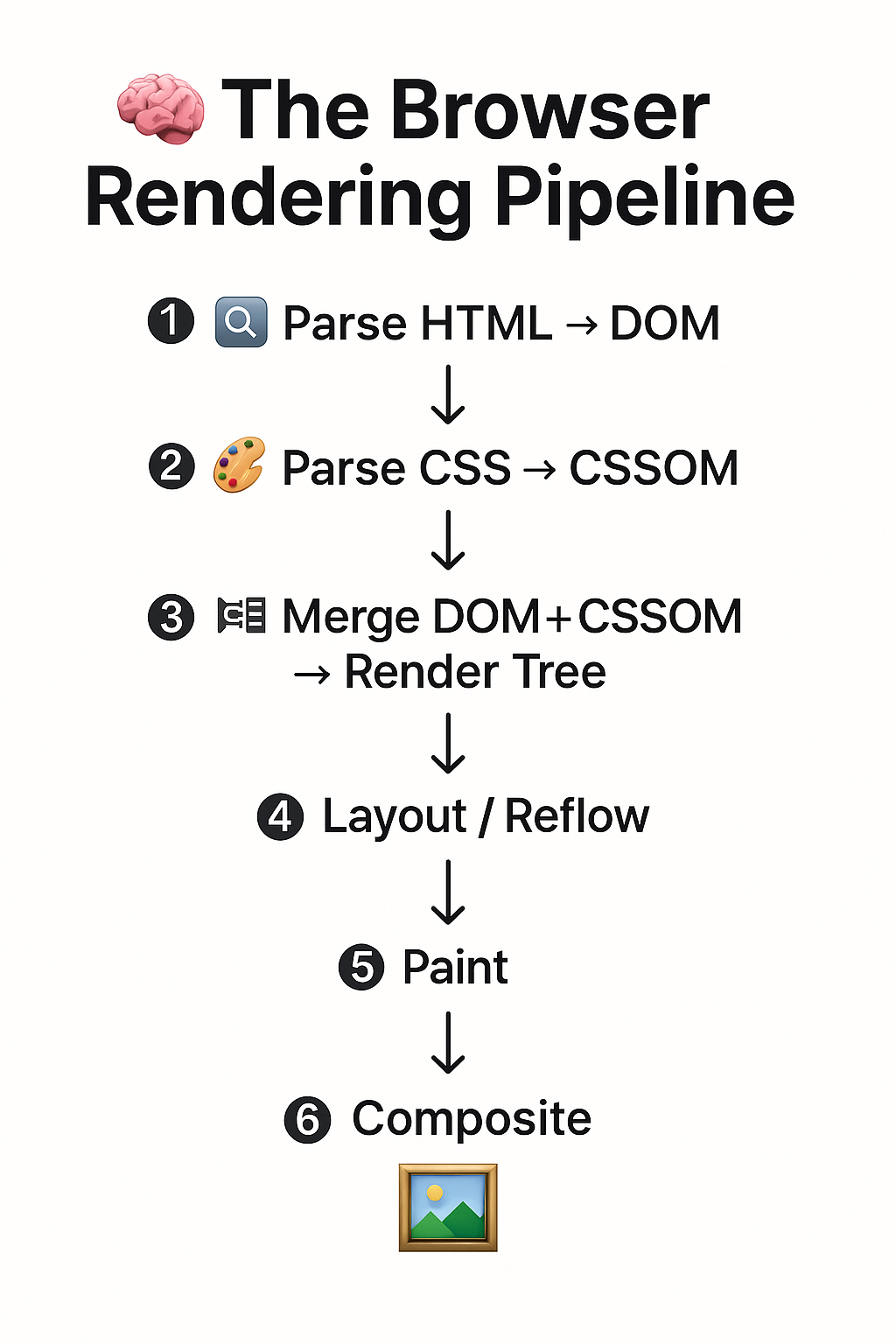
When you type a 🌐 URL in your 🧭 browser and press ⏎ Enter, a complex sequence of ⚙️ events is triggered under the hood. This process converts raw 📝 HTML, 🎨 CSS, and 📜 JavaScript into the 👀 visual interface you see on your screen. For 🧑💻 frontend engineers and 🧑💼 system analysts alike, understanding the browser rendering pipeline is crucial to optimizing ⚡ performance, debugging 🧩 layout issues, and mastering the 🕸️ web platform.
Let’s break down the rendering process into 🔑 six key stages:
1. Parse 📝 HTML → 🌲 DOM (Document Object Model)
The 🧭 browser starts by parsing the 📝 HTML document. As it encounters elements (<html>, <head>, <body>, etc.), it builds a DOM tree 🌳—a hierarchical representation of the structure of the web page.
- Every 🏷️ tag becomes a node in the tree.
- If a
<script>tag withsrcis encountered, parsing is paused until that script is downloaded and executed (unlessdeferorasyncis used). - 💬 Comments, space ⬜, and malformed tags are handled as per the HTML5 spec.
The DOM is a live, interactive structure — 📜 JavaScript can read 🔍 or modify ✍️ it at any point.
2. Parse 🎨 CSS → 📐 CSSOM (CSS Object Model)
In parallel, the browser parses all 🎨 CSS it encounters:
- External stylesheets (
<link>🔗 tags) - Internal styles (
<style>🎨 blocks) - Inline styles (inside HTML 🏷️ tags)
This is compiled into another object model — the CSSOM.
- CSSOM contains computed styles for selectors.
- It transforms rules like
body { font-size: 14px }into a structured format the browser understands. - Inlined styles, default user agent styles, and inherited properties are all considered here.
The browser must build the CSSOM before rendering anything visually because style directly affects 📏 layout.
3. Merge 🌲 DOM + 📐 CSSOM → 🖼️ Render Tree
Next, the browser combines the DOM and CSSOM to create a Render Tree 🖼️.
The Render Tree contains only visible elements with calculated styles.
For example:
- Elements with
display: noneare excluded from the Render Tree. - But elements with
visibility: hiddenare included (since they occupy space).
Each render tree node is called a Render Object, and it holds:
- The content to be displayed
- Computed layout styles (font-size, color, etc.)
✅ Key Point: The Render Tree is what the browser uses to calculate layout and paint — not the raw DOM or CSS.
4. 📐 Layout (Reflow)
The layout step calculates the exact position 📍 and size 📏 of each render object on the screen 🖥️.
Key considerations:
- The CSS box model 📦 (margin ↔️, border 🔲, padding 🔳, content 📑)
- 📄 Text flow, wrapping, and line-breaking ➿ rules
- Layout modes: block ⬛, inline ⬜, flex 🤸, grid 🧱, etc.
- Viewport 🪟 size and scroll positions 🧭
Text nodes are broken into line boxes. The layout engine (like Blink or Gecko) performs these calculations recursively from the root to the leaves of the tree.
⚠️ Layout is expensive! Even small changes (e.g., adjusting width or font-size) can trigger reflows of large portions of the tree.
5. 🎨 Paint
Once layout is done, the browser paints 🖌️ each visual element:
- Drawing 🖍️ background colors, borders, text, images 🖼️, shadows 🌫️, etc.
- Each render object becomes a painted set of 📸 pixels
- This is done layer-by-layer 📚
This work is handled by the browser’s painting engine, often leveraging a graphics library like Skia 🎨 (used in Chrome).
Painting can be parallelized and done incrementally, but it’s still costly for pages with a lot of effects.
Paint can be optimized via techniques like layer promotion 📤 and invalidation regions ❌.
6. 🧩 Composite
Finally, all painted layers are composited 🧩 into a single bitmap 🖼️ that can be shown on screen 💻.
- Managed by the compositor thread 🧵
- Often GPU-accelerated 💨 for smooth performance
- Handles z-index 📊, transforms 🔄, fixed-position 📌 elements, and more
Only the changed portions of the screen (called dirty rectangles 🟫) are redrawn, improving efficiency.
✅ Composite is the final step before pixels appear on your screen.

Understanding the browser rendering pipeline isn’t just academic 🎓 — it’s essential for optimizing ⚡ performance, writing clean layouts 🧼, and creating responsive 📱, accessible ♿ UIs. Whether you’re debugging 🪲 layout shifts or building high-performance animations 🎞️, these six steps are your foundation 🏗️.
메타데이터
- post_id
- a067c1aae40f
- slug
- understanding-the-browser-rendering-pipeline-from-code-to-pixels-a067c1aae40f
- url
- https://medium.com/@nikhilkumarmodi/understanding-the-browser-rendering-pipeline-from-code-to-pixels-a067c1aae40f
- canonical_url
- https://medium.com/@nikhilkumarmodi/understanding-the-browser-rendering-pipeline-from-code-to-pixels-a067c1aae40f
- author_url
- https://medium.com/@nikhilkumarmodi
- status
- ok
- fetched_at
- 2026-07-08 20:12:56


