Dynamic Routing & Transformations Part 13
Shubhojit Dasgupta — API Architect, HUCO FZCO (Dubai)
Dynamic Routing & Transformations Part 13
Shubhojit Dasgupta — API Architect, HUCO FZCO (Dubai)
APIOps Using decK In Bash Script
API Lifecycle Automation (APIOps) applies automation to API best practices. The decK tool facilitates APIOps by offering commands, for automating API delivery.
Drift Detection Using decK
In the “scripts” folder within the “bank” directory, run the “diff_bank.sh” bash script. This script uses the “decK diff” command to compare the desired “bank-deployment.yaml” configuration for the Banking API with the current Kong Gateway state. In the same folder, create another bash script, “diff_keycloak.sh”, to detect and manage drifts for the Keycloak token generation API. This process ensures that the current API configuration remains consistent with the desired YAML state, maintaining reliability and stability.
#! /usr/bin/env bash

# Directory in which the diff script runs
cd bank/scripts

# Difference between the bank deployment file and the Control Plane "Novigo_Accelerators" in Konnect
source ${PWD}/config.txt
printf '\n'
echo 'Difference between deployment config and' ${CONTROL_PLANE} 'Control Plane in Konnect for Bank API'

deck gateway diff \
  --konnect-token-file ../../${TOKEN_FILE} \
  --konnect-control-plane-name ${CONTROL_PLANE} \
  ${BANK_OUTPUT_FILE}

# Root directory of POC
cd ../../
In the root folder of the application “POC_1” run the “diff_bank.sh” bash script file shown above, using the command source bank/scripts/diff_bank.sh in the VS Code Terminal bash shell. The result below shows that 5 entities would be created in Kong, for the Banking Service.
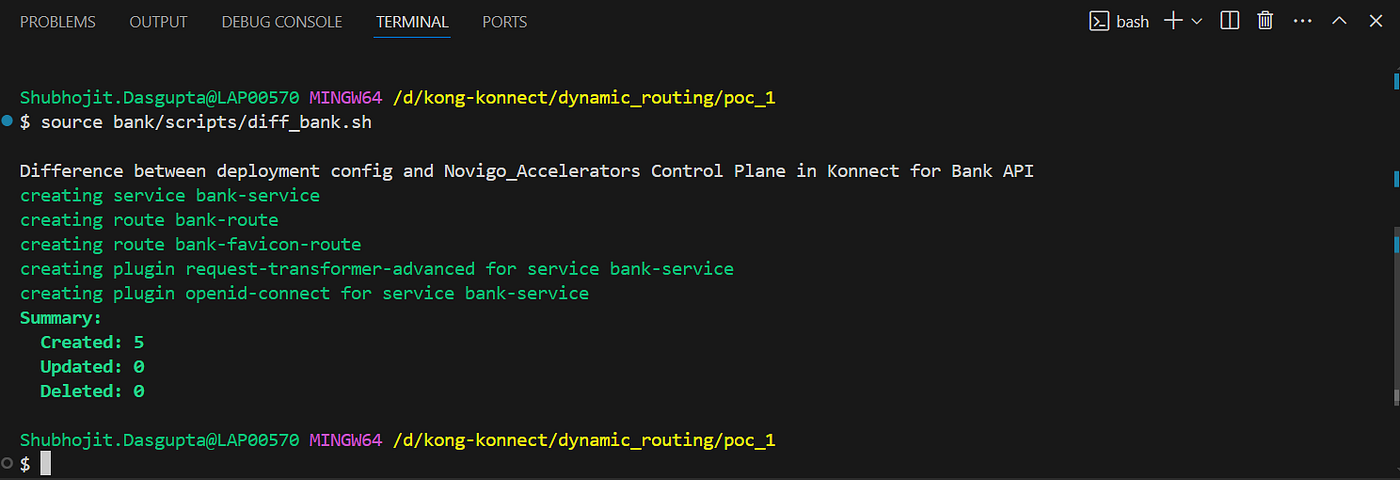
Figure 1: Shows 5 entities for the bank-service to be created in Kong using decK
Detect and manage drifts before onboarding the Keycloak token generation API into Kong using the “diff_keycloak.sh” bash script in the “bank/scripts” folder. Run it from the POC_1 root directory by executing the source bank/scripts/diff_keycloak.sh command in the VS Code terminal bash shell.

Figure 2: Detects 2 Kong entities that would be created in Kong before deploying the Keycloak API
Kong Konnect Before Onboarding API Services Into The Kong Gateway
No entities have been created yet in the Kong Konnect Self-Managed Gateway. It is a good practice to check the configuration changes in the Gateway before applying them using decK.

Figure 3: Shows the services in the Gateway Before Onboarding Banking and Keycloak API Service
Deploying The Banking Service API
Create a bash script “sync_bank.sh” in the “bank/scripts” folder to onboard the Banking service into the Kong Gateway using the decK command line utility tool.
#! /usr/bin/env bash

# Directory in which the sync script runs
cd bank/scripts

# Import configuration environment variables
source ${PWD}/config.txt

# Python application directory
cd ../renderers

# Rendering Banking decK YAML for configuring Kong Gateway with Banking Service API
python render.py ${BANK_INPUT_FILE} ${BANK_OUTPUT_FILE}

# Directory in which the sync script runs
cd ../scripts

echo 'Syncing Banking API configuration into' ${CONTROL_PLANE} 'Control Plane in Kong Konnect'

# Syncing Banking API decK config backup into Control Plane Novigo_Accelerators
deck gateway sync \
  --konnect-token-file ../../${TOKEN_FILE} \
  --konnect-control-plane-name ${CONTROL_PLANE} \
  ${BANK_OUTPUT_FILE}

echo 'Control Plane' ${CONTROL_PLANE} 'sync in Konnect complete.'

# Checking connections between Kong Gateway runtime and Control Plane "Novigo_Accelerators" in Konnect
printf '\n'
echo 'Verify connections between Kong Gateway runtime and' ${CONTROL_PLANE} 'Control Plane in Konnect'

sleep 2
cd ../../
source kong/scripts/sync/kong_connect.sh
In the POC_1 root directory, execute the source bank/scripts/sync_bank.sh command in the VS Code terminal bash shell. Python “render.py” module transforms the “bank-deployment.yaml” state configuration file, before synchronising the changes into the Kong Gateway using decK.
# Rendering Banking decK YAML for configuring Kong Gateway with Banking Service API
python render.py ${BANK_INPUT_FILE} ${BANK_OUTPUT_FILE}
The deck gateway sync command then applies those changes securely into the Kong Gateway.

Figure 4: Banking Service Deployed into the Kong Gateway as per the drift changes detected before via decK
Deploying The Keycloak Token API
To deploy Keycloak token generation endpoint provided from Keycloak discovery URL create a bash script “sync_keycloak.sh” in the “bank/scripts” folder to onboard the API service into the Kong Gateway using the decK command line utility tool.
#! /usr/bin/env bash

# Directory in which the sync script runs
cd bank/scripts

# Syncing decK config backup into Control Plane Novigo_Accelerator
source ${PWD}/config.txt

# Python application directory
cd ../renderers

# Rendering Keycloak decK YAML for configuring Kong Gateway with Keycloak Token Generation API
python render.py ${KEYCLOAK_INPUT_FILE} ${KEYCLOAK_OUTPUT_FILE}

# Directory in which the sync script runs
cd ../scripts

echo 'Syncing Keycloak API configuration into' ${CONTROL_PLANE} 'Control Plane in Kong Konnect'

deck gateway sync \
  --konnect-token-file ../../${TOKEN_FILE} \
  --konnect-control-plane-name ${CONTROL_PLANE} \
  ${KEYCLOAK_OUTPUT_FILE}

echo 'Control Plane' ${CONTROL_PLANE} 'sync in Konnect complete.'

# Checking connections between Kong Gateway runtime and Control Plane "Novigo_Accelerators" in Konnect
printf '\n'
echo 'Verify connections between Kong Gateway runtime and' ${CONTROL_PLANE} 'Control Plane in Konnect'

sleep 2
cd ../../
source kong/scripts/sync/kong_connect.sh
Python “render.py” module transforms the “keycloak-deployment.yaml” state configuration file. It interpolates the placeholder variables with the environment keys imported from the .env file. The transformed state file is stored in the “bank/scripts” folder named “keycloak-deployment-transform.yaml”.
# Rendering Keycloak decK YAML for configuring Kong Gateway with Keycloak Token Generation API
python render.py ${KEYCLOAK_INPUT_FILE} ${KEYCLOAK_OUTPUT_FILE}
In the POC_1 root directory, execute the source bank/scripts/sync_keycloak.sh command in the VS Code terminal bash shell. The deck gateway sync command securely brings the Kong Gateway to the desired state defined in the transformed “keycloak-deployment-transform.yaml” state configuration file.

Figure 5: Keycloak Token API Deployed into the Kong Gateway as per the drift changes detected before via decK
Kong Konnect After Onboarding API Services Into The Kong Gateway
Banking and Keycloak entities are created in the Kong Konnect Self-Managed Gateway. The changes are similar to the drift detected using the decK tool before deploying the API services.

Figure 6: Shows the services in the Gateway After Onboarding Banking and Keycloak API Service
What’s Next
In **part-13 **of this Blog , we covered the following;
• Automating Bash scripts using decK command line tool enabling APIOps.
• Detecting drift in Kong Gateway configuration using decK while applying the configuration changes for Banking and Keycloak API services.
• Checking configuration changes in the Gateway before applying them using decK from Kong Konnect UI.
• Automatically onboarding Banking service API and Keycloak token API using deck commands in Bash scripts and executing them.
• Rendering decK YAML configuration for Banking and Keycloak APIs by executing Python scripts as part if the automated Bash scripts and securely transforming Kong Gateway decK configuration YAML files for Banking and Keycloak token API services before synchronising them with the Kong Konnect Control Plane.
• Checking configuration changes applied to Kong Konnect Platform after onboarding Banking service and Keycloak token API from Konnect UI.
Visit **part-12** of the Blog, to securely onboard the Banking App into Kong Konnect via decK and write a Python application to securely render decK YAML configuration to deploy Banking service into Kong Konnect Control Plane.
Next, in part-14 of the Blog we shall test the Keycloak’s token generation endpoint using Insomnia by providing OpenID client credentials within environment variables using Insomnia API client tool to test the API request and response for Keycloak token generation API.
Let’s dive into **Part-14** of the Blog: https://medium.com/@shubhojit.dasgupta/dynamic-routing-transformations-part-14-e0c5782a685c.
메타데이터
- post_id
- d6328d3aea7a
- slug
- dynamic-routing-transformations-part-13-d6328d3aea7a
- url
- https://medium.com/@shubhojit.dasgupta/dynamic-routing-transformations-part-13-d6328d3aea7a
- canonical_url
- https://medium.com/@shubhojit.dasgupta/dynamic-routing-transformations-part-13-d6328d3aea7a
- author_url
- https://medium.com/@shubhojit.dasgupta
- status
- ok
- fetched_at
- 2026-07-17 12:57:29






