De-Nesting Google Analytics Data in BigQuery
The proper way to flat tables
De-Nesting Google Analytics Data in BigQuery
The proper way to flat tables
Photo of Singapore by Mike Enerio on Unsplash
BigQuery is an analytics engine optimized to crunch pre-joined (or: nested) data. Sub-relations make sense in analytical scenarios because we don’t want to deal with joins over bigger datasets — just imagine daily year-over-year comparisons over the last 3 years, aggregating Terabytes of data — but with joins adding another layer of complexity.
A sub-relation, or sub-table, is usually implemented as an array of structs. The array as a list-like data type provides rows, the struct, similar to a map or dictionary, provides columns. The sub-schema is consistent throughout the table — in contrast to JSON types who can change their schema from row to row.
The only other engine going down this route of nested data seems to be AWS Redshift Spectrum. Yet, if we want to use Google Analytics (GA) data in another system you’d almost always want to de-join the data to have flat tables, because capabilities to aggregate or change arrays of structs are quite limited. Most analytical database engines seem to optimize for design principles (normal forms) that were made for transactional use-cases, while storage formats like Parquet are perfectly capable of representing nested data. So for all the Trinos, DuckDBs, SparkSQLs, and Clickhouses out there — let’s create some sad flat tables.
The most important thing to understand is that we don’t want to simply “flatten” the table. A row in a table is supposed to have meaning. One row in GA4 data represents one event. If we just cross-join with every array we see, we’ll be in trouble. Even if we only choose to left join the items array — a lot of events don’t have items, so what do we end up with? A weird scope mix — a row can mean event, or it can mean item in an event. We don’t want that.
Principle
What we really want is to build multiple tables each with their own respective scope: events, items, custom parameters, item parameters, and user properties:
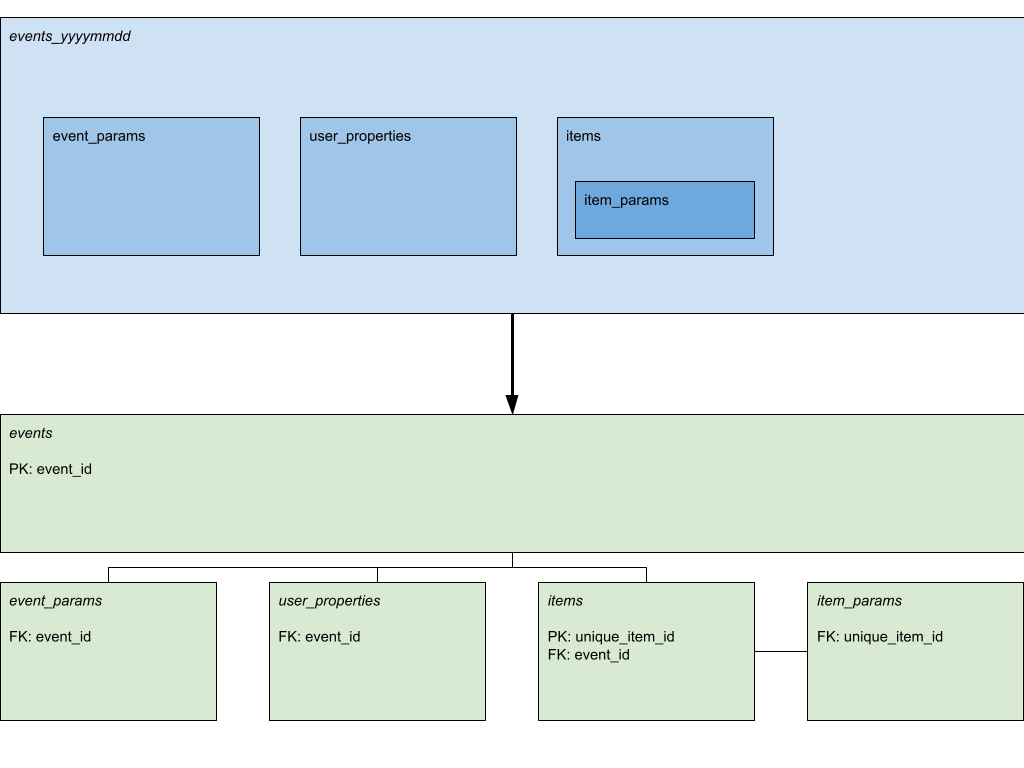
Turning one nested table into multiple flat tables with primary and foreign keys. Picture by author.
With selective flattening it is quite easy to create those tables. There is only a little challenge of creating useful keys for joining the data later. We need a unique event id so we can join event parameters, user properties and items back to the events table, and we need a unique items id, so we can join item parameters back to the items table.
Why not simply pivot the parameter tables and leave them in their respective scope? Of course you can do that with some or all of the parameters, but in the spirit of “custom columns” we should keep some flexibility: It is very easy to introduce new columns or retire old columns if they are just rows in a table. If you know that you’ll never retire a column then it makes sense to add it to the respective table (events or items).
Implementation
There are multiple ways to come up with good keys for joining. I chose to make use of the event timestamps and add an increment in case two events have the same timestamp:
event_timestamp || '-' || row_number() over (partition by event_timestamp) as event_idFor items I simply chose the event_id and added the array offset.
event_id || '-' || i as unique_item_id,
...
from events e, e.items with offset i
This only works for event tables from one property. If you want to combine multiple properties, you need to work around that too, either by union-ing them prior to id creation or by adding a property identifier to the event key.
So here is the plan: we create temp tables to prepare the keys and then materialize the final tables by selectively querying from those temp tables:
-- de-nesting MVP
-- event IDs are created by increments per timestamp per table.
-- This method relies on the fact that two tables can't share
-- the same timestamps, i.e. there are no edge-cases

-- temp event table to prepare creation of final table
-- and sibling tables (user_properties, items, event_params)
create temp table events as
(
 select
   event_timestamp || '-' || row_number() over
     (partition by event_timestamp) as event_id
   ,*
 from
   `project.analytics_123456789.events_20240325`
)
;

-- temp item table to prepare creation of final table
-- and sibling table (item_params)
create temp table items as (
 select
   event_date,
   event_id,
   event_id || '-' || i as unique_item_id,
   its.*
 from events e, e.items as its with offset i
)
;

create or replace table project.dataset.flat_events_20240325 as
 (select * except(items, user_properties, event_params) from events)
;

create or replace table project.dataset.items_20240325 as
 (select * except(item_params) from items)
;

create or replace table project.dataset.user_properties_20240325 as
 (select event_date, event_id, up.key, up.value.* from events e, e.user_properties up)
;

create or replace table project.dataset.event_params_20240325 as
 (select event_date, event_id, ep.key, ep.value.* from events e, e.event_params ep)
;

create or replace table project.dataset.item_params_20240325 as
 (select event_date, unique_item_id, ip.key, ip.value.* from items i, i.item_params ip)
;
Try it on your own events table!
This script only showcases the idea. I kept the date in every table in case you want to partition by it (e.g. in delta tables). You can either parameterize the script to replace the dates dynamically or work with partitions instead (insert into instead of create table). You can also extend it to contain some of the custom parameters as columns in the result tables.
In any case, I hope this little exercise also shows in what sense nested data is to be considered as “pre-joined” and why it makes sense in analytical use-cases to save that join step. There is simply no need to keep tables flat because 1. we don’t want to update data all the time — no need for easy update access, and 2. all the data we deal with is historical, so we can’t save storage by keeping a record in a separate table without timestamp. Let’s hope other analytics engines are open to this idea and add better nested data capabilities in the future. I.e. allow to run complex SQL on arrays of structs in lateral sub-queries.
And of course this also works the other way round. In this article I explain how to create nested data from flat tables:
메타데이터
- post_id
- f01a76cd8126
- slug
- de-nesting-google-analytics-data-in-bigquery-f01a76cd8126
- url
- https://medium.com/data-science/de-nesting-google-analytics-data-in-bigquery-f01a76cd8126
- canonical_url
- https://medium.com/data-science/de-nesting-google-analytics-data-in-bigquery-f01a76cd8126
- author_url
- https://medium.com/@martin.weitzmann
- status
- ok
- fetched_at
- 2026-07-24 04:30:11