IPv6 SLAAC Deep Dive
What is SLAAC
IPv6 SLAAC Deep Dive
What is SLAAC
SLAAC allows a host to:
- Automatically generate its IPv6 address
- Learn the default gateway
- Operate without DHCP
This is how it works step by step:
1. Interface comes up
When the device connects to a network, its network interface initialises and enables IPv6.
2. Link-local address creation
The device first generates a link-local address (always starts with fe80::). It generally builds this using its MAC address (via modified EUI-64).
3. Duplicate Address Detection (DAD)
Before using the address, the device checks if it’s already in use:
- It sends a Neighbour Solicitation (NS) message.
- If no one responds, the address is considered unique and usable.
4. Router Solicitation (RS)
The device asks: “Any routers out there?”
- It sends a Router Solicitation message to the network.
5. Router Advertisement (RA)
A router responds with a Router Advertisement, which contains:
- Network prefix (e.g.,
2001:db8:abcd::/64) - Default gateway info
- Flags indicating whether SLAAC and/or DHCPv6 should be used
6. Global address generation
Using the prefix from the RA:
- The device combines:
- The network prefix (from router)
- Its interface ID (from earlier)
- This forms a global unicast IPv6 address
7. Duplicate Address Detection (again)
The device repeats DAD for this new global address to ensure no conflict.
8. Address becomes usable
Once verified:
- The device can now communicate on the network and the internet using IPv6.
- It also installs the router as its default gateway.
📊 Packet-by-Packet Breakdown
Let’s walk through the actual flow from your capture.
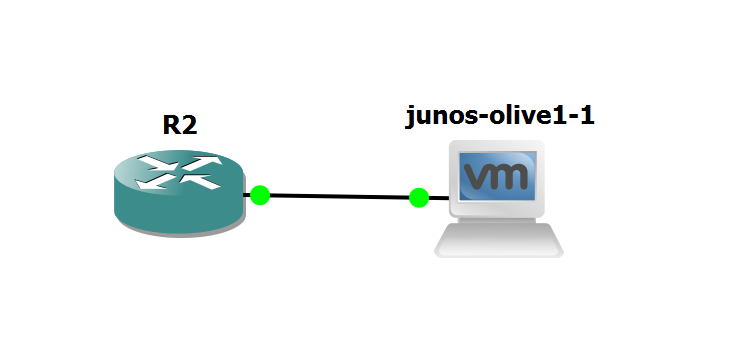
Let’s try it in our Lab,
I am configuring this on my router:
conf t
ipv6 unicast-routing

interface fa0/0
ipv6 address 2001:db8:1::1/64
no shutdown
Let us analyse what happens packet by packet:

🔹 Packet 22 — Neighbor Solicitation (DAD)
- Src
::→ Dstff02::1:ffc1:0 - Checking if
fe80::c803:11ff:fec1:0is already in use. - No reply → address is considered unique.
🔹 Packet 23 , 24, 25 — MLD Report v2
- Host joins multicast groups (
ff02::1, solicited-node group). - Ensures it can receive ND / RA messages.
🔹 Packet 26 — Neighbor Advertisement
- Router replies:
fe80::c803:11ff:fec1:0 is at ca:03:11:c1:00:00 - Confirms ownership of link-local address.
🔹 Packet 27 — Neighbor Solicitation (for global)
- Src
::→ Dstff02::1:ff00:1 - DAD for global IPv6
2001:db8:1::1.
🔹 Packet 28 — Router Advertisement (KEY SLAAC PACKET)
- Router →
ff02::1(all nodes) - Contains:
- Prefix
2001:db8:1::/64 - Flags (A=1 for SLAAC)
- Host uses this to generate global IPv6 address.
🔹 Packet 33 — Neighbor Advertisement (global)
- Router advertises:
2001:db8:1::1 is at MAC - Confirms global IPv6 ownership.
In Nutshell:
- DAD (link-local) → Packet 22
- Multicast join → 23–25
- Router presence → 26
- DAD (global) → 27
- RA → SLAAC happens → 28 (critical)
- Address confirmed → 33
Router Advertisement Fields
From this packet, which is packet no 28:

🔹 Global RA Flags
Managed (M): 0
Other (O): 0
Meaning:
This is a pure SLAAC environment.

🔹 Router Lifetime
1800 secondsHost installs:
Default route valid for 30 minutes🔹 Prefix Information
Prefix: 2001:db8:1::/64Critical Flags inside Prefix
On-link (L): 1
Autonomous (A): 1
Interpretation
L flag = 1
- Network is directly reachable (same subnet)
A flag = 1
- SLAAC is enabled
This is the actual trigger for address creation
🔹 Lifetime Values
Valid Lifetime: 30 days
Preferred Lifetime: 7 days
Behavior:
- Preferred → actively used
- Valid → still usable but deprecated
🔹 MTU Option
MTU: 1500Host adopts MTU from RA
메타데이터
- post_id
- f81d419e2fff
- slug
- ipv6-slaac-deep-dive-f81d419e2fff
- url
- https://medium.com/@aks001235/ipv6-slaac-deep-dive-f81d419e2fff
- canonical_url
- https://medium.com/@aks001235/ipv6-slaac-deep-dive-f81d419e2fff
- author_url
- https://medium.com/@aks001235
- status
- ok
- fetched_at
- 2026-07-16 00:55:23