LibGDX: ScreenShot
How to make a screenshot of a specific area?
LibGDX: ScreenShot
How to make a screenshot of a specific area?
ScreenShot
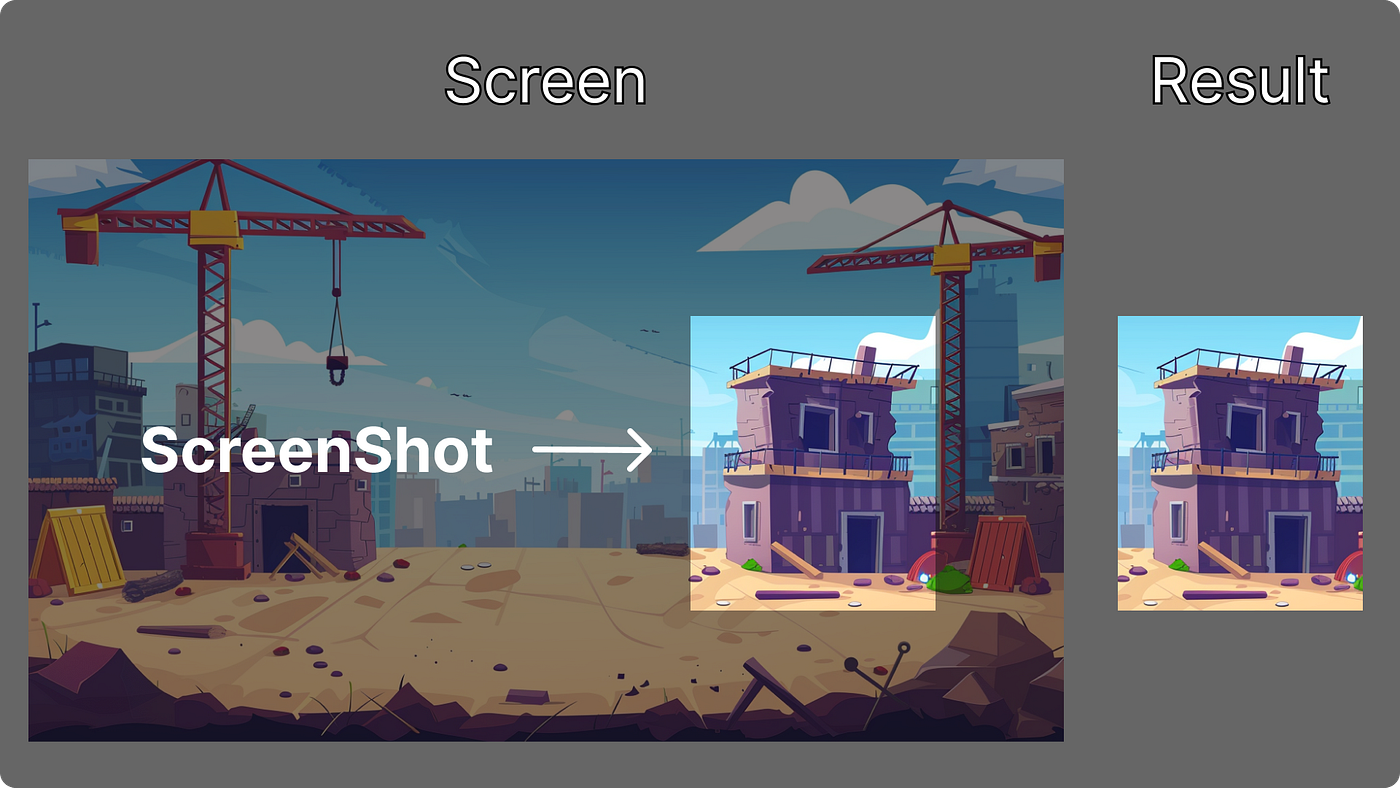
📸Here is the code needed to take a screenshot at specific coordinates and size (they are specified in pixels).
private fun captureScreenShot(region: TextureRegion, x: Int, y: Int, w: Int, h: Int) {
    Gdx.gl.glBindTexture(GL20.GL_TEXTURE_2D, region.texture.textureObjectHandle)
    Gdx.gl20.glCopyTexSubImage2D(GL20.GL_TEXTURE_2D, 0, 0, 0, x, y, w, h)
}
I created a group to show how you can capture a screenshot and draw it:
class AScreenShot: Group() {

    private lateinit var regionScreenShot: TextureRegion
    private val boundsScreenShot = Rectangle()

    private val vecTmp           = Vector2(0f, 0f)
    private val vecGroupPosition = Vector2()
    private val vecBottomLeft    = Vector2()
    private val vecTopRight      = Vector2()

    private val once = AtomicBoolean(false)

    override fun sizeChanged() {
        if (once.getAndSet(true)) return

        updateBoundsScreenShot()
        regionScreenShot = TextureRegion(Texture(boundsScreenShot.width.toInt(), boundsScreenShot.height.toInt(), Pixmap.Format.RGB888)).apply { flip(false, true) }

        addAndFillActor(Image(regionScreenShot))
    }

    override fun draw(batch: Batch?, parentAlpha: Float) {
        updateBoundsScreenShot()
        captureScreenShot(
            regionScreenShot,
            boundsScreenShot.x.toInt(),
            boundsScreenShot.y.toInt(),
            boundsScreenShot.width.toInt(),
            boundsScreenShot.height.toInt()
        )

        super.draw(batch, parentAlpha)
    }

    private fun updateBoundsScreenShot() {
        vecGroupPosition.set(localToStageCoordinates(vecTmp.set(0f, 0f)))

        // Отримуємо екранні координати (перетворюємо їх у пікселі)
        val bottomLeft = vecBottomLeft.set(vecGroupPosition.x, vecGroupPosition.y)
        val topRight   = vecTopRight.set(vecGroupPosition.x + width, vecGroupPosition.y + height)

        // Конвертуємо координати з FitViewport у ScreenViewport
        screen.viewportUI.project(bottomLeft)
        screen.viewportUI.project(topRight)

        // Отримуємо екранні значення
        val screenX = bottomLeft.x
        val screenY = bottomLeft.y
        val screenW = topRight.x - bottomLeft.x
        val screenH = topRight.y - bottomLeft.y

        //log("screenX = $screenX, screenY = $screenY, screenW = $screenW, screenH = $screenH")

        boundsScreenShot.set(screenX, screenY, screenW, screenH)
        //boundsScreenShot.set(0f, 0f, screenW, screenH)
    }

    private fun captureScreenShot(region: TextureRegion, x: Int, y: Int, w: Int, h: Int) {
        Gdx.gl.glBindTexture(GL20.GL_TEXTURE_2D, region.texture.textureObjectHandle)
        Gdx.gl20.glCopyTexSubImage2D(GL20.GL_TEXTURE_2D, 0, 0, 0, x, y, w, h)
    }

}
🔮 The main point here is to convert the position and size into screen pixels, which is what the method updateBoundsScreenShot does.
👓 Note the texture format Pixmap.Format.RGB888, this is done so that if there are semi-transparent actors on the screen, when the screenshot is drawn over the screen, there is no transparency.
🔄 Also note that we take the screenshot directly into a TextureRegion, this is done so that we can flip the texture with flip(false, **true**). This is necessary because the screenshot itself is recorded upside down, and to display it correctly, we need to flip the texture back into the proper orientation.
The main thing you should understand is how a screenshot is made. Our screenshot method simply takes pixels from the back buffer of the screen — that is, everything that was drawn on the screen before calling our method. Gdx.gl20.glCopyTexSubImage2D writes it into our bound texture with Gdx.gl.glBindTexture, and then we can use this texture however we want.
A big plus is taking a screenshot in a group, because the screenshot will include exactly the images of actors that were added before this group — logically, they are already on the screen and thus in the back buffer. Actors drawn after the group will not be included in the screenshot.

PS. Vel_daN: Love what You DO 💚.
메타데이터
- post_id
- c7fe39b123dc
- slug
- libgdx-screenshot-c7fe39b123dc
- url
- https://medium.com/@veldan1202/libgdx-screenshot-c7fe39b123dc
- canonical_url
- https://medium.com/@veldan1202/libgdx-screenshot-c7fe39b123dc
- author_url
- https://medium.com/@veldan1202
- status
- ok
- fetched_at
- 2026-06-25 07:00:49