[DPA Update] Now Available on Dable: Dynamic Product Ads (DPA)
Hello from Dable 👋
[DPA Update] Now Available on Dable: Dynamic Product Ads (DPA)
Hello from Dable 👋
We’re excited to introduce a new ad product built for e-commerce advertisers: Dynamic Product Ads (DPA).
Did you know that 97% of users who visit a product detail page leave without making a purchase? These users have already shown intent — and simply re-introducing them to the products they viewed can meaningfully lift conversion rates.
“We want to bring back users who left without buying.”
“Designing banners every time is exhausting — can they be generated automatically?”
“We don’t want to keep showing ads to people who already purchased.”
We heard you. That’s why we built DPA.
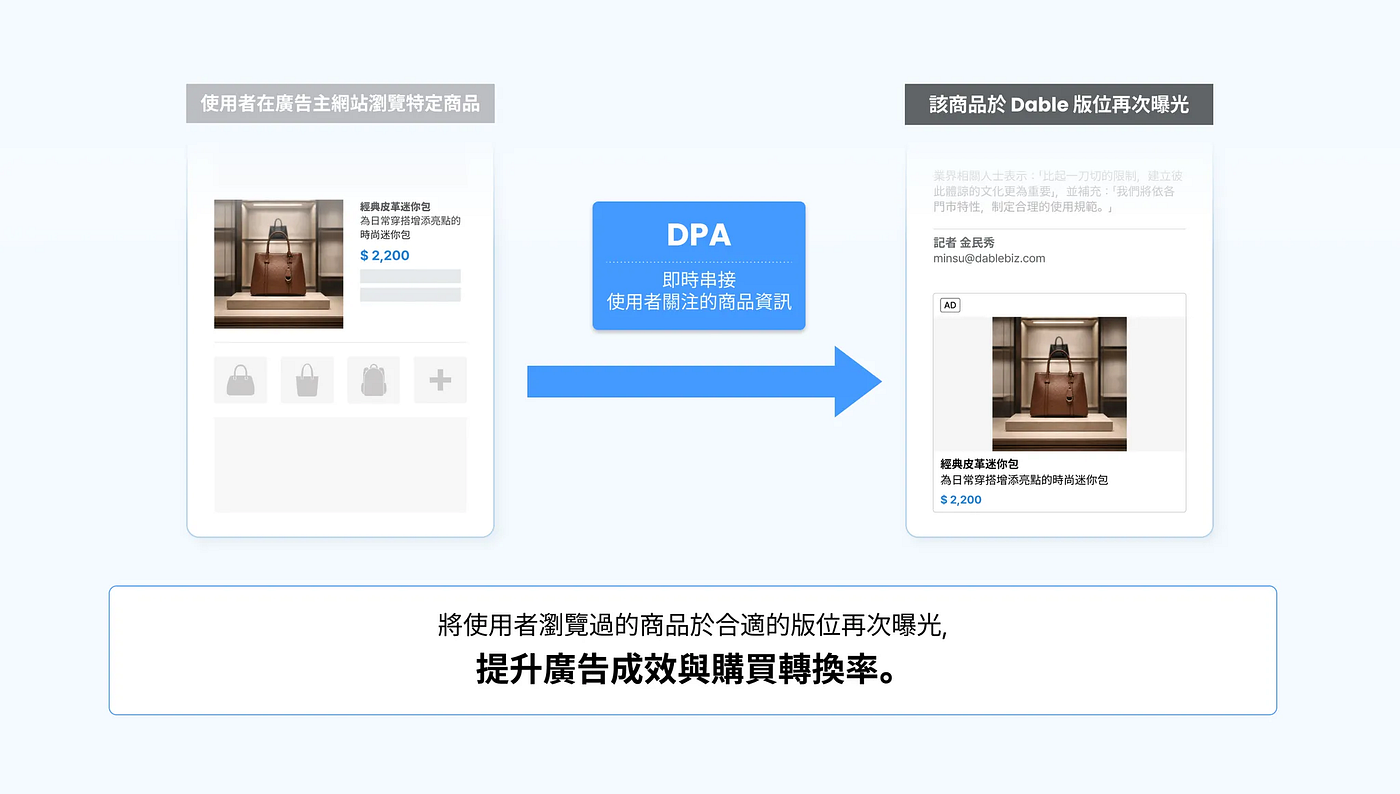
Dable DPA is a retargeting ad product that automatically generates and serves personalized creatives based on your product feed — no banner design required.

Why Dable DPA?
1️⃣ Premium placements only Your ads run on high-quality traffic from premium news inventory. No pop-ups, no follow-around ads — just natural, in-context placements that meet users at eye level while they’re reading.
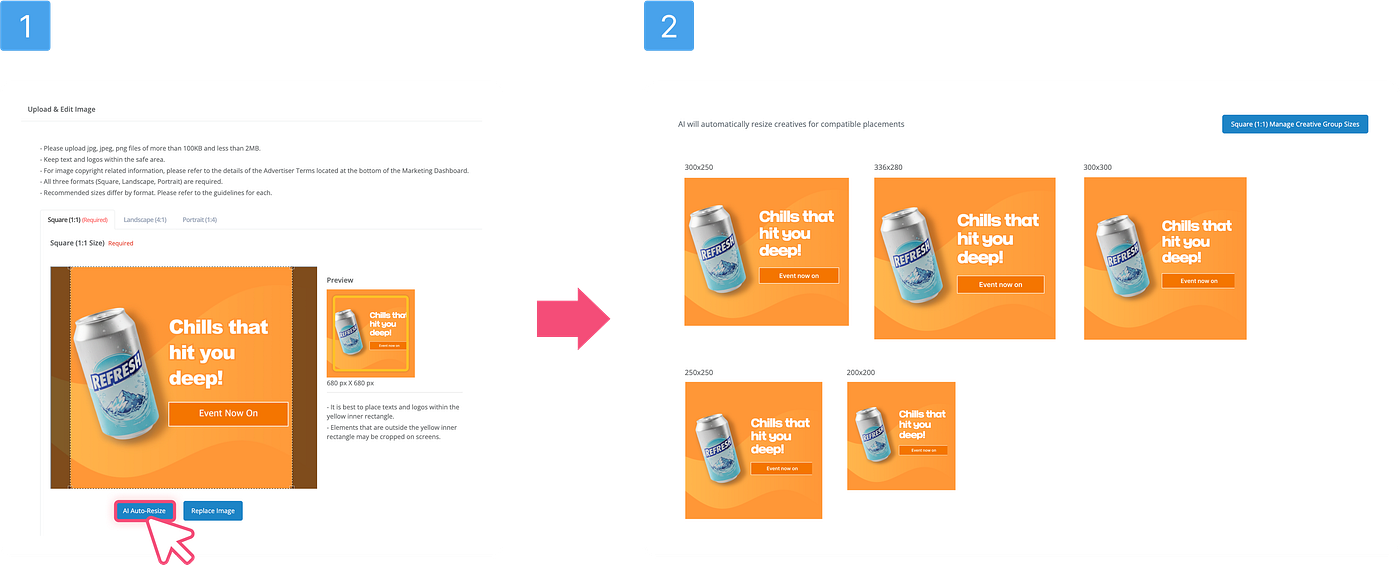
2️⃣ No banner design needed Connect your product feed (EP) and conversion script — that’s it. Dable’s system generates banners across multiple sizes automatically, saving you production time and cost.
3️⃣ Personalized retargeting, set-and-forget Products a user viewed or added to cart are surfaced automatically. Products they’ve already purchased are excluded automatically. Targeting and de-targeting both run without any extra setup on your end.
4️⃣ Built for efficiency, not just impressions DPA reaches users in information-seeking mode at the moment their attention is highest, so you can expect stronger efficiency compared to standard retargeting.
How to set up DPA
1. Register your product feed (EP) Share your product feed URL with Dable.
- Full EP: Complete product catalog (synced once a day)
- Summary EP: Frequently changing fields like price and stock (synced hourly)
- TSV format following Naver Shopping’s price comparison spec is recommended
- Required fields: product ID, product name, image URL, price, product URL, sold-out status
- Images: minimum 200×200px (400×400px recommended, 1:1 ratio)
2. Install the conversion script ([DPA Conversion Script Installation Guide]) Add these three product events to your site:
- ViewContent — when a user views a product detail page
- AddToCart — when a user adds to cart
- Purchase — when a user completes a purchase
⚠️ The product_id in your script must exactly match the product ID in your EP.
3. Register DPA content (creative) On the content registration screen, select the DPA option. Dable will auto-generate template banners using your EP data. Choose from square, horizontal, or vertical sizes.
4. Create a DPA campaign In the campaign creation flow, go to the remarketing section and select “Product event-based ads (DPA)”. Budget, schedule, and bidding settings work the same as a standard banner campaign.
📌 Good to know
- Retargeting window: 30 days by default, expandable up to 90 days on request
- Best suited for commerce advertisers with 50+ products
- Each banner currently shows one product; multi-product banners are coming soon
- Existing native campaigns are unaffected — you can simply add DPA campaigns alongside them as needed 🤗
For any questions about this update or your ads, reach out anytime at **ad-gs@dable.io**.
메타데이터
- post_id
- fc2ec9b33c71
- slug
- dpa-update-now-available-on-dable-dynamic-product-ads-dpa-fc2ec9b33c71
- url
- https://medium.com/dableblog/dpa-update-now-available-on-dable-dynamic-product-ads-dpa-fc2ec9b33c71
- canonical_url
- https://medium.com/dableblog/dpa-update-now-available-on-dable-dynamic-product-ads-dpa-fc2ec9b33c71
- author_url
- https://medium.com/@jisoojeon_ad
- status
- ok
- fetched_at
- 2026-06-09 15:37:30